
Recently I came across a quick need where I needed to retrieve domain of the email address. The email address is in the database table. I quickly wrote following script which will extract the domain and will also count how many email addresses are there with the same domain address. The trick is to pick the domain from email address values with RIGHT and CHARINDEX.
SELECT RIGHT(Email, LEN(Email) - CHARINDEX('@', email)) Domain ,
COUNT(Email) EmailCount
FROM   dbo.email
WHERE  LEN(Email) > 0
GROUP BY RIGHT(Email, LEN(Email) - CHARINDEX('@', email))
ORDER BY EmailCount DESC
Above script will select the domain after @ character. Please note, if there is more than one @ character in the email, this script will not work as that email address is already invalid.
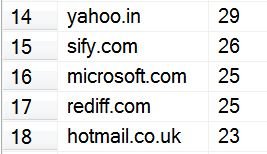
Do you have any similar script which can do the same thing efficiently? Please post as a comment.
Edge Cases When You Pull the Domain from Email Address Values
Real email columns are rarely as clean as a demo table, so test the script against the messy rows before you trust the counts. Here are the cases I would look for:
- No @ sign: CHARINDEX returns 0, so the expression returns the whole value. Add
AND CHARINDEX('@', Email) > 0to the WHERE clause to skip those rows. - Trailing spaces: LEN ignores trailing spaces but RIGHT does not, so a value with spaces at the end loses the first letters of its domain. Wrap the column in
LTRIM(RTRIM(Email)), or useTRIM(Email)on SQL Server 2017 and later. - Mixed case: with a case-insensitive collation, Gmail.com and gmail.com land in the same group. With a case-sensitive collation they do not, so add
LOWER()if you are not sure. - NULL values: the LEN check already filters them out, which is what you want here.
If you prefer, SUBSTRING(Email, CHARINDEX('@', Email) + 1, LEN(Email)) gives the same result for clean values and reads a little easier, since it simply starts one character after the @ sign.
If you run this report often on a large table, add the domain as a persisted computed column and index it. The grouping can then read a narrow index instead of working out the domain for every row each time. It also makes other questions easy, such as how many new sign-ups each domain brought this month. Test the new column against the same messy rows listed above before you rely on it.
Published by Pinal Dave on SQLAuthority. More of my work at pinaldave.com.
Discover more from SQL Authority with Pinal Dave
Subscribe to get the latest posts sent to your email.




34 Comments. Leave new
I would like to set the domain formula in a defaut value for a new column … but it seems not to be possible …
Hi There,
I have a requirement: Find and extract email address from Long Text field. The field contains more than 2000 chars. I am looking for ordinary SQL Query (TSQL), so i can use it in Business Intelligence Report.
I can’t use ‘Function’ or any other format.s
I am searching in Google not able to find the right method.
Thanks for your help.
Kiru
Hint:
You can easily turn this query around to give you all the Email Adresses of a given colum, simply change the code a little bit to get the left string part instead of the right string part:
—
SELECT LEFT(Col0, CHARINDEX(‘@’, Col0) ) as EmailColumn, Col0
FROM MyTabe
order by Col0
—-
in asp access database this query not work, someone has the solution, for asp and access database thanks in advance.
SQL = ” SELECT RIGHT(email, LEN(email) – CHARINDEX(‘@’, email)) AS Domain, COUNT(email) AS EmailCount FROM tbUser WHERE (LEN(email) > 0) GROUP BY RIGHT(emailUser, LEN(email) – CHARINDEX(‘@’, email)) ORDER BY EmailCount DESC
This was so helpful, thank you!
Hi, I have solved this in very clear way, no need to long query
Ex.
Select Id, email, right(email, charindex(‘@’, reverse(email))-1) as domain from domain
Here I’d, email is a column name and table name is domain.
Amit pratap
select reverse(substring(reverse(email),1,charindex(‘@’,reverse(email))-1)),count(*) as count
from membersinfo
group by reverse(substring(reverse(email),1,charindex(‘@’,reverse(email))-1))
order by count(*) desc;
Hi Sir can you please simplify my query to get domain name without .com
select email,
left(
replace(
substring(email,charindex(‘@’,email)+1,LEN(Email) – CHARINDEX(‘@’, email)),
right(
substring(email,charindex(‘@’,email)+1,LEN(Email) – CHARINDEX(‘@’, email)),len(
substring(email,charindex(‘.’,email)+1,LEN(Email) – CHARINDEX(‘.’, email))
)),”),
charindex(‘.’,
replace(substring(email,charindex(‘@’,email)+1,LEN(Email) – CHARINDEX(‘@’, email)),
right(
substring(email,charindex(‘@’,email)+1,LEN(Email) – CHARINDEX(‘@’, email)),len(
substring(email,charindex(‘.’,email)+1,LEN(Email) – CHARINDEX(‘.’, email))
)),”)
)-1)
Thanks,
Vani
select substring(‘hemasundar@gmail.com’,charindex(‘@’,’hemasundar@gmail.com’)+1,charindex(‘.,’,hemasundar@gmail.com’)
-charindex(‘@’,’hemasundar@gmail.com’)-1)
—-this method will you to get only domain name from given email
thank you so much indeed nice query works perfect
Yes, thanks this query did exactly what I needed. Pinal Dave is the Man!
I have a column in a SQL table that has 5000 email addresses in it. I created two new columns called Username and Domain. I would like to split that email address at the @ writing into the new column the prefix into Username and the suffix into Domain. I cannot find an example of how to do this. Your help would be appreciated.
You can use LEFT for “@” and get username and use my trick.