
ETL stands for extract, transform and load. Three words, and the middle one is where almost all the work lives. People new to it assume the hard part is moving the data. The hard part is deciding what the data means once it arrives.
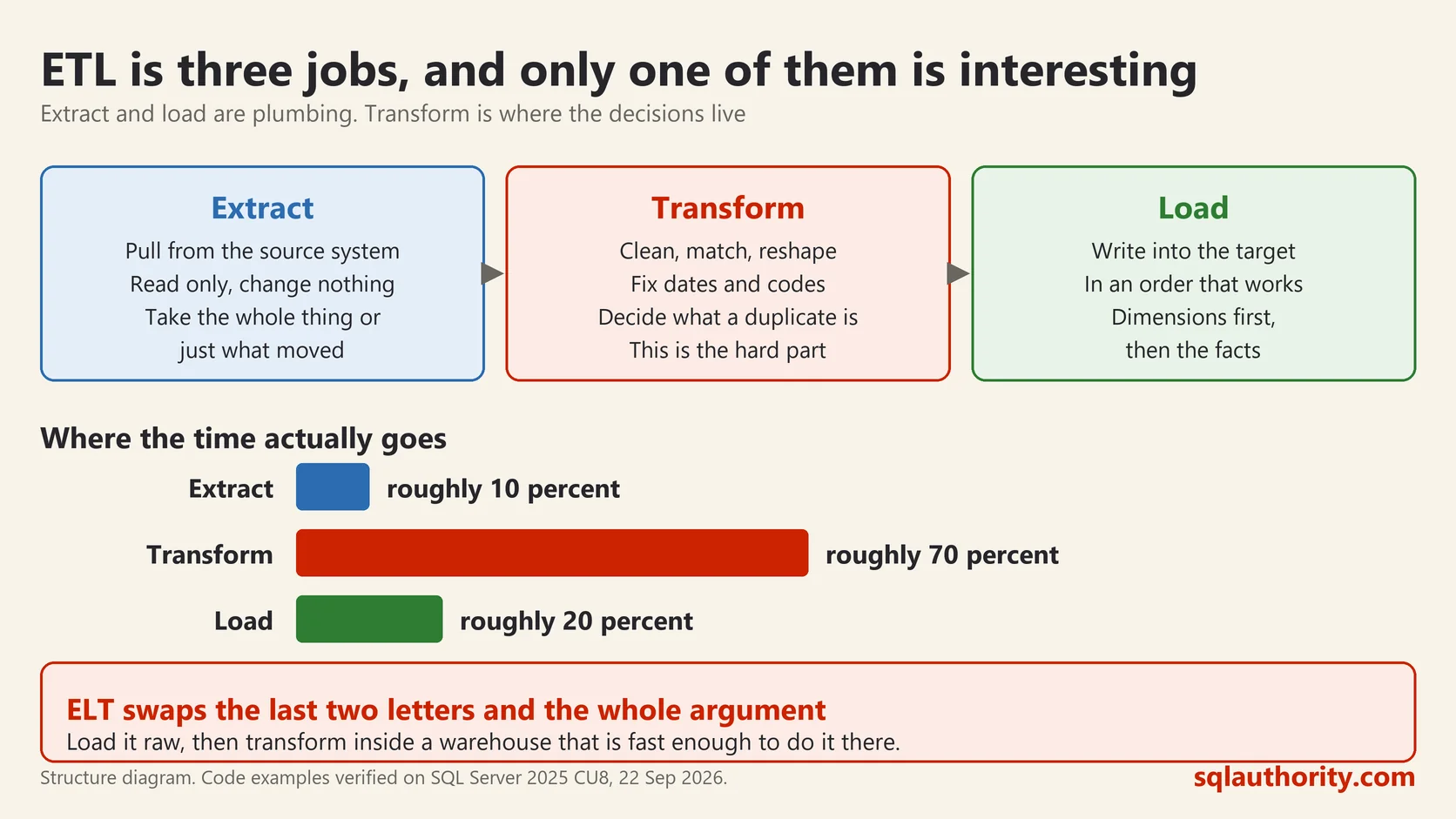
The Three Steps, in Order
Extract is getting a copy of the data out of wherever it lives. A file from a supplier, a table in another database, an export from an application nobody maintains. You take a copy and you leave the source alone.
Transform is making that copy fit the shape you need. Trimming spaces, fixing types, agreeing on spellings, dropping duplicates, deciding what a missing value means. This is the step that takes the time.
Load is putting the result into the table people will actually query. Safely, and in a way that can be run again tomorrow without doubling anything.
What Actually Arrives
Here is a staging table with five rows from a supplier file. I ran all of this on SQL Server 2025 while writing this post.
CREATE TABLE dbo.Staging_Customer (
    CustomerCode varchar(20),
    Name varchar(100),
    Country varchar(50),
    Spend varchar(20)
);

INSERT dbo.Staging_Customer VALUES
 ('C001', '  Amy Booth ', 'india',         '1250.50'),
 ('C002', 'Ben Carter',   'INDIA',         '980'),
 ('C003', 'cara diaz',    'United States', '  2310.00 '),
 ('C001', 'Amy Booth',    'India',         '1250.50'),
 ('C004', 'Dev Patel',    'india',         NULL);
Notice that every column is text, including the money. That is deliberate, and it is what I do on real work. A staging table takes whatever the file gives you. Declare Spend as a decimal, let one row contain the word “pending”, and the whole load fails. You learn nothing about the other rows.
Four problems are hiding in five rows. One query finds them:
SELECT COUNT(*) AS rows_in,
       COUNT(DISTINCT CustomerCode) AS distinct_codes,
       SUM(CASE WHEN Spend IS NULL THEN 1 ELSE 0 END) AS missing_spend,
       COUNT(DISTINCT Country) AS spellings_of_country
FROM dbo.Staging_Customer;
rows_in distinct_codes missing_spend spellings_of_country
5 4 1 2Five rows and four customers, so one is a duplicate. One spend is missing. The same country is spelled two ways. That is before you count the leading spaces that make ” Amy Booth ” a different string from “Amy Booth”.
Transform Is Where the Decisions Live
Every line of the query below is a decision somebody had to make.
WITH cleaned AS (
    SELECT CustomerCode = LTRIM(RTRIM(CustomerCode)),
           Name = LTRIM(RTRIM(Name)),
           Country = UPPER(LEFT(LTRIM(RTRIM(Country)), 1))
                   + LOWER(SUBSTRING(LTRIM(RTRIM(Country)), 2, 50)),
           Spend = TRY_CAST(LTRIM(RTRIM(Spend)) AS decimal(12,2)),
           rn = ROW_NUMBER() OVER (
                    PARTITION BY LTRIM(RTRIM(CustomerCode))
                    ORDER BY (SELECT NULL))
    FROM dbo.Staging_Customer
)
SELECT CustomerCode, Name, Country, Spend FROM cleaned WHERE rn = 1;
CustomerCode Name Country Spend
C001 Amy Booth India 1250.50
C002 Ben Carter India 980.00
C003 cara diaz United states 2310.00
C004 Dev Patel India NULLTwo things in that result are worth your attention, and they are the whole point of this post.
“United States” came back as “United states”. My tidy-the-capitals rule only fixed the first letter. Nobody thought about two word country names. It is a small bug, and it would have shipped.
“cara diaz” is still lower case, because I only cleaned the country column. Whether that matters is a business question, not a technical one, and the answer is different for a mailing list than for a report.
TRY_CAST is worth knowing. CAST throws an error and stops the batch when a value will not convert. TRY_CAST returns NULL and carries on. One bad row no longer takes the other nine thousand with it.
ROW_NUMBER is how the duplicate goes. I kept one row per code. My ORDER BY says I do not care which one, which is only honest when the duplicates are identical. If they differ, that arbitrary choice becomes tomorrow’s bug.
Load It So You Can Run It Twice
This is the part people get wrong first. A load that works once and doubles everything on the second run is not finished. MERGE updates what exists and inserts what does not.
MERGE dbo.Customer AS target
USING (SELECT CustomerCode, Name, Country, Spend FROM cleaned WHERE rn = 1) AS source
   ON target.CustomerCode = source.CustomerCode
WHEN MATCHED THEN
    UPDATE SET Name = source.Name, Country = source.Country, Spend = source.Spend
WHEN NOT MATCHED THEN
    INSERT (CustomerCode, Name, Country, Spend)
    VALUES (source.CustomerCode, source.Name, source.Country, source.Spend);
First run: 4 rows merged, 4 rows in the table. I ran it again straight away, and the table still held 4 rows. That is what you are testing for.
The target table is where the strictness belongs. CustomerCode is the primary key and Name and Country are NOT NULL, so the database refuses anything that got past my cleaning. Loose on the way in, strict on the way out.
What Nobody Tells Beginners
The code above is the easy half. The hard half is the questions it forced me to answer. Every one of them was a guess about what somebody meant.
Is a missing spend a zero or genuinely unknown? I left it NULL, which says unknown. Sum that column and zero and NULL behave the same way. Average it and they do not.
Is “india” the same customer country as “India”? Obviously yes to a person, and obviously not to a database, until somebody writes the rule.
When the file arrives twice, is the second copy a correction or a repeat? Nothing in the file tells you.
A tool makes the three steps easier to draw and easier to schedule. It answers none of those questions. That is why two teams with the same tool and the same file build different pipelines. The team that asked more questions at the start is the one still sleeping at night.
ETL is not moving data, it is writing down what the data was supposed to mean.
This post was rewritten from scratch in September 2026. The original, published on 2011-04-11, was a short announcement about something that no longer exists. The address is the same, the subject is now a basic idea worth keeping.
Published by Pinal Dave on SQLAuthority. More of my work at pinaldave.com.
Discover more from SQL Authority with Pinal Dave
Subscribe to get the latest posts sent to your email.



8 Comments. Leave new
DI tools so funny =)
Drag and drop interface and nothing more
For me it only helps to understand (and some times control) work flow and nothing more.
Poor perfomance and Stupid code generation they are friends of all DI tools.
I looked at demo on expressor Studio, SCD2 with 4 customers. It’s not a good Idea to show video like there for the “Industrial” DI Tools. They have to show performance on 10 000 000 customers. If they use PER ROW UPDATE it will look funny…
Hi,
Is the expressor studio a replacement for SSIS.
Thank you
Hi Ramdas,
No it is not replacement. It is just a tool which I have used.
I haven’t had the time to try out expressor Studio yet, but comparing it with SSIS what are your thoughts and where would you place it?
Hi Pinal Dave,
It is clear you are a fan of Expressor, and a very well written blog, I must say!
How do you rate it to other ETL tools? It is certainly less expensive than the “big” names, but does it have the same functionality? If not, what does it lack? Does it really simplify the whole ETL process the way they seem to advertise with the semantic layer?
Thanks!
Can you tell me how can I duplicate a record based on a column say “count” in Expressor?
I want to know the all process of expressor tool.
How to use update query in expressor studio tool.
It is very urgent to implement.Please provide solutions as possible.