STARTUP_STATE describes future automatic startup, while runtime state tells you whether an Extended Events session is running now. Read both before troubleshooting collection. Changing the setting does not start a stopped session.

Separate configuration from runtime state
sys.server_event_sessions lists the stored server-session definitions. sys.dm_xe_sessions lists running server sessions. A session can exist in the first view without appearing in the second. That difference is useful evidence, rather than proof that collection failed.
Run this setup block first. It creates a server session named StartupStateDemo with STARTUP_STATE = ON, but it does not start it. The session writes to an event file in the folder that holds the SQL Server error log, so the service can already write there. You need permission to create Extended Events sessions and view server state.
DROP TABLE IF EXISTS #XeState, #XeFile;
CREATE TABLE #XeState(Ordinal int PRIMARY KEY,Phase nvarchar(70) NOT NULL,StartupState bit NOT NULL,RuntimePresent bit NOT NULL);
CREATE TABLE #XeFile(FilePath nvarchar(600) NOT NULL);
IF EXISTS(SELECT 1 FROM sys.dm_xe_sessions WHERE name=N'StartupStateDemo')
 ALTER EVENT SESSION StartupStateDemo ON SERVER STATE=STOP;
IF EXISTS(SELECT 1 FROM sys.server_event_sessions WHERE name=N'StartupStateDemo')
 DROP EVENT SESSION StartupStateDemo ON SERVER;

DECLARE @Log nvarchar(520)=CONVERT(nvarchar(520),SERVERPROPERTY('ErrorLogFileName'));
DECLARE @File nvarchar(600)=LEFT(@Log,LEN(@Log)-CHARINDEX(N'\',REVERSE(@Log))+1)
  +N'StartupStateDemo_'+REPLACE(CONVERT(nvarchar(36),NEWID()),N'-',N'')+N'.xel';
INSERT #XeFile VALUES(@File);

DECLARE @Sql nvarchar(max)=N'CREATE EVENT SESSION StartupStateDemo ON SERVER
ADD EVENT sqlserver.error_reported
(ACTION(sqlserver.session_id,sqlserver.client_app_name)
 WHERE([severity]>=(16) AND [error_number]=(51379) AND [sqlserver].[session_id]=('+CONVERT(nvarchar(12),@@SPID)+N')))
ADD TARGET package0.event_file
(SET filename=N'''+REPLACE(@File,N'''',N'''''')+N''',max_file_size=(5),max_rollover_files=(2))
WITH(MAX_DISPATCH_LATENCY=1 SECONDS,STARTUP_STATE=ON);';
EXEC sys.sp_executesql @Sql;
INSERT #XeState SELECT 1,N'Created ON, not started',s.startup_state,CASE WHEN r.name IS NULL THEN 0 ELSE 1 END
FROM sys.server_event_sessions s LEFT JOIN sys.dm_xe_sessions r ON r.name=s.name
WHERE s.name=N'StartupStateDemo';This query records the first state, before the session has been started. It uses the temporary table from the setup block and does not change existing collectors. Permission requirements depend on the engine and scope. Do not read an inaccessible or filtered view as a complete inventory without checking the executing identity.
Observe four distinct states
The setup block created one server session with STARTUP_STATE = ON. The next block starts that session explicitly. Then it changes the setting to OFF while the session runs. Finally, it stops the session. After each step it records the startup bit and whether the session has a runtime row.
The block also raises one error from your own connection while the session runs, so the event file has something to read. It waits two seconds before the stop.
ALTER EVENT SESSION StartupStateDemo ON SERVER STATE=START;
INSERT #XeState SELECT 2,N'Explicit START, configuration ON',s.startup_state,CASE WHEN r.name IS NULL THEN 0 ELSE 1 END
 FROM sys.server_event_sessions s LEFT JOIN sys.dm_xe_sessions r ON r.name=s.name
 WHERE s.name=N'StartupStateDemo';

ALTER EVENT SESSION StartupStateDemo ON SERVER WITH(STARTUP_STATE=OFF);
INSERT #XeState SELECT 3,N'Changed OFF while running',s.startup_state,CASE WHEN r.name IS NULL THEN 0 ELSE 1 END
 FROM sys.server_event_sessions s LEFT JOIN sys.dm_xe_sessions r ON r.name=s.name
 WHERE s.name=N'StartupStateDemo';

BEGIN TRY THROW 51379,N'Startup state demo error',1; END TRY
BEGIN CATCH END CATCH;
WAITFOR DELAY '00:00:02';

ALTER EVENT SESSION StartupStateDemo ON SERVER STATE=STOP;
INSERT #XeState SELECT 4,N'Explicit STOP, configuration OFF',s.startup_state,CASE WHEN r.name IS NULL THEN 0 ELSE 1 END
 FROM sys.server_event_sessions s LEFT JOIN sys.dm_xe_sessions r ON r.name=s.name
 WHERE s.name=N'StartupStateDemo';

SELECT Ordinal,Phase,StartupState,RuntimePresent FROM #XeState ORDER BY Ordinal;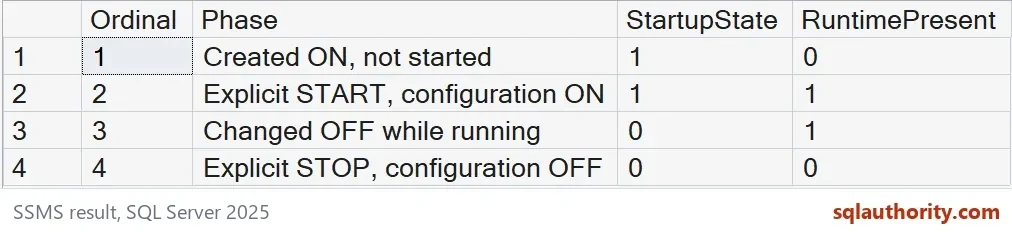
These are the four observed states. The table below shows the bit values from the output as True and False. The ON session initially had no runtime row. Changing its startup setting to OFF left it running until the explicit STOP.
| Ordinal | Phase | StartupState | RuntimePresent |
|---|---|---|---|
| 1 | Created ON, not started | True | False |
| 2 | Explicit START, configuration ON | True | True |
| 3 | Changed OFF while running | False | True |
| 4 | Explicit STOP, configuration OFF | False | False |
These steps separate the stored startup choice from the current runtime row. Changing startup configuration is not the same operation as starting or stopping collection. The example never restarts SQL Server. The automatic startup after a restart was not tested here.

Verify an event reached the file
A running session still needs useful events and a usable target. The demo session captures one error raised from its own connection. The predicate restricts the error number, severity and generating session ID. It does not collect unrelated workload errors.
The event includes the generating session ID and client application name. The query below reads the event file and compares that session ID with your own connection. Parsing the CREATE statement alone cannot supply that collection evidence.
DECLARE @Pattern nvarchar(600)=(SELECT REPLACE(FilePath,N'.xel',N'*.xel') FROM #XeFile);
SELECT f.object_name,f.timestamp_utc,
 x.e.value('(/event/data[@name="error_number"]/value)[1]','int') AS ErrorNumber,
 x.e.value('(/event/data[@name="severity"]/value)[1]','int') AS Severity,
 x.e.value('(/event/data[@name="message"]/value)[1]','nvarchar(200)') AS EventMessage,
 x.e.value('(/event/action[@name="session_id"]/value)[1]','int') AS EventSpid,
 x.e.value('(/event/action[@name="client_app_name"]/value)[1]','nvarchar(200)') AS EventApp,
 CASE WHEN x.e.value('(/event/action[@name="session_id"]/value)[1]','int')=@@SPID THEN 1 ELSE 0 END AS SameConnection
FROM sys.fn_xe_file_target_read_file(@Pattern,NULL,NULL,NULL) AS f
CROSS APPLY (SELECT CAST(f.event_data AS xml) AS e) AS x;
The file contains one error_reported event, error 51379, severity 16, with the message Startup state demo error. SameConnection is 1 because the event came from the same session ID. The timestamp, session ID and client application name vary from run to run.
The event file is retained after the session stops. A one-second dispatch latency and a short wait before the stop give the file time to receive the event. The query reads the actual written file. This is separate from a ring buffer, whose contents are unavailable after its stopped session disappears.
Keep target access and ownership explicit
The demo writes its file to the SQL Server log folder and touches only its own session, StartupStateDemo. Existing application collectors and system_health are outside this demonstration.
A file-access failure is a different outcome from an empty event result. Preserve its natural error before changing anything. Check the target path and executing identity deliberately. Do not repair the example by broadening permissions or reusing another collector.
When you are done, drop the demo session and the temporary tables. The result should show no session definition, no runtime row and no open transaction. The event file stays in the log folder, and you can delete it when you no longer need it.
DROP EVENT SESSION StartupStateDemo ON SERVER;
DROP TABLE IF EXISTS #XeState, #XeFile;
SELECT (SELECT COUNT(*) FROM sys.server_event_sessions WHERE name=N'StartupStateDemo') AS SessionDefinitions,
 (SELECT COUNT(*) FROM sys.dm_xe_sessions WHERE name=N'StartupStateDemo') AS RuntimeRows,
 @@TRANCOUNT AS OpenTransactions;
Read the relevant state first
When collection seems absent, confirm the exact session definition and current runtime state. Then inspect the predicate, target and actual event evidence. These observations answer different questions. The STARTUP_STATE setting alone does not describe what is being captured at this moment.
Read each state on its own, and the picture clears up fast.
A startup setting is not a running session, it is only a plan for the next restart.
Published by Pinal Dave on SQLAuthority. More of my work at pinaldave.com.
Discover more from SQL Authority with Pinal Dave
Subscribe to get the latest posts sent to your email.