I use STCurveToLine when a consumer requires linear geometry instead of circular arcs. It returns an approximation for curved input. The result type depends on the source, so I’d inspect that type before assuming every conversion yields a line.

Compare different curved inputs
The first input is a CircularString describing an arc through three points. The second is a CurvePolygon formed from a closed circular string. Both are geometry values with SRID zero.
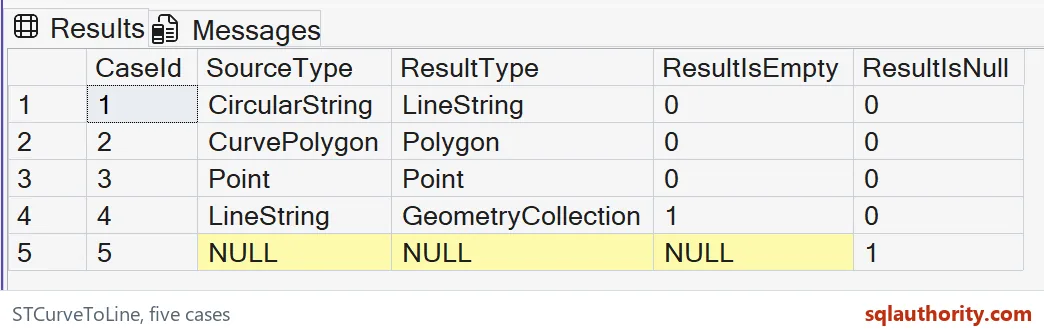
The expected converted types differ. The arc produces a LineString, while the curved polygon produces a Polygon. That distinction matters at an interface requiring a particular shape family. Converting curved segments doesn’t remove the source’s dimensional role. A polygonal region still needs a polygon result.
WITH Inputs AS
(
 SELECT CaseId, Shape
 FROM (VALUES
  (1,geometry::STGeomFromText('CIRCULARSTRING(0 0,2 2,4 0)',0)),
  (2,geometry::STGeomFromText('CURVEPOLYGON(CIRCULARSTRING(2 0,0 2,-2 0,0 -2,2 0))',0)),
  (3,geometry::Point(1,2,0)),
  (4,geometry::STGeomFromText('LINESTRING EMPTY',0)),
  (5,CAST(NULL AS geometry))
 ) v(CaseId,Shape)
), Converted AS
(
 SELECT CaseId, Shape, Shape.STCurveToLine() AS LinearShape FROM Inputs
)
SELECT CaseId, CAST(Shape.STGeometryType() AS nvarchar(40)) AS SourceType,
       CAST(LinearShape.STGeometryType() AS nvarchar(40)) AS ResultType,
       LinearShape.STIsEmpty() AS ResultIsEmpty,
       CAST(CASE WHEN LinearShape IS NULL THEN 1 ELSE 0 END AS bit) AS ResultIsNull
FROM Converted
ORDER BY CaseId;
Understand the approximation boundary
The method replaces curved geometry with a polygonal approximation. The resulting segments represent the curve using straight pieces. This is a geometric transformation, not merely a change in the printed type name.
I’d avoid inventing a universal number of output vertices for every possible source. The example checks the shape-family results instead. A consumer requiring a particular approximation tolerance needs a separately defined contract. This method call alone doesn’t establish that additional requirement for every curved dataset.
Keep ordinary inputs in view
Case three starts as a Point. A noncurved input returns a copy of its geometry. The expected result remains a nonempty Point rather than becoming a LineString.
I’d retain this row in a test collection containing mixed types. A name such as CurveToLine can tempt a caller to infer one result type. The actual method contract is broader. Inspect the returned value before passing it to an operation that requires a specific spatial family.
Separate empty from uninitialized
The fourth source is an empty LineString. The conversion returns an empty GeometryCollection. The fifth source is SQL NULL, which expects a NULL converted value instead. These are different states.
ResultIsEmpty and ResultIsNull keep that difference visible. An empty geometry is still an initialized geometry value with a type. A NULL doesn’t describe any geometry instance. I’d preserve both states at an export boundary rather than silently turning each into a fabricated point or empty line.

Choose meaningful assertions
The result table reports source type, result type and empty or NULL state. Those properties explain all five cases without predicting arbitrary approximation coordinates. CaseId gives their rows a stable order.
For a real consuming application, I’d also inspect any geometric property that its decision requires. Type conversion alone doesn’t prove a distance or membership remains within an accepted tolerance. Keep that application-specific check explicit. It shouldn’t be inferred from an attractive rendering of the approximated shape.
Respect the planar example
All source values are inline and the query performs no writes. The inputs use geometry, not geography. The small coordinates make type changes easy to follow without introducing a dataset’s projection choices.
I’d verify the source reference system before adding real measurements. The method also ignores z-coordinates when forming the approximation. This example uses only two-dimensional inputs. It makes no promise about preserving a three-dimensional measurement or improving a production query’s speed.
Inspect the returned type and the empty state, and test the tolerance your application needs.
A line approximation is not the original curve, it is a stand-in you must test.
Published by Pinal Dave on SQLAuthority. More of my work at pinaldave.com.
Discover more from SQL Authority with Pinal Dave
Subscribe to get the latest posts sent to your email.