OUTPUT INTO can record old and new values within a controlled SQL Server write statement. Explicit output columns connect the business change with its history row. The transaction decides whether both changes survive.

Use OUTPUT INTO with a compatible audit shape
This setup creates two temporary tables, one for the business rows and one for the history. Both amount columns use compatible decimal types and allow NULL. The history records operation, old value, new value, UTC time and execution login.
DROP TABLE IF EXISTS #Changes;
DROP TABLE IF EXISTS #Items;
CREATE TABLE #Items(Id int NOT NULL PRIMARY KEY,Amount decimal(9,2) NULL);
CREATE TABLE #Changes(Id int,Operation varchar(6),OldAmount decimal(9,2) NULL,
  NewAmount decimal(9,2) NULL,ChangedAtUtc datetime2(7),ExecutionLogin sysname);
INSERT #Items VALUES(1,10),(2,NULL),(3,NULL);
DECLARE @Utc datetime2(7)=SYSUTCDATETIME(),
@ExecutionLogin sysname=SUSER_SNAME();
UPDATE #Items SET Amount=20
OUTPUT inserted.Id, 'UPDATE', deleted.Amount, inserted.Amount,
@Utc, @ExecutionLogin
INTO #Changes
(Id,Operation,OldAmount,NewAmount,ChangedAtUtc,ExecutionLogin)
WHERE Id IN(1,2) AND (Amount<>20 OR Amount IS NULL);
SELECT * FROM #Changes ORDER BY Id;For UPDATE, deleted exposes the old amount and inserted exposes the new amount. The predicate excludes unchanged values and includes NULL-to-20 transitions. Both matching rows belong to the same statement.
Keep unchanged writes out of OUTPUT INTO history
OUTPUT records rows affected by the write, not an automatic semantic comparison of every field. Define the meaningful-change predicate explicitly. Repeating the update adds no history rows, because the predicate finds nothing left to change.
The block below also assigns NULL to a row that is already NULL, and again no history row appears. Compare each tracked field using an appropriate NULL-safe rule. Do not replace NULL with a sentinel that a real business value could equal.
DECLARE @Utc datetime2(7)=SYSUTCDATETIME(),
        @ExecutionLogin sysname=SUSER_SNAME();
UPDATE #Items SET Amount=20
OUTPUT inserted.Id, 'UPDATE', deleted.Amount, inserted.Amount,
       @Utc, @ExecutionLogin
INTO #Changes
     (Id,Operation,OldAmount,NewAmount,ChangedAtUtc,ExecutionLogin)
WHERE Id IN(1,2) AND (Amount<>20 OR Amount IS NULL);

UPDATE #Items SET Amount=NULL
OUTPUT inserted.Id, 'UPDATE', deleted.Amount, inserted.Amount,
       @Utc, @ExecutionLogin
INTO #Changes
     (Id,Operation,OldAmount,NewAmount,ChangedAtUtc,ExecutionLogin)
WHERE Id=3 AND Amount IS NOT NULL;

SELECT COUNT(*) AS HistoryRows FROM #Changes;
Verify rollback and audit-target failures
The block below changes one amount inside a transaction and then rolls it back. Both the amount and the history count return to their earlier state. This history represents committed changes, not every failed attempt.
DECLARE @Utc datetime2(7)=SYSUTCDATETIME(),
        @ExecutionLogin sysname=SUSER_SNAME();
BEGIN TRAN;
UPDATE #Items SET Amount=30
OUTPUT inserted.Id, 'UPDATE', deleted.Amount, inserted.Amount,
       @Utc, @ExecutionLogin
INTO #Changes
     (Id,Operation,OldAmount,NewAmount,ChangedAtUtc,ExecutionLogin)
WHERE Id=1;
ROLLBACK;

SELECT Id,Amount FROM #Items ORDER BY Id;
SELECT COUNT(*) AS HistoryRows FROM #Changes;
The next block writes a value too large for a deliberately narrow history column. The business amount must remain unchanged when that statement fails. Keep history types compatible and handle the error before reporting success.
CREATE TABLE #Narrow(NewAmount decimal(3,2));

BEGIN TRY
  EXEC(N'UPDATE #Items SET Amount=500 OUTPUT inserted.Amount INTO #Narrow WHERE Id=1;');
END TRY
BEGIN CATCH
  SELECT ERROR_NUMBER() AS ErrorNumber, ERROR_MESSAGE() AS ErrorMessage;
END CATCH;

SELECT Id,Amount FROM #Items ORDER BY Id;
SELECT COUNT(*) AS HistoryRows FROM #Changes;
Respect OUTPUT INTO target and timing restrictions
An OUTPUT INTO target has restrictions, including enabled triggers, foreign keys and CHECK constraints. The block below tries a CHECK-constrained target and catches the error. Check those restrictions before choosing the target design.
CREATE TABLE #Checked(NewAmount decimal(9,2) CHECK(NewAmount>=0));

BEGIN TRY
  EXEC(N'UPDATE #Items SET Amount=30 OUTPUT inserted.Amount INTO #Checked WHERE Id=1;');
END TRY
BEGIN CATCH
  SELECT ERROR_NUMBER() AS ErrorNumber, ERROR_MESSAGE() AS ErrorMessage;
END CATCH;

SELECT Id,Amount FROM #Items ORDER BY Id;
SELECT COUNT(*) AS HistoryRows FROM #Changes;
OUTPUT values reflect the write before AFTER triggers run. Rows returned to a client can appear even when the statement encounters an error and rolls back. A returned row alone does not prove a committed change.
Give DELETE and identity fields their precise meanings
DELETE supplies deleted values, with no inserted row. The block below records DELETE explicitly and stores NULL as the new amount. Do not depend on output order when several rows change.
DECLARE @DeleteUtc datetime2(7)=SYSUTCDATETIME(),
        @ExecutionLogin sysname=SUSER_SNAME();
DELETE #Items
OUTPUT deleted.Id, 'DELETE', deleted.Amount, NULL,
       @DeleteUtc, @ExecutionLogin
INTO #Changes
     (Id,Operation,OldAmount,NewAmount,ChangedAtUtc,ExecutionLogin)
WHERE Id=2;

SELECT Id,Operation,OldAmount,NewAmount
FROM #Changes ORDER BY Id,ChangedAtUtc;
SUSER_SNAME records the current execution login, which may be a shared application login or an impersonated context. It does not authenticate an individual application user. A separate identity design must establish that attribution.
Observed OUTPUT INTO results
SQL Server 2025 returned two UPDATE history rows in this example. Rollback restored all three business rows and the original two history rows.
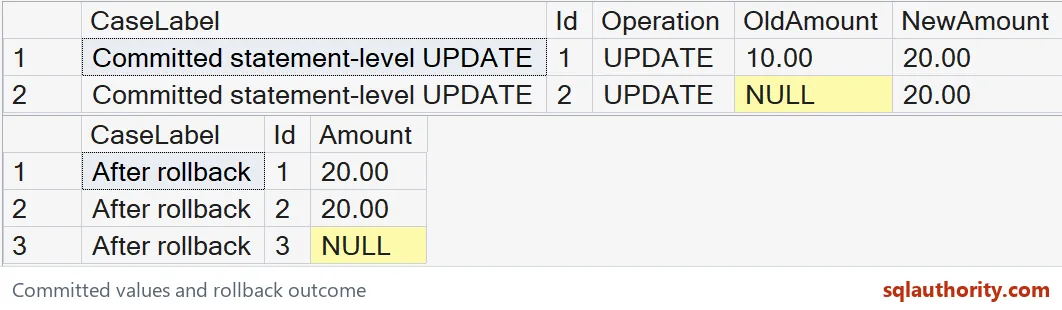
The narrow history target raised error 8115. The CHECK-constrained target raised error 333. Both failures left the business rows and history unchanged.
The final delete added one DELETE row, leaving three history rows in total.
| Id | Operation | Old amount | New amount |
|---|---|---|---|
| 1 | UPDATE | 10.00 | 20.00 |
| 2 | UPDATE | NULL | 20.00 |
| 2 | DELETE | 20.00 | NULL |
Keep the Controlled Write Path Clear
Every required writer must use the audited statement contract. Direct writes through other paths can bypass this example. It is operational change history within that contract, not a complete tamper-proof audit system.
Validate the business change and its history together at the commit boundary.
When you are done, drop the temporary tables.
DROP TABLE #Checked;
DROP TABLE #Narrow;
DROP TABLE #Changes;
DROP TABLE #Items;
OUTPUT INTO is not an audit trail, it is a record of what one statement changed.
Published by Pinal Dave on SQLAuthority. More of my work at pinaldave.com.
Discover more from SQL Authority with Pinal Dave
Subscribe to get the latest posts sent to your email.