Schema-bound views protect referenced table definitions when you deploy schema changes. An ordinary view can keep stale metadata after an underlying change. Binding gives SQL Server a dependency it must enforce before accepting incompatible changes.

Define schema-bound views with an explicit contract
Use explicit columns and two-part object names. Referenced objects must belong to the same database. Creating a view requires its own batch, so each CREATE VIEW below sits in its own batch.
First, a small demo table with two rows, plus an ordinary view for a comparison later.
DROP VIEW IF EXISTS dbo.BoundReportView;
DROP VIEW IF EXISTS dbo.LooseReportView;
DROP TABLE IF EXISTS dbo.ReportSource;
GO
CREATE TABLE dbo.ReportSource(
    Id int NOT NULL PRIMARY KEY,
    Amount decimal(9,2) NULL,
    Caption nvarchar(30) NULL);
INSERT dbo.ReportSource VALUES (1, 10, N'First'), (2, NULL, N'Second');
GO
CREATE VIEW dbo.LooseReportView AS SELECT * FROM dbo.ReportSource;
GO
Now bind a view to the table. It names its columns and uses WITH SCHEMABINDING.
CREATE VIEW dbo.BoundReportView
WITH SCHEMABINDING
AS
SELECT Id, Amount
FROM dbo.ReportSource;
Separate compatible additions from blocked changes
Schema-bound views do not freeze every part of the source table. Adding an unreferenced column can remain compatible with the explicit view definition. Changing or removing a referenced column requires changing the dependent view first.
ALTER TABLE dbo.ReportSource ADD Note nvarchar(30) NULL;
GO
UPDATE dbo.ReportSource SET Note = N'Fresh note';
SELECT Id, Amount FROM dbo.BoundReportView;
GO
-- These three statements are blocked. Each one returns an error.
ALTER TABLE dbo.ReportSource DROP COLUMN Amount;
GO
ALTER TABLE dbo.ReportSource ALTER COLUMN Amount decimal(12,2) NULL;
GO
DROP TABLE dbo.ReportSource;
GO
Read the complete Messages output alongside each error. One failed operation can emit more than one message, and the table and both views stay in place.

Read dependencies before changing schema-bound views
Inspect sys.sql_expression_dependencies before deploying an affected change. This query lists the bound references with their column names. Coordinate the new table and view definitions as one reviewed deployment.
SELECT OBJECT_NAME(referencing_id) AS ReferencingObject,
    referenced_entity_name,
    COL_NAME(referenced_id, referenced_minor_id) AS ReferencedColumn,
    is_schema_bound_reference
FROM sys.sql_expression_dependencies
WHERE referencing_id = OBJECT_ID(N'dbo.BoundReportView')
ORDER BY referenced_minor_id;
Refresh ordinary view metadata deliberately
The demo also has an ordinary SELECT * view. After Note was added, the next step removes Caption, which the bound view never referenced. Compare the loose view headings and values before and after sp_refreshview. The last three lines drop the demo objects.
ALTER TABLE dbo.ReportSource DROP COLUMN Caption;
GO
SELECT * FROM dbo.LooseReportView ORDER BY Id;
EXEC sys.sp_refreshview N'dbo.LooseReportView';
SELECT * FROM dbo.LooseReportView ORDER BY Id;
GO
DROP VIEW dbo.BoundReportView;
DROP VIEW dbo.LooseReportView;
DROP TABLE dbo.ReportSource;
Explicit projections make the intended result easier to review. Schema-bound views still need tests through the real consumer of that result.
Observed schema-bound views and refresh behavior
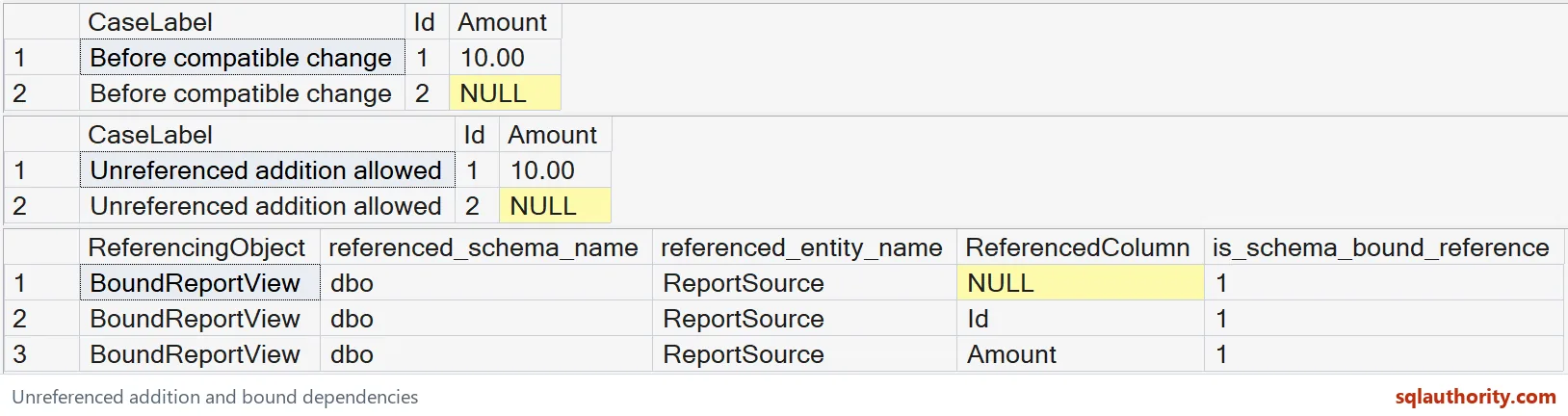
SQL Server 2025 allowed the unreferenced Note addition. Both bound rows retained their Id and Amount values.
| Attempted change | Caught error |
|---|---|
| Drop Amount | 4922 |
| Alter Amount type | 4922 |
| Drop ReportSource | 3729 |
The dependency results included the source object plus the Id and Amount columns. The ordinary view still labeled the new values Caption before refresh. sp_refreshview corrected that heading to Note.
Both stages returned Fresh note for each row, while Amount remained 10.00 and NULL.
For the separate indexing contract, read indexed-view requirements. Binding alone does not establish an indexed view or its access path. This example concerns table-change dependencies.
Make the referenced columns explicit before you plan the table change.
A schema-bound view is not a frozen table, it is a guard on the columns it names.
Published by Pinal Dave on SQLAuthority. More of my work at pinaldave.com.
Discover more from SQL Authority with Pinal Dave
Subscribe to get the latest posts sent to your email.