CROSS APPLY aggregate behavior depends on whether the right-side query actually produces a row. I inspect that query before assuming unmatched customers disappear. An aggregate without GROUP BY can return a row even when its input is empty.
This is a useful distinction when a report includes customers with no orders. A zero count and a missing maximum can describe one returned summary row. That summary differs from having no right-side row at all.

Compare the same data with one query change
The source has three customers. Customer one has two populated order values. Customer two has no orders, while customer three has one order with a missing value. Those cases separate empty input from NULL input.
The first right-side query calculates COUNT and MAX without GROUP BY. The second adds GROUP BY on the order’s customer identifier. Everything else, including the source values and correlation predicate, stays the same.
Both queries use CROSS APPLY and an explicit customer order. They are read-only, with no table setup or session-setting commands. The complete result sets are small enough to compare row by row.
WITH Customers AS
(
    SELECT CustomerId FROM (VALUES (1), (2), (3)) AS v(CustomerId)
), Orders AS
(
    SELECT CustomerId, OrderValue
    FROM (VALUES (1, CAST(10 AS int)), (1, 20), (3, NULL)) AS v(CustomerId, OrderValue)
)
SELECT c.CustomerId, a.OrderCount, a.LargestOrder
FROM Customers AS c
CROSS APPLY
(
    SELECT COUNT(*) AS OrderCount, MAX(o.OrderValue) AS LargestOrder
    FROM Orders AS o
    WHERE o.CustomerId = c.CustomerId
) AS a
ORDER BY c.CustomerId;

WITH Customers AS
(
    SELECT CustomerId FROM (VALUES (1), (2), (3)) AS v(CustomerId)
), Orders AS
(
    SELECT CustomerId, OrderValue
    FROM (VALUES (1, CAST(10 AS int)), (1, 20), (3, NULL)) AS v(CustomerId, OrderValue)
)
SELECT c.CustomerId, a.OrderCount, a.LargestOrder
FROM Customers AS c
CROSS APPLY
(
    SELECT COUNT(*) AS OrderCount, MAX(o.OrderValue) AS LargestOrder
    FROM Orders AS o
    WHERE o.CustomerId = c.CustomerId
    GROUP BY o.CustomerId
) AS a
ORDER BY c.CustomerId;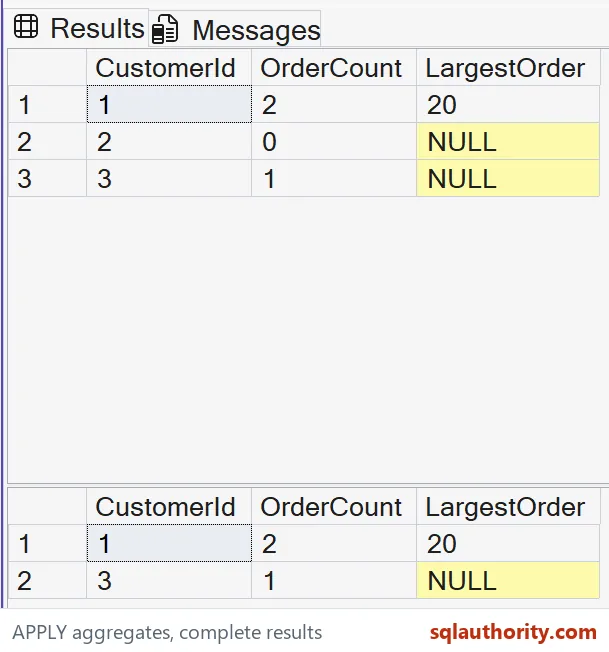
Read the scalar aggregate result
The first expected result contains all three customers. Customer one has a count of two and a largest order of 20. Customer two has count zero and a NULL maximum.
Customer two stays because the scalar aggregate produces one summary row from its empty qualifying input. CROSS APPLY therefore has a right-side row to combine with the customer. The row contains aggregate outcomes rather than an actual matching order.
Customer three has count one and a NULL maximum. COUNT star counts the order row even though its value is missing. MAX has no populated value to return for that row.
The two NULL maxima consequently have different supporting counts. One represents no orders, and the other represents an existing order with no value. Keeping both columns prevents the maximum alone from hiding that distinction.
Read the grouped aggregate result
The second expected result contains customers one and three only. Their counts and maxima match the first result. Customer two has no qualifying order group, so that right-side query produces no row for it.
CROSS APPLY removes that customer when there is no right-side result row. This is consistent with its normal row-combination behavior. The important change was GROUP BY inside the correlated query.
Do not reduce the distinction to whether the source has a match. Row production can change after aggregation or filtering. Inspect the full right-side expression, including any GROUP BY or HAVING clause.
An additional HAVING predicate could also remove a scalar aggregate result. That would create another output contract from the same underlying orders. The example omits HAVING so the effect of grouping remains clear.
Choose the report contract before choosing the spelling
If every customer needs an order summary, the first expression already returns a summary for an empty input. If only customers with qualifying order groups belong, the second expression expresses that rule. Define the desired population before changing APPLY forms.
The count does not claim that every order has a populated value. A report that counts populated values needs a different measure. This example uses COUNT star deliberately to expose the missing-value order.
The query does not establish which form is faster on a production table. It compares logical result cardinality with tiny source values. Indexes, row counts and the actual plan require separate evidence for a performance decision.
When adapting the example, include both no-row and NULL-value cases. A data set containing only populated matches cannot reveal this difference. Compare the full customer population as well as the numbers returned for each surviving customer.

Look at what the right side returns before you decide who disappears.
An aggregate is not always a filter, it is a summary that can exist for empty input.
Published by Pinal Dave on SQLAuthority. More of my work at pinaldave.com.
Discover more from SQL Authority with Pinal Dave
Subscribe to get the latest posts sent to your email.