REGEXP_INSTR returns the position of a selected regular-expression match or capture group. I compare its positional arguments using one short string. This example requires SQL Server 2025 with database compatibility level 170, or another platform that supports the function.
Finding a match and finding one group inside that match are separate questions. Selecting a later occurrence adds another choice. Keeping those arguments visible prevents an unexplained position number from becoming the whole example.

Use two recognizable matches
The source is AB-12 followed by a space and CD-345. The pattern captures letters in its first group and digits in its second. Group zero refers to the whole matched expression.
The cases vary occurrence, return option, group number and starting position. Two additional rows use no matching pattern and a start beyond the source. A typed NULL source supplies a separate missing-input check.
The result returns each case’s arguments beside Position. All searches use the case-sensitive flag c. The fixed ASCII input avoids introducing Unicode indexing questions into this positional demonstration.
WITH Cases AS
(
    SELECT CaseId, CaseName, TextValue, Pattern, StartAt, Occurrence, ReturnOption, GroupNumber
    FROM (VALUES
        (1, 'First match start', CAST('AB-12 CD-345' AS varchar(30)), '([A-Z]+)-([0-9]+)', 1, 1, 0, 0),
        (2, 'First match end', 'AB-12 CD-345', '([A-Z]+)-([0-9]+)', 1, 1, 1, 0),
        (3, 'Second match start', 'AB-12 CD-345', '([A-Z]+)-([0-9]+)', 1, 2, 0, 0),
        (4, 'Second match end', 'AB-12 CD-345', '([A-Z]+)-([0-9]+)', 1, 2, 1, 0),
        (5, 'First digits start', 'AB-12 CD-345', '([A-Z]+)-([0-9]+)', 1, 1, 0, 2),
        (6, 'First digits end', 'AB-12 CD-345', '([A-Z]+)-([0-9]+)', 1, 1, 1, 2),
        (7, 'Second digits start', 'AB-12 CD-345', '([A-Z]+)-([0-9]+)', 1, 2, 0, 2),
        (8, 'Second digits end', 'AB-12 CD-345', '([A-Z]+)-([0-9]+)', 1, 2, 1, 2),
        (9, 'Search from seven', 'AB-12 CD-345', '([A-Z]+)-([0-9]+)', 7, 1, 0, 0),
        (10, 'No matching text', 'AB-12 CD-345', 'Z+', 1, 1, 0, 0),
        (11, 'Start beyond text', 'AB-12 CD-345', '([A-Z]+)-([0-9]+)', 20, 1, 0, 0),
        (12, 'Missing source', CAST(NULL AS varchar(30)), '([A-Z]+)-([0-9]+)', 1, 1, 0, 0)
    ) AS v(CaseId, CaseName, TextValue, Pattern, StartAt, Occurrence, ReturnOption, GroupNumber)
)
SELECT CaseId, CaseName, StartAt, Occurrence, ReturnOption, GroupNumber,
       REGEXP_INSTR(TextValue, Pattern, StartAt, Occurrence, ReturnOption, 'c', GroupNumber) AS Position
FROM Cases
ORDER BY CaseId;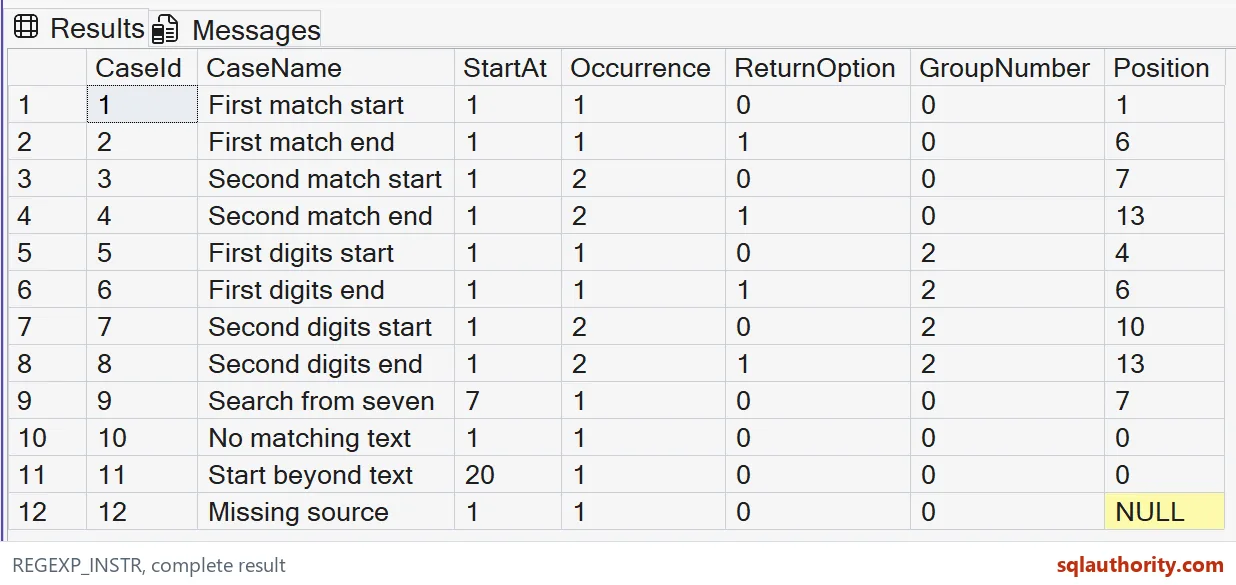
Read the start positions
The first whole match begins at position one, while the second begins at position seven. The first digit group begins at four and the second at ten. These are absolute positions in the supplied source.
Starting the search at seven should find CD-345 as the first occurrence from that starting point. Its returned position should still be seven. It is not a position relative to a newly displayed substring.
The no-match and beyond-text cases should return zero. The missing-source case is expected to return NULL and remains separately modeled. A zero search result should not be treated as character position one.
Return option one gives the boundary immediately after the selected match in these cases, producing six or thirteen. Compare those positions with the complete source text before using them in an extraction formula.
Choose the group and occurrence independently
Group two changes which part of a found match supplies the returned position. It does not replace the pattern with a separate digit search. That preserves the surrounding letters-and-hyphen requirement.
Occurrence two selects the second qualifying whole match before the requested group’s position is returned. The second match has three digits rather than two. That difference helps distinguish its bounds from the first match.
Return option zero requests the beginning, and option one requests the ending position. Other return-option values are outside the supported choices. The copyable example deliberately avoids invalid arguments that would interrupt the result set.
I don’t use the returned position alone to establish a business identifier’s validity. The pattern recognizes a bounded text form. A complete validation rule may need anchors, permitted ranges and a missing-value policy.

Keep the supported scope clear
The source and pattern are tiny fixed strings. This is not a benchmark or a claim that regex outperforms ordinary string functions. Choose the simplest suitable operation after identifying the real requirement.
The function’s supported version and argument rules matter before copying the query into an older environment. A parser accepting the function name does not establish runtime availability. Verify the target platform and its compatibility level separately.
The complete result includes twelve ordered cases. No objects or settings are changed. Keep occurrence, group, no-match and missing-input cases when adapting these offsets to another text shape.
Specify which occurrence and capture group you need, then verify the returned position against the complete source text.
A returned position is not the match, it is only where the match begins or ends.
Published by Pinal Dave on SQLAuthority. More of my work at pinaldave.com.
Discover more from SQL Authority with Pinal Dave
Subscribe to get the latest posts sent to your email.