ISO week numbers can belong to a different year from the date on the calendar. I calculate the matching week year before using a year-and-week pair as a reporting label.

A calendar year is not always the week year
A date at the end of December can belong to week one of the following ISO year. Early January can belong to the preceding ISO year. Combining YEAR with DATEPART(ISO_WEEK) can therefore create a misleading label. Both parts need the same calendar rule.
An ISO week belongs to the year that contains its Thursday. DATEPART supplies the ISO week number. This demonstration finds that Thursday separately and reads its year. The calendar year stays visible beside the ISO year for comparison.
I’d preserve the original date when building weekly reports. A derived label shouldn’t erase the boundary that produced it. The sample includes dates from both sides of several new years. It also includes one date before the weekday arithmetic’s anchor.
Find the weekday position without changing the connection
The calculation uses 1900-01-01, a Monday, as a fixed date anchor. DATEDIFF counts the day offset from that anchor. Reducing that offset modulo seven gives a weekday position. A second normalization keeps negative offsets within zero through six.
The normalized position treats Monday as zero and Sunday as six. Adding three minus that position moves the date to its week’s Thursday. YEAR of that Thursday gives the ISO week year. DATEPART(ISO_WEEK) supplies the accompanying week number.
The script uses DATEPART only for ISO_WEEK, rather than the DATEFIRST-dependent weekday argument. It doesn’t issue SET DATEFIRST or alter language. Typed dates come from the explicit 112 conversion style. No locale-dependent date text interpretation is required.
WITH Inputs AS
(
    SELECT Id, CONVERT(date, DateText, 112) AS CalendarDate
    FROM (VALUES (1, '20181231'), (2, '20210101'), (3, '20210104'),
                 (4, '20201231'), (5, '20220101'), (6, '18991231'))
        AS v(Id, DateText)
), Weekdays AS
(
    SELECT Id, CalendarDate,
           ((DATEDIFF(day, CONVERT(date, '19000101', 112), CalendarDate)
               % 7) + 7) % 7 AS MondayZero
    FROM Inputs
), Thursdays AS
(
    SELECT Id, CalendarDate,
           DATEADD(day, 3 - MondayZero, CalendarDate) AS WeekThursday
    FROM Weekdays
)
SELECT Id, CalendarDate, YEAR(CalendarDate) AS CalendarYear,
       DATEPART(ISO_WEEK, CalendarDate) AS IsoWeek,
       WeekThursday, YEAR(WeekThursday) AS IsoWeekYear
FROM Thursdays
ORDER BY Id;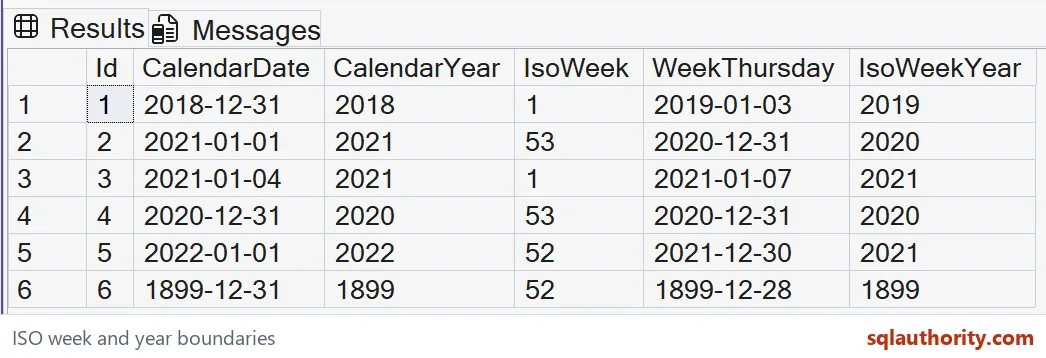

Read the boundary examples together
December 31, 2018 belongs to ISO week one of 2019. January 1, 2021 belongs to ISO week 53 of 2020. Their calendar years remain different from their ISO years. The selected Thursday makes each result’s reason visible.
January 4, 2021 starts week one of ISO year 2021. January 1, 2022 remains in ISO week 52 of 2021. These cases prevent a rule based solely on the month. A fixed January or December adjustment needs the actual week position.
The earlier date is December 31, 1899. Its negative offset tests the normalized modulo expression. The expression produces the preceding Thursday rather than a later week. That boundary matters when reusing the arithmetic with dates before the chosen anchor.
Keep the reporting contract explicit
ISO weeks are one reporting choice, rather than a universal business calendar. A fiscal calendar may define different periods and week starts. This calculation doesn’t implement those rules. I’d name the calendar in the report contract before deriving grouping keys.
The pair of ISO year and ISO week should travel together. Grouping only by week number combines different years. Combining the calendar year with the ISO week creates another inconsistency. Separate typed columns make these accidental combinations easier to identify.
The arithmetic operates on dates within the demonstrated safe range. DATEADD still has type-range limits at extreme dates. This article doesn’t claim every date near a type boundary can move safely to Thursday. Apply the permitted date range when using the pattern.
Verify the whole date tuple
The CTE contains six literal dates and calculated day offsets. The final SELECT returns the original date, both years, week number and Thursday. It creates no tables or session state. ORDER BY fixes the case sequence rather than implying chronological order.
Compare each complete date tuple with the Thursday used to identify its ISO week year. Retain both year columns in the result. A matching week number alone cannot prove the year boundary was handled correctly. Keep December and January boundary dates in the comparison.
Keep both year columns in the report, and the January boundary stops being a surprise.
An ISO week number is not a period label, it is half of an ISO year-and-week pair.
Published by Pinal Dave on SQLAuthority. More of my work at pinaldave.com.
Discover more from SQL Authority with Pinal Dave
Subscribe to get the latest posts sent to your email.