CDC capture lag is the gap between committed source work and the captured changes that a reader can use. A successful insert does not prove that its change row is available yet. I check a known marker, the capture sessions and the captured watermark together. That evidence separates a waiting change from an idle source.

Check the capture stage before the consumer
Change Data Capture reads committed changes from the transaction log into change tables. A downstream consumer then reads those changes and advances its own position. Capture progress and consumer progress are different stages. An up-to-date scanner does not prove that the consumer has applied the rows.
Start in the database you intend to inspect and identify its capture instances. The database flag alone does not show whether a particular source table is tracked. The following checks read existing metadata and enable nothing. Run them in a demo database. Check the permissions required for your SQL Server version.
SELECT DB_NAME() AS DatabaseName, is_cdc_enabled
FROM sys.databases WHERE database_id = DB_ID();
IF EXISTS(SELECT 1 FROM sys.databases
          WHERE database_id = DB_ID() AND is_cdc_enabled = 1)
    EXEC(N'SELECT capture_instance, source_object_id, start_lsn
           FROM cdc.change_tables ORDER BY capture_instance;');
In an ordinary SQL Server setup, the first enabled source table creates the database’s CDC capture and cleanup jobs. Those are SQL Server Agent jobs, so SQL Server Agent must be running when you enable a table. Your account needs permission to enable CDC (sysadmin works for a demo). Removing the gating role does not remove the other permissions required to read change data. A supported edition and the actual capture mechanism are prerequisites, not results to assume from an empty grid.
A controlled real CDC capture-lag example
The example below uses a small keyed table in your demo database. It enables real CDC on that table. Normally the capture job scans the log on its own schedule. To make the wait visible, the example drops the capture job it just created and calls the CDC scanner by hand in one-shot mode. Use this only in a demo database, never on a database you care about. SQL Server Agent still has to be running for the table to be enabled.
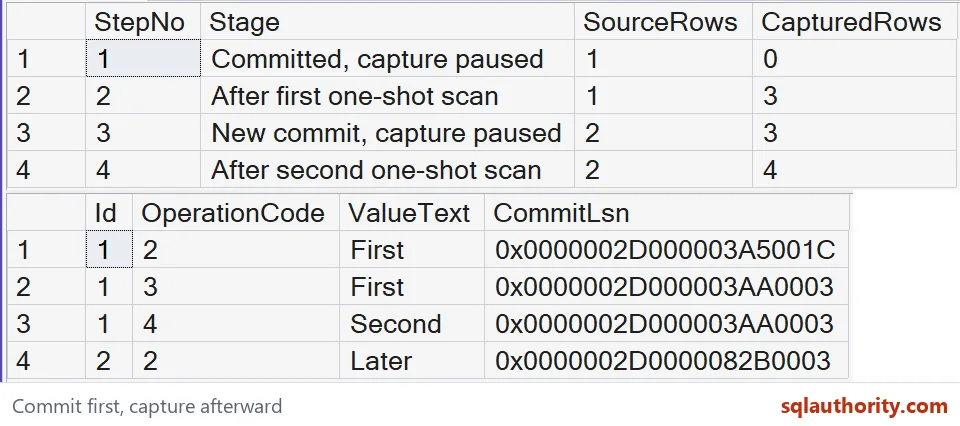
The source receives an insert followed by an update in separate autocommit statements. While the capture job is gone, the source has one row and the change table has none. The first scan captures the insert and the update’s before and after images. A second committed row then waits until a second scan.
EXEC sys.sp_cdc_enable_db;

DROP TABLE IF EXISTS dbo.SourceMarker;
CREATE TABLE dbo.SourceMarker(Id int NOT NULL PRIMARY KEY,
                              ValueText nvarchar(30) NOT NULL);

EXEC sys.sp_cdc_enable_table @source_schema = N'dbo',
     @source_name = N'SourceMarker', @capture_instance = N'SourceMarker',
     @supports_net_changes = 0, @role_name = NULL;

-- Remove the capture job so the scans below are the only ones.
EXEC sys.sp_cdc_drop_job @job_type = N'capture';

CREATE TABLE #Stages(StepNo int PRIMARY KEY, Stage nvarchar(35),
                     SourceRows int, CapturedRows int);

INSERT dbo.SourceMarker VALUES(1, N'First');
UPDATE dbo.SourceMarker SET ValueText = N'Second' WHERE Id = 1;
DECLARE @WriteReturned datetime2(7) = SYSUTCDATETIME(), @Observed datetime2(7);

INSERT #Stages SELECT 1, N'Committed, capture paused',
    (SELECT COUNT(*) FROM dbo.SourceMarker), (SELECT COUNT(*) FROM cdc.SourceMarker_CT);

WAITFOR DELAY '00:00:01';
EXEC sys.sp_cdc_scan @maxtrans = 100, @maxscans = 10,
     @continuous = 0, @pollinginterval = 0;
SET @Observed = SYSUTCDATETIME();

INSERT #Stages SELECT 2, N'After first one-shot scan',
    (SELECT COUNT(*) FROM dbo.SourceMarker), (SELECT COUNT(*) FROM cdc.SourceMarker_CT);

INSERT dbo.SourceMarker VALUES(2, N'Later');
INSERT #Stages SELECT 3, N'New commit, capture paused',
    (SELECT COUNT(*) FROM dbo.SourceMarker), (SELECT COUNT(*) FROM cdc.SourceMarker_CT);

EXEC sys.sp_cdc_scan @maxtrans = 100, @maxscans = 10,
     @continuous = 0, @pollinginterval = 0;
INSERT #Stages SELECT 4, N'After second one-shot scan',
    (SELECT COUNT(*) FROM dbo.SourceMarker), (SELECT COUNT(*) FROM cdc.SourceMarker_CT);

SELECT StepNo, Stage, SourceRows, CapturedRows FROM #Stages ORDER BY StepNo;

SELECT Id, __$operation AS OperationCode, ValueText, __$start_lsn AS CommitLsn
FROM cdc.SourceMarker_CT ORDER BY __$start_lsn, __$seqval, __$operation;

SELECT DATEDIFF_BIG(millisecond, @WriteReturned, @Observed)
       AS ObservedAfterWriteMilliseconds;

DROP TABLE #Stages;
The four stages compare source row counts with captured change row counts. My SQL Server 2025 run returned 1 and 0, then 1 and 3, then 2 and 3. The final stage returned 2 source rows and 4 captured rows. The extra change rows describe operations rather than extra current source rows.
This is a deliberately paused capture, rather than a measurement of normal Agent polling. The interval in the last result starts immediately after the write statements return and ends after the first scan returns. It includes the one-second pause I added and the scan itself. It is not an exact source commit timestamp, a service-level target or end-to-end consumer latency. Your number will differ.
The example runs the scanner in noncontinuous mode for each bounded scan. In my single run the interval was 1,596 milliseconds, I saw no capture errors, and the captured LSN advanced after the second scan. This result does not measure normal capture latency.
Read scan latency with its commit evidence
The scan DMV records recent capture activity in the current database. Its latency is the difference in seconds between a session’s end time and its last captured commit time. Read those fields together and distinguish the aggregate row, whose session ID is zero. The observation interval above and this session counter answer different questions.
SELECT session_id, start_time, end_time, duration, tran_count,
       last_commit_cdc_time, latency, error_count,
       empty_scan_count, failed_sessions_count
FROM sys.dm_cdc_log_scan_sessions
ORDER BY session_id DESC;
The DMV keeps up to 32 sessions plus the aggregate row. Restart or failover resets those records. On SQL Server 2022 and later, reading it requires VIEW DATABASE PERFORMANCE STATE; earlier versions use VIEW DATABASE STATE. Preserve selected observations before this short history disappears, and do not count repeated observations as new sessions.

Check errors and the captured watermark
Read capture errors before treating the pipeline as merely slow. Then compare a known committed marker with the maximum captured LSN and its mapped time. An old mapped time can describe an idle source. It becomes useful evidence of waiting work only when you know that relevant commits occurred after it.
SELECT session_id, entry_time, error_number, error_message
FROM sys.dm_cdc_errors ORDER BY entry_time DESC;
SELECT sys.fn_cdc_get_max_lsn() AS LastCapturedLsn,
       sys.fn_cdc_map_lsn_to_time(sys.fn_cdc_get_max_lsn())
           AS LastMappedCommitTime;
The example showed the maximum captured LSN advancing after its second row was scanned. A real consumer must also check whether its requested starting LSN still belongs to the retained change range. Scanner history and change retention are separate concerns. A healthy recent scan cannot recover changes that cleanup has already removed.
When you finish with the demo, turn CDC off in that database and remove the table.
EXEC sys.sp_cdc_disable_db;
DROP TABLE IF EXISTS dbo.SourceMarker;
If a marker is absent after a bounded observation window, record the window. Investigate the capture job, permissions, errors and available change range. Collect source, capture and consumer evidence before deciding which stage needs attention. A useful alert describes sustained waiting work rather than the age of a quiet database’s last change.
Related reading includes the SQL Server 2008 CDC introduction and the CDC and TRUNCATE explanation. Check their prerequisites against your SQL Server version. This example focuses on capture progress, not net-change consumption or a complete CDC deployment guide.
Collect the evidence first, and the lag explains itself.
CDC capture lag is not consumer delay, it is the wait for committed changes to reach capture.
Published by Pinal Dave on SQLAuthority. More of my work at pinaldave.com.
Discover more from SQL Authority with Pinal Dave
Subscribe to get the latest posts sent to your email.