geometry STTouches tests whether shapes meet without their interiors intersecting. I keep that predicate separate from a general intersection check. Sharing an edge and sharing an area are different spatial relationships.
Ordinary language can call both relationships contact. A spatial query needs a more precise rule. Adjacent regions may touch legitimately while an interior overlap represents a different condition.

Use four relationships to one region
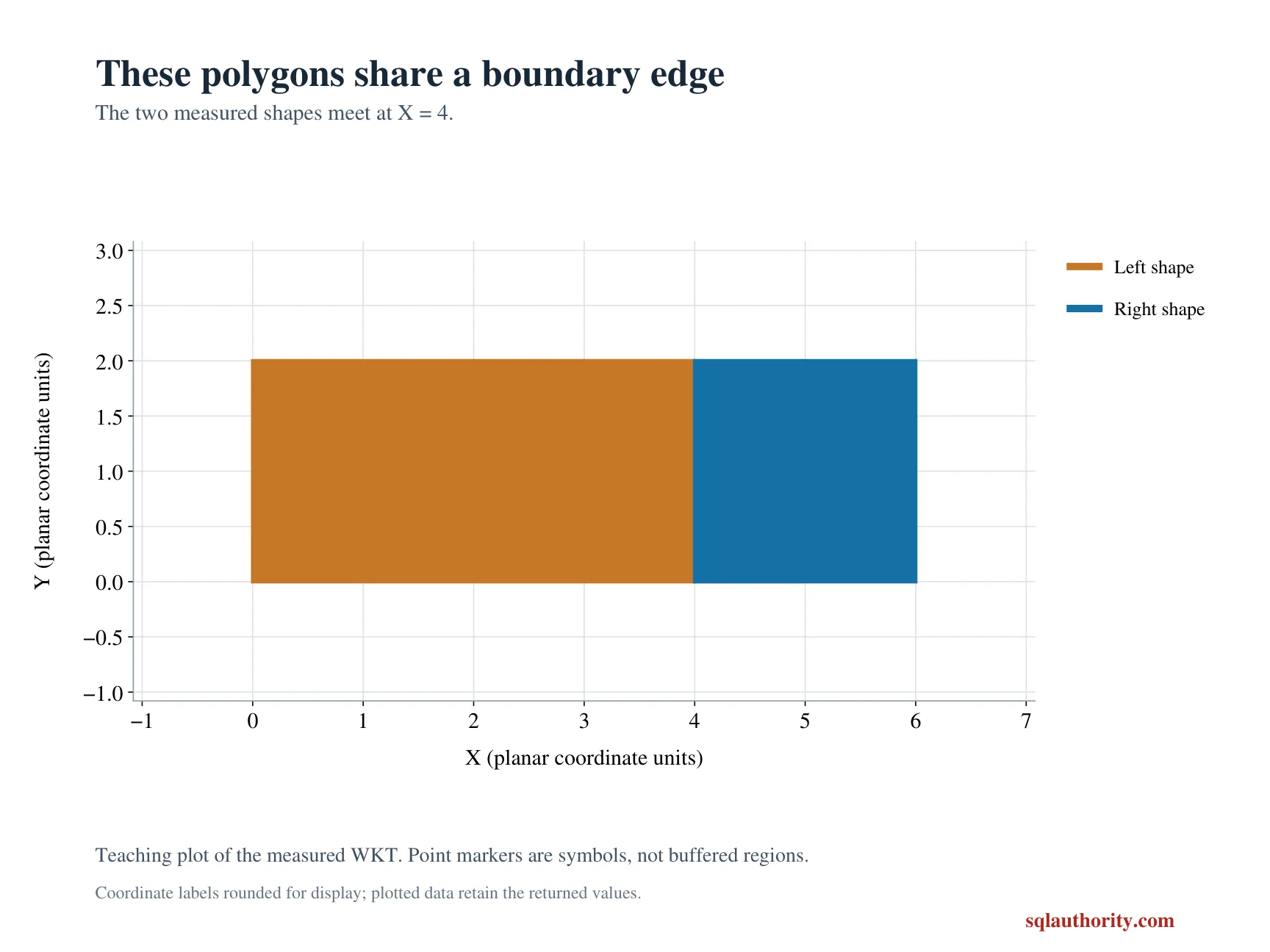
The left rectangle extends horizontally from zero to four and vertically from zero to two. A right rectangle first shares its right edge. Another right rectangle meets only its upper-right corner.
The third rectangle overlaps part of the left interior. The fourth is separated by a gap. All shapes are valid planar polygons with reference identifier zero.
The query returns STTouches beside STIntersects. The second flag asks whether any points are shared. Displaying both makes it clear that touching is a narrower relationship than general intersection.
WITH Inputs AS
(
    SELECT CaseId, CaseName, RightWkt
    FROM (VALUES
        (1, CAST('Shared edge' AS varchar(20)), CAST('POLYGON((4 0, 6 0, 6 2, 4 2, 4 0))' AS varchar(200))),
        (2, 'Shared corner', 'POLYGON((4 2, 6 2, 6 4, 4 4, 4 2))'),
        (3, 'Interior overlap', 'POLYGON((2 0, 6 0, 6 2, 2 2, 2 0))'),
        (4, 'Separated', 'POLYGON((5 0, 7 0, 7 2, 5 2, 5 0))')
    ) AS v(CaseId, CaseName, RightWkt)
), Shapes AS
(
    SELECT CaseId, CaseName,
           geometry::STGeomFromText('POLYGON((0 0, 4 0, 4 2, 0 2, 0 0))', 0) AS LeftShape,
           geometry::STGeomFromText(RightWkt, 0) AS RightShape
    FROM Inputs
)
SELECT CaseId, CaseName, LeftShape.STTouches(RightShape) AS Touches,
       LeftShape.STIntersects(RightShape) AS Intersects
FROM Shapes
ORDER BY CaseId;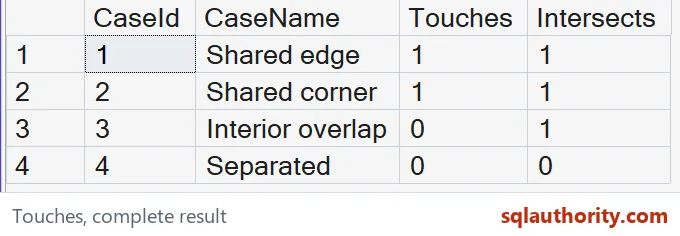
Read edge and corner contact
The shared-edge pair should return one for both flags. Its common points lie along the regions’ boundaries. Their interiors remain separate.
The shared-corner pair should also return one for both flags. Sharing just that boundary point is enough for contact in this example. No common area is required for STTouches to return one.
The interior-overlap pair should return zero for touching and one for intersection. Its interiors share points, so it fails the boundary-only contact requirement. A populated intersection flag alone cannot classify it as touching.
The separated pair should return zero for both. It has neither shared boundary points nor shared interior points. This distinguishes separation from the overlap row, which also had a zero touching flag.
Interpret a zero flag carefully
A zero STTouches result does not always mean the regions are far apart. It can also describe an interior overlap. Use the predicate that matches the complete relationship your application needs.
Likewise, STIntersects returning one does not establish whether interiors overlap. The shared-edge and shared-corner rows also intersect. A general shared-point test deliberately covers more cases.
I don’t turn the two flags into an undocumented adjacency policy. A particular application may count only shared edges, rather than corners, as neighboring regions. That narrower rule needs additional geometry checks and an explicit definition.
The coordinates in this query create exact contacts. A small gap or displacement changes the point set. A requirement to tolerate near-contact is a separate rule, not something to assume from the method name.
Keep type and coordinate assumptions visible
The examples use two-dimensional polygons. Boundary and interior definitions depend on the input types, so other combinations deserve their own tests. Do not infer every line or point behavior from these rectangle cases.
Matching reference identifiers are intentional. These methods can return NULL for mismatched identifiers instead of one of the displayed zero-or-one outcomes. Incompatible-reference results require their own handling.
The planar units are abstract and common to both inputs. This query makes no distance-in-meters or geographic-model claim. It also makes no spatial-index or performance claim.
The complete four-row result checks an edge, a corner, an overlap and a gap. Keep those categories when reviewing a boundary-contact rule. An edge-only demonstration would hide the fact that some intersecting shapes do not touch under this definition.
Want to run it yourself? Copy the query above into any query window. It needs no tables.
Test touching when boundary-only contact is the requirement, and keep it distinct from any shared-point intersection.
A shared boundary is not an overlap, it is contact without any shared interior.
Published by Pinal Dave on SQLAuthority. More of my work at pinaldave.com.
Discover more from SQL Authority with Pinal Dave
Subscribe to get the latest posts sent to your email.