geometry STCentroid returns a polygon’s geometric center, but that point is not a promise of interior placement. I keep the center calculation separate from an interior test. A holed region makes that distinction visible.
A centroid also differs from the midpoint of an enclosing rectangle. A symmetric rectangle makes them agree, but an asymmetric triangle does not. The type and distribution of the area matter.

Compare four explicit input shapes
The example includes a rectangle, a right triangle, a square region with a centered hole and a line. Every shape uses reference identifier zero. The given box-center coordinates are supplied from each literal’s known extent.
The query calculates STCentroid and guards the coordinate access when no center is returned. It reports the center beside the given box midpoint. An interior predicate supplies a separate witness for the returned point.
The given box columns are comparison inputs, not values produced by another spatial method. That keeps the example focused on centroids. The batch is read-only and creates no spatial tables or indexes.
WITH Inputs AS
(
    SELECT CaseId, InputName, Wkt, BoxCenterX, BoxCenterY
    FROM (VALUES
        (1, CAST('Rectangle' AS varchar(20)), CAST('POLYGON((0 0, 4 0, 4 2, 0 2, 0 0))' AS varchar(250)), CAST(2 AS decimal(12,3)), CAST(1 AS decimal(12,3))),
        (2, 'Triangle', 'POLYGON((0 0, 6 0, 0 3, 0 0))', 3, 1.5),
        (3, 'Region with hole', 'POLYGON((0 0, 4 0, 4 4, 0 4, 0 0),(1 1, 1 3, 3 3, 3 1, 1 1))', 2, 2),
        (4, 'Line', 'LINESTRING(0 0, 4 2)', 2, 1)
    ) AS v(CaseId, InputName, Wkt, BoxCenterX, BoxCenterY)
), Shapes AS
(
    SELECT CaseId, InputName, BoxCenterX, BoxCenterY,
           geometry::STGeomFromText(Wkt, 0) AS InputShape
    FROM Inputs
), Centers AS
(
    SELECT CaseId, InputName, BoxCenterX, BoxCenterY, InputShape,
           InputShape.STCentroid() AS CenterShape
    FROM Shapes
)
SELECT CaseId, InputName,
       CASE WHEN CenterShape IS NULL THEN NULL ELSE CAST(CenterShape.STX AS decimal(12,3)) END AS CenterX,
       CASE WHEN CenterShape IS NULL THEN NULL ELSE CAST(CenterShape.STY AS decimal(12,3)) END AS CenterY,
       BoxCenterX AS GivenBoxCenterX, BoxCenterY AS GivenBoxCenterY,
       CASE WHEN CenterShape IS NULL THEN NULL ELSE InputShape.STContains(CenterShape) END AS CenterInInterior
FROM Centers
ORDER BY CaseId;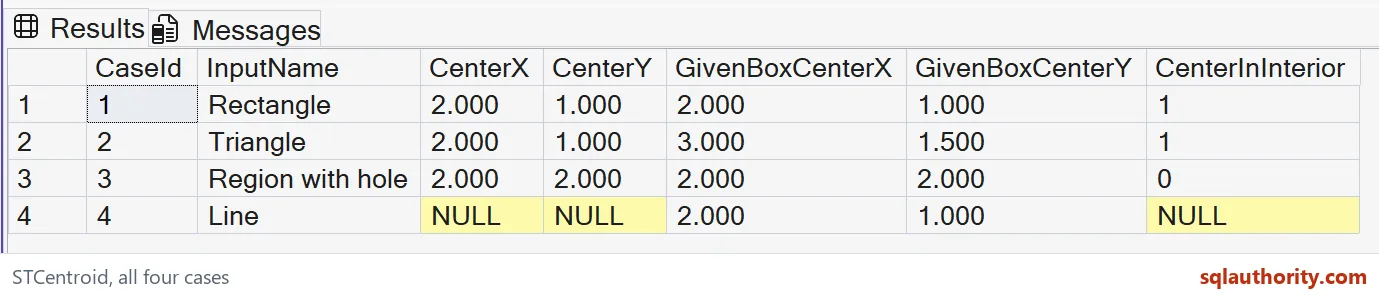
Read center versus box midpoint
The rectangle should have center coordinates two and one. Its given box midpoint is the same point. Its geometric center lies in the rectangle’s interior.
The triangle should also have center coordinates two and one. Its box midpoint is three and one-and-a-half instead. The area is not distributed like the full rectangle that encloses it.
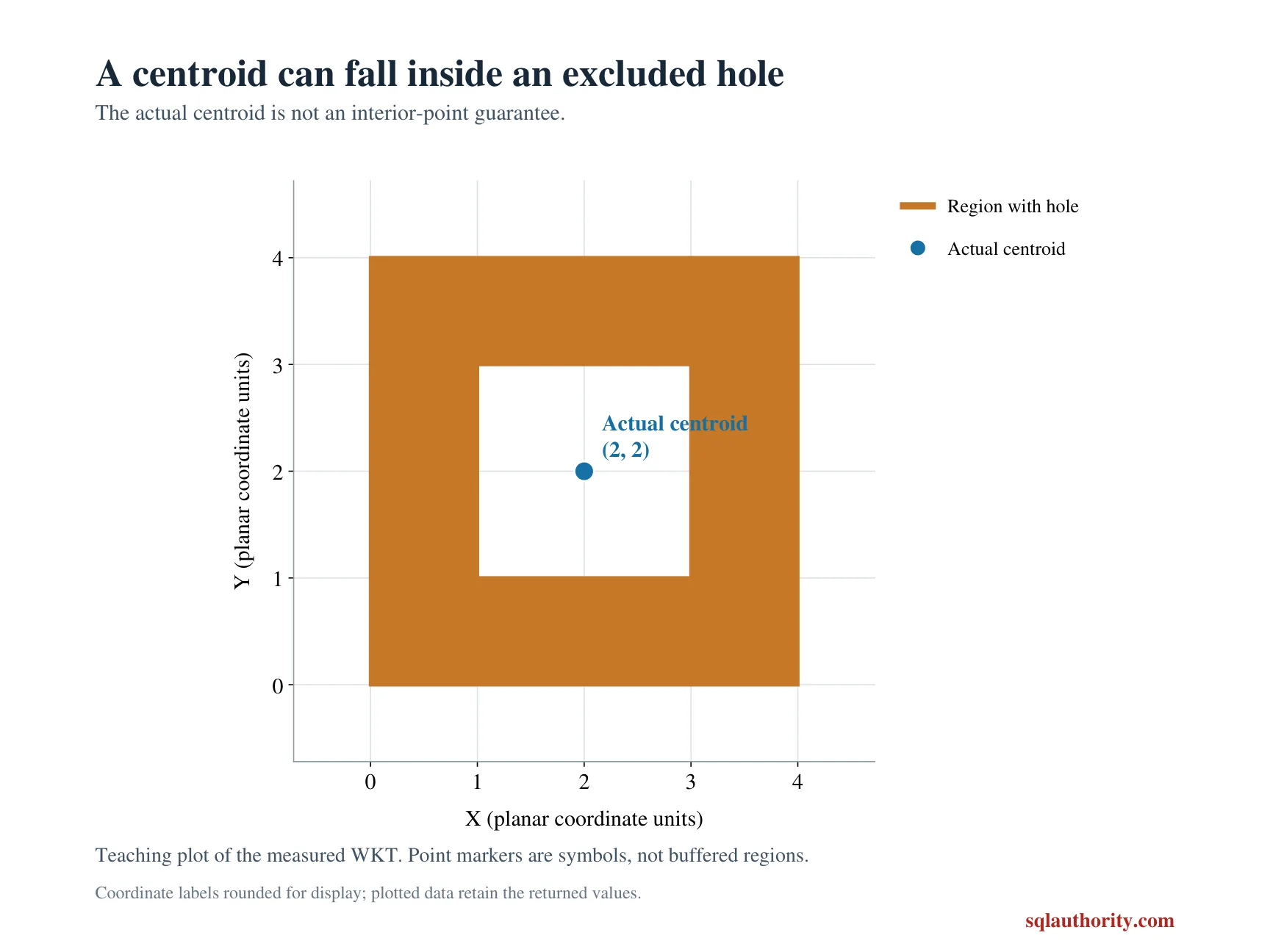
The holed region is symmetric about coordinates two and two. Its centroid should be at that point, which lies in the removed hole. CenterInInterior should therefore be zero despite a populated centroid result.
The line should return no polygon centroid. Its displayed center coordinates and interior witness remain NULL. The given midpoint does not turn that unsupported input type into a polygon.
A center point can have several meanings
STCentroid returns a Point for polygonal input types. It returns NULL for an input such as this LineString. Do not interpret that NULL as a zero coordinate or invent a default center.
The returned point reflects the polygon’s area distribution. Holes affect that distribution rather than becoming filled areas. A centroid can consequently occupy a place outside the represented region, including a hole.
A map label or sampling point may need to lie inside its region. That is a separate requirement from geometric balance. A populated centroid alone cannot establish that placement contract.
I don’t substitute an enclosing box midpoint as an automatic repair. The triangle already shows that it answers a different question. Choose a method and validation rule that matches the actual application need.
Keep the demonstration bounded
These coordinates describe valid planar shapes with a common abstract unit. The query is not computing a geographic center on the earth’s surface. It does not infer a coordinate system from the reference identifier.
The decimal casts provide a compact coordinate display for this small example. They do not make the underlying spatial calculation exact decimal arithmetic. Real coordinate tolerances need an explicitly defined rule.
The output includes symmetric, asymmetric, holed and unsupported-type cases. Each exposes a different assumption that a rectangle-only example could hide. Keep those categories when reviewing another center calculation.
No spatial-index or performance claim follows from these results. The method is being used to explain returned geometry and application meaning. Verify the center’s required properties before using it as a display, routing or sampling location.
Use the centroid for an area-based center, and test interior needs separately.
A centroid is not guaranteed to lie inside, it is only the area’s balance point.
Published by Pinal Dave on SQLAuthority. More of my work at pinaldave.com.
Discover more from SQL Authority with Pinal Dave
Subscribe to get the latest posts sent to your email.