SUM DISTINCT adds different amounts, even when several rows share them. I check row identity before using it to correct a total. Equal prices don’t make two orders the same order.

Start with two equal orders
Imagine two orders worth $10 each and another worth $20. The order total is $40. Taking distinct amounts produces $30 because the second $10 contributes nothing.
I’d keep the order identifier beside the amount while investigating that difference. A price tells me what an order contributes. It doesn’t tell me whether another row describes the same order.
SUM(Amount) uses every supplied amount. SUM(DISTINCT Amount) first reduces those amounts to different values. The DISTINCT applies to Amount, without considering OrderId or another unmentioned column.
Compare the full inputs
The following batch uses literal rows and doesn’t require existing tables. The first query compares five cases. The second query separates identical order rows before adding their amounts.
;WITH Cases AS
(
    SELECT CaseId, CaseLabel
    FROM (VALUES
        (CAST(1 AS int), CAST('Equal legitimate orders' AS varchar(24))),
        (2, 'All NULL'),
        (3, 'Empty'),
        (4, 'Zero and negative'),
        (5, 'Repeated order row')
    ) AS v(CaseId, CaseLabel)
), Input AS
(
    SELECT CaseId, OrderId, Amount
    FROM (VALUES
        (CAST(1 AS int), CAST(101 AS int), CAST(10 AS decimal(10,2))),
        (1, 102, 10),
        (1, 103, 20),
        (1, 104, NULL),
        (2, 201, NULL),
        (2, 202, NULL),
        (4, 401, 0),
        (4, 402, 0),
        (4, 403, -10),
        (4, 404, -10),
        (4, 405, 10),
        (5, 501, 10),
        (5, 501, 10),
        (5, 502, 10)
    ) AS v(CaseId, OrderId, Amount)
)
SELECT c.CaseId, c.CaseLabel, totals.RowTotal, totals.DistinctAmountTotal
FROM Cases AS c
CROSS APPLY
(
    SELECT CAST(SUM(i.Amount) AS decimal(12,2)) AS RowTotal,
           CAST(SUM(DISTINCT i.Amount) AS decimal(12,2)) AS DistinctAmountTotal
    FROM Input AS i
    WHERE i.CaseId = c.CaseId
) AS totals
ORDER BY c.CaseId;

;WITH Input AS
(
    SELECT OrderId, Amount
    FROM (VALUES
        (CAST(501 AS int), CAST(10 AS decimal(10,2))),
        (501, 10),
        (502, 10)
    ) AS v(OrderId, Amount)
), OrderRows AS
(
    SELECT DISTINCT OrderId, Amount
    FROM Input
)
SELECT CAST(SUM(Amount) AS decimal(12,2)) AS OneRowPerOrderTotal
FROM OrderRows;
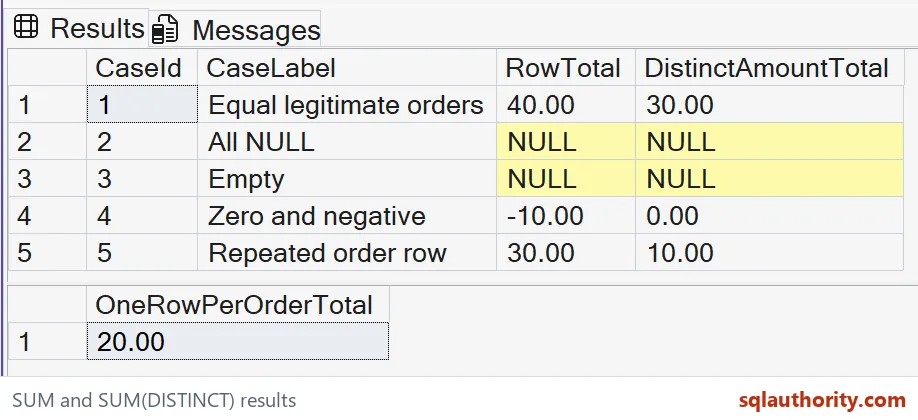
The first case returns 40 and 30. Its two $10 orders have different identifiers and both belong in the order total. The missing amount contributes to neither sum.
The all-NULL case returns NULL for both totals. The empty case does too, although its input contains no orders. The separate Cases list keeps both situations visible in the output.
The zero-and-negative case returns negative 10 using every row. Its distinct amounts are negative 10, zero and 10, totaling zero. Zero remains a supplied value rather than becoming NULL.
Fix the row problem at its source
The repeated-order case returns 30 and 10. Neither result is the intended one-row-per-order total of 20. Order 501 appears twice, while order 502 has the same legitimate amount.
The second query selects distinct OrderId and Amount pairs. That leaves one row for each of the two orders. Its total is 20 because the identifiers keep equal-priced orders separate.
That repair depends on this example’s contract: duplicate copies have identical values and each order has one amount. Conflicting amounts need another decision. Keeping both different pairs wouldn’t resolve which amount belongs to the order.
I’d check the join before applying any duplicate removal. A one-to-many join can repeat an order amount once per detail row. Aggregate or select the correct order-level input before summing it.
Keep the meaning of missing amounts
Replacing a NULL sum with zero changes the reporting contract. An empty selection and missing amounts deserve separate handling when that distinction matters. I wouldn’t silently translate unknown amounts into confirmed zero dollars.
The displayed totals are explicitly cast to decimal(12,2). That declaration sets the numeric scale, while the query tool controls formatting. The small supplied amounts fit that type without rounding or overflow.
Choose the aggregate for the question
SUM DISTINCT remains useful when different amount values are the intended input. For example, it can total the distinct fees represented in a list. The output label should make that unusual counting rule clear.
I’d argue against my own shortcut here. Seeing a repeated total after a join doesn’t justify adding DISTINCT to the aggregate. First establish the row grain, then choose an expression that matches it.
These SQL Server queries read CTE inputs without changing objects or options. They compare meaning rather than query speed. Larger amounts need a deliberate numeric range and a receiving column that preserves it.

Pick the row grain first, and the total follows.
An order total is not a sum of distinct prices, it is a sum at the intended grain.
Published by Pinal Dave on SQLAuthority. More of my work at pinaldave.com.
Discover more from SQL Authority with Pinal Dave
Subscribe to get the latest posts sent to your email.