Columns with no statistics can remain in an execution plan after you create one missing statistic. Read the warning list again. A change on one filter column does not supply every piece of information needed by a join.

Read the named columns before changing anything
Statistics help the optimizer estimate how many rows a query will return. A missing-statistics warning identifies information unavailable when that plan compiled. Read its database, table and column references. A warning alone does not establish the cause of every slow query.
This example joins 10,000 sample items to 500 customers and filters StatusValue = 7. Automatic column-statistics creation is turned off, only to expose the case, so run the setup below in a demo database and not in an application database. Both tables have primary-key indexes. Those indexes do not supply a histogram for every other column.
Run this setup first. It builds the two tables and the sample rows the rest of the post uses. The demonstration was measured on SQL Server 2025.
ALTER DATABASE CURRENT SET AUTO_CREATE_STATISTICS OFF;

DROP TABLE IF EXISTS dbo.Items;
DROP TABLE IF EXISTS dbo.Customers;

CREATE TABLE dbo.Items
(
    Id int NOT NULL PRIMARY KEY,
    CustomerId int NOT NULL,
    StatusValue int NOT NULL
);

CREATE TABLE dbo.Customers
(
    CustomerId int NOT NULL PRIMARY KEY,
    CustomerLabel varchar(30) NOT NULL
);

INSERT dbo.Items (Id, CustomerId, StatusValue)
SELECT n, n % 500, n % 100
FROM (SELECT TOP (10000) ROW_NUMBER() OVER (ORDER BY (SELECT NULL)) - 1 AS n
      FROM sys.all_objects AS a CROSS JOIN sys.all_objects AS b) AS x;

INSERT dbo.Customers (CustomerId, CustomerLabel)
SELECT Id, 'Customer' + CONVERT(varchar(10), Id)
FROM dbo.Items
WHERE Id < 500;
SELECT i.Id, i.StatusValue, c.CustomerLabel
FROM dbo.Items AS i
JOIN dbo.Customers AS c
ON c.CustomerId = i.CustomerId
WHERE i.StatusValue = 7
ORDER BY i.Id
OPTION (RECOMPILE);Compare the before and after warning lists
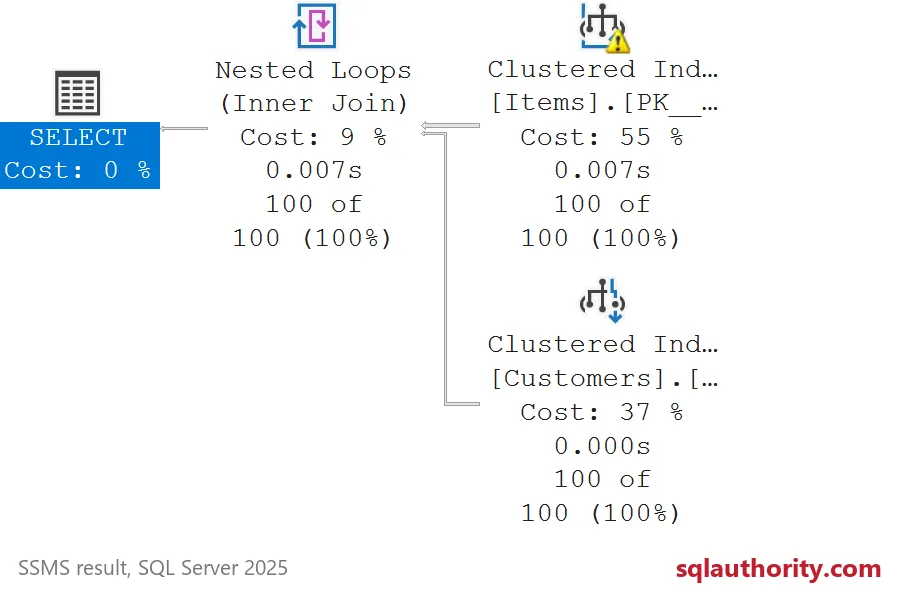
The first actual plan lists Items.CustomerId and Items.StatusValue under ColumnsWithNoStatistics. The join and filter need different columns. Both names matter when deciding what information is missing. The first plan is preserved for comparison.
CREATE STATISTICS ST_Items_Status
ON dbo.Items (StatusValue)
WITH FULLSCAN;
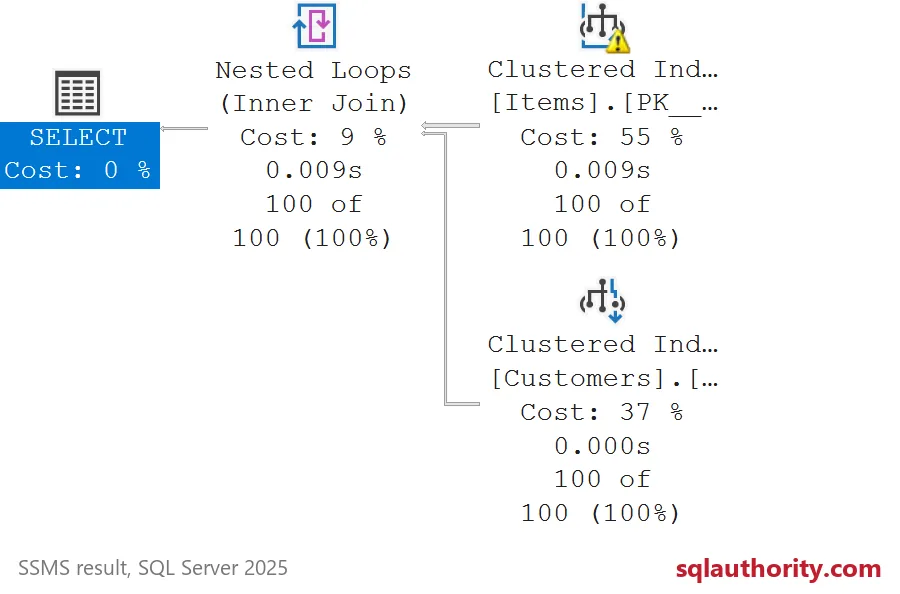
Create this statistic, then run the same SELECT again. The second warning still names CustomerId. It no longer names StatusValue. Creating the filter statistic did not eliminate the entire missing-statistics warning.
| Plan | Columns listed as having no statistics |
|---|---|
| Before | CustomerId, StatusValue |
| After StatusValue statistic | CustomerId |
Both executions returned the same 100 complete rows, including customer labels. The plans retained nested loops, a clustered index scan and a clustered index seek. These observations demonstrate a changed warning list. They establish no elapsed-time improvement or universally better plan.

Separate missing statistics from stale statistics
Automatic creation and automatic updates do different jobs. Creation supplies qualifying missing single-column statistics. Updates refresh existing statistics after data changes. Updating an existing object cannot create a different missing column statistic by itself.
Inspect the exact warning and the existing statistics before choosing a response. Check the database options and whether the database is writable. This example deliberately turned automatic creation off to expose the case. That choice is not a recommendation for an application database.
For these sample tables, the next missing-information question concerns the join column CustomerId. This example stops before creating its statistic. Do not label the after plan warning-free. Check estimates and workload behavior separately when investigating a real query.
When you are done, clean up the demo objects.
DROP TABLE IF EXISTS dbo.Items;
DROP TABLE IF EXISTS dbo.Customers;
ALTER DATABASE CURRENT SET AUTO_CREATE_STATISTICS ON;
A missing-statistics warning is not a diagnosis, it is a pointer to the next column.
Published by Pinal Dave on SQLAuthority. More of my work at pinaldave.com.
Discover more from SQL Authority with Pinal Dave
Subscribe to get the latest posts sent to your email.