
Just a day ago, I was looking for script which generates all the tables in database along with its schema name. I tried to Search@SQLAuthority.com but got too many results. For the same reason, I am going to write down today’s quick and small blog post and I will remember that I had written I wrote it after my 1000th article. The query returns the schema name and table name together for every table.
SELECT '['+SCHEMA_NAME(schema_id)+'].['+name+']'
AS SchemaTable
FROM sys.tables
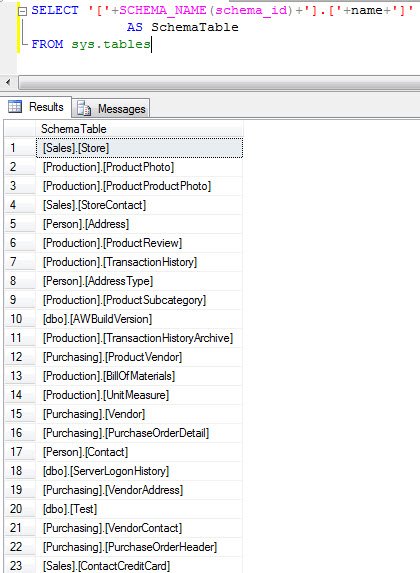
A Safer Way to List Schema Name and Table Name
Since writing this post, I have changed the script I keep in my toolbox. Adding square brackets by hand works for most names, but it breaks when a name already contains a closing bracket. The QUOTENAME function handles that case correctly. Joining to sys.schemas also gives you the schema name and table name in separate columns, which is easier to filter and sort.
SELECT s.name AS SchemaName,
    t.name AS TableName,
    QUOTENAME(s.name) + '.' + QUOTENAME(t.name) AS SchemaTable
FROM sys.tables AS t
INNER JOIN sys.schemas AS s ON t.schema_id = s.schema_id
ORDER BY s.name, t.name;
Remember that sys.tables returns only user tables in the current database, so switch to the right database before you run it. If you also need views, query sys.objects or INFORMATION_SCHEMA.TABLES instead. The INFORMATION_SCHEMA views follow the SQL standard, while the sys catalog views show everything SQL Server knows about a table.
I use this list all the time. It helps me count tables before a migration, compare two databases side by side and build quick scripts, for example a row count query for every table. When a client sends me a database I have never seen, this is one of the first queries I run to learn its shape. A quick glance at the schema names also tells me how the team organized the application, whether everything lives in dbo or the tables are grouped by area, such as Sales or HR.
Published by Pinal Dave on SQLAuthority. More of my work at pinaldave.com.
Discover more from SQL Authority with Pinal Dave
Subscribe to get the latest posts sent to your email.




32 Comments. Leave new
Hi Pinal,
Thanks for the blog. I have a question. I would like to get the table name and locks for that particular table. The current locks by a particular user can be found out in sys.dm_exec_sessions
Do you have any suggests?
Please let me know.
Thanks
Murali.
This will work too…
SELECT SCHEMA_NAME,NAME
FROM INFORMATION_SCHEMA.SCHEMATA i
INNER JOIN SYS.TABLES s
ON i.SCHEMA_NAME = SCHEMA_NAME(s.SCHEMA_ID)
ORDER BY SCHEMA_NAME
select * from INFORMATION_SCHEMA.TABLES
select * from INFORMATION_SCHEMA.COLUMNS
The above statements will give the same information using single statements
select * from INFORMATION_SCHEMA.TABLES
select * from INFORMATION_SCHEMA.COLUMNS
Hi,
I have created a linked server named like Test. It contains around 20 tables.
I want to list out tables in linked server in sql server. Can you please let me know how to do?
Thanks,
Murali
I am running something similar (see below). I use this to help me find what tables a field is in, however I noticed that a field/table combo that exists in the database does NOT appear when I run this, why is that? I also just looked for the table in sys.table and it doesn’t appear, it is a custom table, could that be the issue, do you have to run something to get tables to appear in sys.table?
SELECT
t.name AS table_name
,SCHEMA_NAME(schema_id) AS schema_name
,c.name AS column_name
FROM sys.tables AS t
INNER JOIN sys.columns c ON t.OBJECT_ID = c.OBJECT_ID
WHERE c.name LIKE ‘insert field name’
ORDER BY schema_name, table_name;
Thanks everyone!
Jill
Is there any way i can know who created Schema, in my Db someone created Custom schema and I want to know who did that >>
Hello, is there any way to select all tables from all databases inside the same server?
Create table #yourcolumndetails(
DBaseName varchar(100),
TableSchema varchar(50),
TableName varchar(100),
ColumnName varchar(100),
DataType varchar(100),
CharMaxLength varchar(100))
EXEC sp_MSForEachDB @command1=’USE [?];
INSERT INTO #yourcolumndetails SELECT
Table_Catalog
,Table_Schema
,Table_Name
,Column_Name
,Data_Type
,Character_Maximum_Length
FROM INFORMATION_SCHEMA.COLUMNS
WHERE COLUMN_NAME like ”origin”’
select * from #yourcolumndetails
Drop table #yourcolumndetails