
I have written following script every time when I am asked by our team leaders or managers that how many rows are there in any particular table or sometime I am even asked which table has highest number of rows. Being Sr. Project Manager, sometime I just write down following script myself rather than asking my developers. It also tells me the largest table in database at a glance.
This script will gives row number for every table in database.
USE AdventureWorks
GO
SELECT OBJECT_NAME(OBJECT_ID) TableName, st.row_count
FROM sys.dm_db_partition_stats st
WHERE index_id < 2
ORDER BY st.row_count DESC
GO
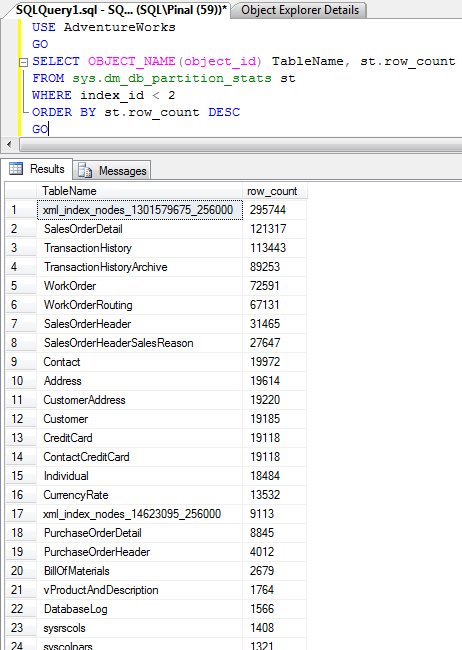
How to Find the Largest Table in Database by Size, Not Just Rows
A table with the most rows is not always the one using the most space. A log table with a million narrow rows can be smaller than a table with fifty thousand rows full of long text or XML. When a manager asks about the biggest table, I first ask whether they mean rows or disk space, because the answer is often different.
This view also has page counts, so you can get both in one query. Each page is 8 KB, which gives you the size in megabytes:
SELECT OBJECT_SCHEMA_NAME(object_id) AS SchemaName, OBJECT_NAME(object_id) AS TableName, SUM(CASE WHEN index_id < 2 THEN row_count ELSE 0 END) AS RowsCount, SUM(reserved_page_count) * 8 / 1024 AS ReservedMB FROM sys.dm_db_partition_stats WHERE OBJECTPROPERTY(object_id, 'IsUserTable') = 1 GROUP BY object_id ORDER BY ReservedMB DESC;
Two notes about this approach. First, a partitioned table has one row per partition in this view, so grouping and summing matters. Without it, the same table can show up several times. Second, the row counts come from metadata. They are very fast to read and usually right, but the documentation calls them approximate, so use COUNT(*) when you need an exact number for a report. The query also needs VIEW DATABASE STATE permission.
The reserved size includes every index on the table, not only the data. If a table looks much bigger than its rows suggest, check how many indexes it has. Checking the biggest tables every few months is a good habit. It shows which tables are growing fast, which ones need archiving, and where your index maintenance time goes.
Published by Pinal Dave on SQLAuthority. More of my work at pinaldave.com.
Discover more from SQL Authority with Pinal Dave
Subscribe to get the latest posts sent to your email.




41 Comments. Leave new
Dave Pinal, you REALLY should update the main article to use something like what Books Online shows:
SELECT SUM (row_count) AS total_number_of_rows
FROM sys.dm_db_partition_stats
WHERE object_id=OBJECT_ID(‘HumanResources.Employee’) AND (index_id=0 or index_id=1);
That query handles multiple partitions, and handles the schema name correctly. It will show the results for a heap, or a table with a primary key. This has been mentioned in the comments a few times, and you say “thanks”, but it would help if you could update the article itself! The code in the article is not quite correct.
David Walker
Followup: If you want to get the number of records for each table, you need to group by object ID and then sum for each group.
man u are ossom….
Can someone help me with my problem?
My table looks like this
CID FNAME MIN MAX COM
A OP1 0 23 5
A OP1 24 35 2
A OP1 36 99 1
A OP2 0 23 5
A OP2 24 35 2
A OP2 36 99 0
A OP3 0 23 5
A OP3 24 35 2
A OP3 36 99 1
B OP1 0 23 9
B OP1 24 99 2
B OP2 0 23 9
B OP2 24 99 2
B OP3 0 23 7
B OP3 24 35 3
B OP3 36 99 1
The expected duplicate results i need are:
A OP1
A OP3
B OP1
B OP2
thanks
how can i get every table rows base on a snapshot? please help
HI Pinal,
You did good job.
Kommineni
Most of suggested solutions will work for sure but I suggest this:
EXEC sp_spaceused ‘Table_Name’
It gives some other useful information as well! Hope it helps :)
Just in case you want to get row counts for all tables in a database, you can run the following:
exec sp_MSforeachtable ‘exec sp_spaceused ”?”’
(all quotes are single quotes [‘])
Note that sp_MSforeachtable is undocumented stored procedure and you need to keep this in mind
Pinal, How to count column of a table in sql server?
Do you want to know total number of columns in a table? If so, use this
thanks for this information. explained well and quick
sir
i have assignment table in that table assigmnet table iam going to assign some requirements for all the recruters but iam going to assign multiple requirements for single one how to calculate how many records he have in that table
using sql server
An interesting discussion is worth comment. There’s no doubt that that you should publish more on this subject matter, it might not be a taboo subject but generally people do not discuss such issues.
To the next! Kind regards!!
Hi Pinal,
I have totally 1000 tables in a database . Now i have to count table wise row count that should be for 100 tables only . so how to write a query for that…
You can apply the filter like below
WHERE OBJECT_NAME(OBJECT_ID) in (‘table1′,’table2′,…..,’table100’)