
SQL Injection can make a good database joke, but it makes a terrible production incident. Readers sent me the same popular cartoon many times before I first shared it here. The lesson behind the humor is still worth discussing.

Keep Data Separate from Instructions
A database should treat a name as a name. An apostrophe in that name should not become part of the command. The trouble starts when an application joins untrusted input directly into SQL text.
SQL Injection is not limited to SQL Server. It comes from allowing input to change the meaning of a command. A funny example can make that mistake memorable, but the fix belongs in the application code.
See the Failure
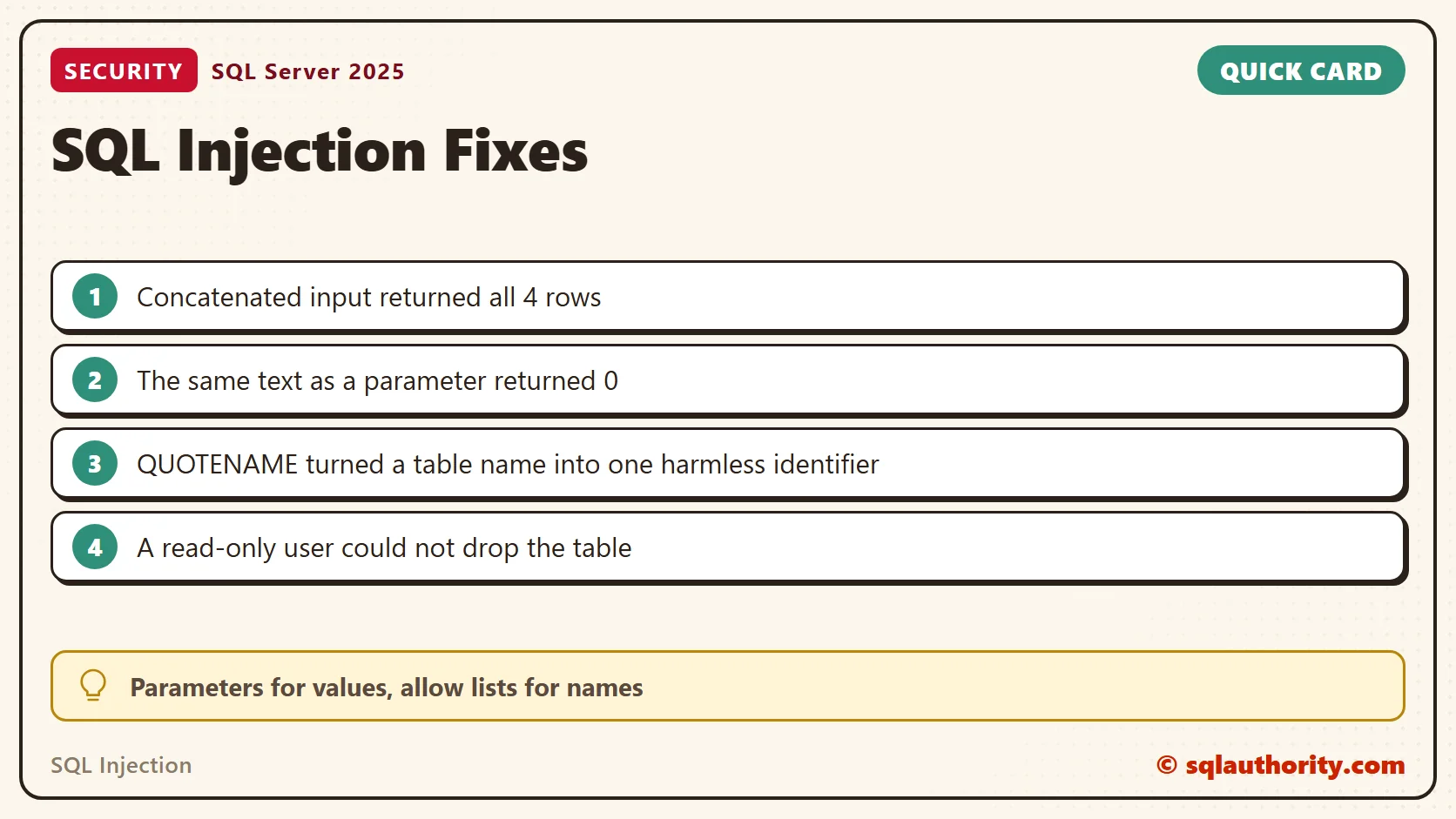
I built the failure on SQL Server 2025 with a table of four members. The first query joins a name into the statement as text. An ordinary name works. A hostile one, x' OR '1'='1, turns the condition into one that is always true.
CREATE TABLE dbo.Members (MemberId int IDENTITY(1,1) PRIMARY KEY, MemberName nvarchar(50) NOT NULL);
INSERT dbo.Members (MemberName) VALUES (N'Asha Patel'), (N'O''Brien'), (N'Meera Shah'), (N'Ravi Nair');
DECLARE @Name nvarchar(100) = N'x'' OR ''1''=''1';
DECLARE @Sql nvarchar(max) = N'SELECT MemberId, MemberName FROM dbo.Members WHERE MemberName = ''' + @Name + N'''';
PRINT @Sql;
EXEC (@Sql);
It returned all four rows, not none. A name with an apostrophe fails in the same query. O'Brien stopped with error 102, Incorrect syntax near 'Brien'. A real customer can trigger the same bug that an attacker uses. That is why I treat it as a correctness problem first.
DECLARE @Name nvarchar(100) = N'O''Brien';
DECLARE @Sql nvarchar(max) = N'SELECT MemberId, MemberName FROM dbo.Members WHERE MemberName = ''' + @Name + N'''';
BEGIN TRY EXEC (@Sql); END TRY
BEGIN CATCH SELECT ERROR_NUMBER() AS err, ERROR_MESSAGE() AS msg; END CATCH
Dynamic SQL Needs Parameters
My original advice was to avoid dynamic SQL when possible. That advice needs a qualification: dynamic SQL has useful, legitimate applications. The important question is how the statement is built and how values reach it.
Use parameters for values rather than joining them into the command string. This small example keeps a name separate from the SQL text:
DECLARE @SubmittedName nvarchar(100) = N'O''Brien';
EXEC sys.sp_executesql
    N'SELECT @Name AS submitted_name;',
    N'@Name nvarchar(100)',
    @Name = @SubmittedName;
The result is O'Brien. The apostrophe remains part of the name because the value is passed through a typed parameter. It does not change the SELECT statement.
Now the same hostile text from the failure above, sent as a parameter to the real query. It returned zero rows. The database looked for a member whose whole name was x' OR '1'='1.
DECLARE @Name nvarchar(100) = N'x'' OR ''1''=''1';
EXEC sys.sp_executesql
    N'SELECT MemberId, MemberName FROM dbo.Members WHERE MemberName = @Name',
    N'@Name nvarchar(100)', @Name = @Name;
Calling sp_executesql alone does not make a query safe. If you already joined the input into the statement, the risk is still there. Parameters must carry the values separately.
Names Can’t Be Parameters
Parameters do not stand in for table names, column names or SQL keywords. If those choices must vary, restrict them to choices the application explicitly permits. QUOTENAME wraps the text as one identifier. I fed it a table name that carried a DROP TABLE command. The statement failed with error 208, the allow-list check returned NULL, and all four members were still there.
DECLARE @Table sysname = N'Members; DROP TABLE dbo.Members;--';
DECLARE @Sql nvarchar(max) = N'SELECT COUNT(*) AS n FROM dbo.' + QUOTENAME(@Table);
PRINT @Sql;
BEGIN TRY EXEC (@Sql); END TRY
BEGIN CATCH SELECT ERROR_NUMBER() AS err, ERROR_MESSAGE() AS msg; END CATCH
SELECT OBJECT_ID(N'dbo.' + QUOTENAME(@Table)) AS allow_list_check;
SELECT COUNT(*) AS members_still_there FROM dbo.Members;
Limit What the Login Can Do
Keep database permissions limited to the operations the application needs. I created a user in the read-only role and tried to drop the table as that user. SQL Server answered with error 3701 and the members were safe. Permissions are the second wall behind the parameter. A login that can only read can still leak data through an injection, so the first wall matters most.
CREATE USER AppReader WITHOUT LOGIN;
ALTER ROLE db_datareader ADD MEMBER AppReader;
EXECUTE AS USER = 'AppReader';
SELECT COUNT(*) AS can_read FROM dbo.Members;
BEGIN TRY DROP TABLE dbo.Members; END TRY
BEGIN CATCH SELECT ERROR_NUMBER() AS err, ERROR_MESSAGE() AS msg; END CATCH
REVERT;
SELECT COUNT(*) AS members_still_there FROM dbo.Members;
Find the Risky Code
In a code review, I look for statements built from text and run with EXEC (@Sql). Then I trace where each joined piece comes from. This query lists the modules in a database that contain that pattern. It finds candidates, not proof, so read every hit.
CREATE OR ALTER PROCEDURE dbo.FindMember @Name nvarchar(100)
AS
BEGIN
    DECLARE @Sql nvarchar(max) = N'SELECT MemberId FROM dbo.Members WHERE MemberName = ''' + @Name + N'''';
    EXEC (@Sql);
END;
GO
SELECT OBJECT_SCHEMA_NAME(m.object_id) AS schema_name, OBJECT_NAME(m.object_id) AS routine_name
FROM sys.sql_modules AS m
WHERE m.definition LIKE N'%EXEC (@%' OR m.definition LIKE N'%EXEC(@%' OR m.definition LIKE N'%EXECUTE (@%';
It returned FindMember. A routine that passes @Sql to sp_executesql with no parameter list needs the same read. So does any application code that builds SQL text before it reaches the database.
More to Read
For another example, read handling dynamic SQL to avoid SQL Injection. For the full walk through, read SQL Injection: How It Works and How to Stop It. For object names built from input, read Safe Dynamic SQL With sp_executesql and QUOTENAME.
SQL Injection is not a reason to fear punctuation, it is a reason to keep data separate from commands.
Published by Pinal Dave on SQLAuthority. More of my work at pinaldave.com.
Discover more from SQL Authority with Pinal Dave
Subscribe to get the latest posts sent to your email.


14 Comments. Leave new
I know what SQL Injection is but I don’t get the relation between “Little Bobby Tables” and “Drop Table Students”. Would you explain it? I’m sorry I’m not a native English speaker and that might be my problem.
Can u explain more please?
The name ‘Bobby’ is a diminutive or ‘nickname’ for Robert.
The joke is that the parent named the child
Robert ‘);DROP TABLE Students;
And so the database input actually executed the code DROP TABLE Students.
Which the parent then is making fun of the school for not checking their data inputs.
(I have no idea how you would import such a string so that it would actually run, but I gues there must be a way)
I’ll take a whack at it…
imagine that the program used to enter new students in the database looked something like this:
sql = ” insert into students (firstname,lastname) VALUES (‘” & field1.value & “‘, ‘” & field2.value & ‘”)”
normally, it’d be fine, where fields “bobby tables” could be:
insert into students (firstname,lastname) VALUES (‘bobby’,’tables’);
with the comic’s first name provided, which is “Robert’); DROP TABLE Students; — ”
which becomes:
insert into students (firstname,lastname) VALUES (‘Robert’); DROP TABLE Students; –‘,’tables’);
in other words, the punctuation inserted causes the insert to become two statements and a comment.
in other words, insert into students, drop table students and comment out the rest.
so … as the mother of bobby tables states in the comics,
“AND I HOPE YOU’VE LEARNED TO SANITIZE YOUR DATABASE INPUTS”.
cheers.
Hehe, good one!
Please elaborate more…
Search for SQL injection in google/bing
Hi,
Good humour!
Its simple. The name of the student which school entered in the application caused dropping of the table. Pupils name is
“Robert’);drop table students”
Good one.
Paresh
I enjoyed this actually this is a good one to realize about the validation of the inputs.
Lol, even though i got it, Vaevictus explained it quite well
THAT was FUNNY!!! If I had a nickel for every time I fixed a database where the only ‘real’ problem was user inputs… I would have more money than Bill Gates!
hey really good one. Provides better understanding about the sql injection.
Thats cool. I have seen lot of people referring that
Here is an approach with derived table that avoids sql injection
Good one.
I really enjoyed it.