
Full Text Index helps to perform complex queries against character data. These queries can include words or phrase searching. We can create a full-text index on a table or indexed view in a database. Only one full-text index is allowed per table or indexed view. The index can contain up to 1024 columns. Software developer Monica Monica, who helped with screenshots also informed that this feature works with the RTM (Ready to Manufacture) version of SQL Server 2008 and does not work on CTP (Community Technology Preview) versions. Let us learn about Creating Full Text Catalog and Full Text Search in this blog post.
To create an Index, follow the steps:
- Create a Full-Text Catalog
- Create a Full-Text Index
- Populate the Index
1) Create a Full-Text Catalog
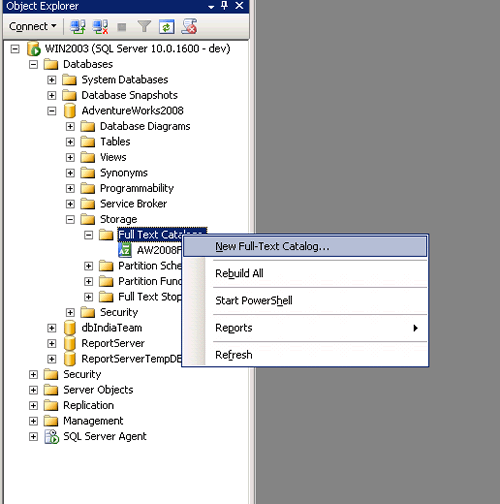


Full – Text can also be created while creating a Full-Text Index in its Wizard.
2) Create a Full-Text Index


3) Populate the Index


As the Index Is created and populated, you can write the query and use in searching records on that table which provides better performance.
For Example,
We will find the Employee Records who has “Marking “in their Job Title.
FREETEXT( ) Is predicate used to search columns containing character-based data types. It will not match the exact word, but the meaning of the words in the search condition. When FREETEXT is used, the full-text query engine internally performs the following actions on the freetext_string, assigns each term a weight, and then finds the matches.
- Separates the string into individual words based on word boundaries (word-breaking).
- Generates inflectional forms of the words (stemming).
- Identifies a list of expansions or replacements for the terms based on matches in the thesaurus.
CONTAINS( ) is similar to the Freetext but with the difference that it takes one keyword to match with the records, and if we want to combine other words as well in the search then we need to provide the “and” or “or” in search else it will throw an error.
USE AdventureWorks2008
GO

SELECT BusinessEntityID, JobTitle
FROM HumanResources.Employee
WHERE FREETEXT(*, 'Marketing Assistant');

SELECT BusinessEntityID,JobTitle
FROM HumanResources.Employee
WHERE CONTAINS(JobTitle, 'Marketing OR Assistant');

SELECT BusinessEntityID,JobTitle
FROM HumanResources.Employee
WHERE CONTAINS(JobTitle, 'Marketing AND Assistant');
GO

Conclusion
Full text indexing is a great feature that solves a database problem, the searching of textual data columns for specific words and phrases in SQL Server databases. Full Text Index can be used to search words, phrases and multiple forms of a word or phrase using FREETEXT () and CANTAINS () with “and” or “or” operators.
Reference : Pinal Dave (https://blog.sqlauthority.com)




154 Comments. Leave new
Hi. I have SQL 2008 r2 installed on my pc. I want to upgrade with advance services or full text search only, through sql 2008 r2 advance(795 mb setup). Is it possible.? I don’t want to install whole sql 2008 r2.
Regards
Ankit
Hi
I am using MSSQL Server 2005 with the Full Text Search.
Query with Contains and like not give the same results
My Query is
Select * from Searchtable where (ipccode like ‘%A61K 36/00%’ or ipccode like ‘%A61P 17/00%’) and (ipccode like ‘%C13K 13/00%’ and ipccode like ‘%A61P 1/00%’)
Its gives the 78 results and
Select * from Searchtable Where ( Contains( IPCCode ,'(“A61K 36/00” or “A61P 17/00”) and (“C13K 13/00” and “A61P 1/00”)’) )
Its gives the 355 results
both are same query first with Like and second with Contains, why results come with differents.
Any help to find out the problem
Thanks and Regards
Manohar
Hi,
we have bilingual site english & arabic.
in English free text search, its working perfectly for any word and all word search.
i need to search for Arabic any word & all word.
can any one give me step by step procedure or any links ?
i tried with Arabic it searches only with all words.
in the table column there is option to set word break;
i can choose only english;
Same problem here
Thanx Pinal for the info..
Hi Friends,
I am working on SQL Server 2005, I would like grouping the full text index. Take an example: I have three tables 1) Employee 2) Supplier and 3) Client. All this tables have id and name fields. I would like to create the index such a way that if I will search with “John OR Thomas”, it will search on all these tables together and return the records based rank descending order.
Can we achieve this?
Thanks in advance
Krunal Panchal
Awesome Post. Thanx :)
Thank, it is very useful for me.
Dear sir,
this is nice article, i have found one tricky problem with Full text indexing.
Os. window server 2003 32 bit
sql server: sql server 2008 Enterprise edition
i have applied full text index with track change: automatic. and normal cpu uses is 1-4%
but some time a cpu uses go to 100% all memory is taken by sqlserver.exe, population status : idle
last population date: 5 minute before current date.
this cpu uses remains 100% until next track changes does not occurred ( population date change after 10-20 minutes.)
please help me.
Thanks in advance.
–nilesh
hi, i have same problem… how i resolve? pls?
After install full text my CPU go from 4% to 99%…
The image screenshots are not loading for part of the Tutorial. I’ve gone as far as “Populate the Index” which I guess is important because searching the table returns no results.
Thanks for the wonderful resources you offer…
Hi ,
I had an issue with the full-text index in the sql server .
What i need is if i can search with the singular word it has to get the results for plural word to respective singular word.
I have tried this by enabling the full-text index in the specific table.But i am not able to get those results exactly what we except .
Please anyone help can be really appreciated in Advance.
Thanks .
And also i need any one of your help to resolve this .
Please help me on this issue.
Thanks for that
Excellent tut.
Thanks
USE AdventureWorks
GO
SELECT ManagerID, Title
FROM HumanResources.Employee
WHERE FREETEXT(*, ‘Marketing Assistant’);
SELECT ManagerID,Title
FROM HumanResources.Employee
WHERE CONTAINS(Title, ‘Marketing OR Assistant’);
SELECT ManagerID,Title
FROM HumanResources.Employee
WHERE CONTAINS(Title, ‘Marketing AND Assistant’);
GO
Hi,
Can you please let me know if it is possible to include DateTime columns in Full Text Index?
No datetime column can’t be included
Can you please clear out my doubts:
There is one table say tbl_Test .I have created fulltext index on this table for search purpose.But if when I am going to add some record in this table from the site then my site speed goes down. Is this related to indexing applied on this table.
I have problems with whitespace :
SELECT count(ID) FROM A
WHERE Contains(A.titlefile,’a’)! This query works well!
SELECT count(ID) FROM A
WHERE Contains(A.titlefile,’a c’)!//This query throw exception : systax is error at ‘a’.
Help me please
I have started the SQL Full-text Filter Daemon Launcher but am still unable to see the “Storage” node under the database (in this case AdventureWorks2008). I had attached a .mdf file for full text searching but the node is not there!! please help!!
hi,
i have 2 records in my database.
in the first record, i have the word ‘spoiled’ in it.
in the second record i have the word ‘spoiler’ in it.
my query is:
select*
from products
where freetext(*, ‘spoil’)
the problem is that as results i am only getting 1 record which is the first record. am i doing something wrong?
thanks for any help in advance
I have tried and tried and no matter what I do I cannot get this to produce results when I search the table.
Here are the steps I used to create …
CREATE TABLE HR_Documents(DOCID int identity not null,
DOCUMENT VARBINARY(MAX) NULL,
DOCTYPE VARCHAR(10) NULL,
CONSTRAINT PK_HR_Documents
PRIMARY KEY (DOCID))
CREATE FULLTEXT CATALOG ftCatalog AS DEFAULT
CREATE FULLTEXT INDEX ON dbo.HR_Documents(DOCUMENT TYPE COLUMN DOCTYPE)
KEY INDEX PK_HR_Documents ON ftCatalog
WITH CHANGE_TRACKING OFF
— Declare a variable to store the image data
DECLARE @Doc AS VARBINARY(MAX)
— Load the image data
SELECT @doc = CAST(bulkcolumn AS VARBINARY(MAX))
FROM OPENROWSET( BULK ‘Test Resume.docx’, SINGLE_BLOB ) AS x
— Insert the document
INSERT INTO HR_Documents (DOCID, DOCUMENT, DOCTYPE)
VALUES (1, @doc, ‘.doc’ )
Then when I perform a query, I get no results.
SELECT DOCID, DOCUMENT, DOCTYPE
FROM HR_Documents
WHERE CONTAINS(DOCUMENT, ‘%great%’)
Can you spot my problem?