COMPRESS and DECOMPRESS return binary data, so I restore text with its original character type explicitly. A decompressed value is not automatically a readable string. Its bytes still need the correct interpretation.
The roundtrip has two separate jobs: recover the bytes and interpret them as the intended text. An nvarchar source needs an nvarchar result here. A varchar example uses a matching varchar result instead.

Verify the whole restored value
The first query covers empty text, a Unicode string, long text and missing input. Every source is explicitly nvarchar(max). This keeps the long row from being narrowed before compression.
The long value contains 6000 x characters and occupies 12000 bytes. The short Unicode value contains A, ß and a supplementary symbol. Its expected original and restored lengths are eight bytes.
I compare binary representations and their byte lengths together. Text equality alone can apply collation rules or ignore distinctions such as trailing spaces. The combined diagnostic is intended to establish the complete byte roundtrip for these inputs.
WITH Inputs AS
(
    SELECT CaseId, InputLabel, InputText
    FROM (VALUES
        (1, CAST('Empty' AS varchar(12)), CAST(N'' AS nvarchar(max))),
        (2, 'Unicode', CAST(N'Aß😀' AS nvarchar(max))),
        (3, 'Long', REPLICATE(CAST(N'x' AS nvarchar(max)), 6000)),
        (4, 'Missing', CAST(NULL AS nvarchar(max)))
    ) AS v(CaseId, InputLabel, InputText)
), Restored AS
(
    SELECT CaseId, InputLabel, InputText,
           CAST(DECOMPRESS(COMPRESS(InputText)) AS nvarchar(max)) AS RestoredText
    FROM Inputs
)
SELECT CaseId, InputLabel, DATALENGTH(InputText) AS OriginalBytes,
       DATALENGTH(RestoredText) AS RestoredBytes,
       CASE WHEN InputText IS NULL AND RestoredText IS NULL THEN 'Missing'
            WHEN DATALENGTH(InputText) = DATALENGTH(RestoredText)
             AND CONVERT(varbinary(max), InputText) = CONVERT(varbinary(max), RestoredText)
            THEN 'Exact bytes' ELSE 'Mismatch' END AS RoundtripStatus
FROM Restored
ORDER BY CaseId;

WITH Input AS
(
    SELECT CAST('plain' AS varchar(max)) AS InputText
)
SELECT InputText, CAST(DECOMPRESS(COMPRESS(InputText)) AS varchar(max)) AS RestoredText,
       DATALENGTH(InputText) AS OriginalBytes,
       DATALENGTH(CAST(DECOMPRESS(COMPRESS(InputText)) AS varchar(max))) AS RestoredBytes
FROM Input;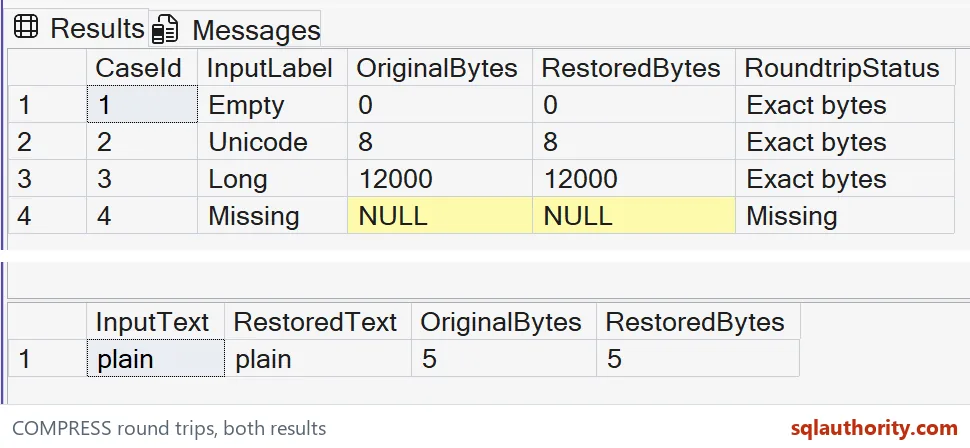
Read missing and empty values separately
The empty input should restore to empty text with zero bytes. The Missing row should remain NULL on both sides. The status column deliberately gives missing input its own outcome.
A zero-byte result is not the same as a missing result. Preserving that distinction matters when empty input is a valid value. Substituting an empty string before compression would change the meaning of the missing case.
The Unicode and long rows should report Exact bytes with matching lengths. The output summarizes a complete comparison instead of displaying thousands of characters. The query above defines every input used by that check.
The second result set uses the ASCII text plain as varchar(max). Its restored text should remain plain with five bytes. It demonstrates matching the original non-Unicode type without relying on a mixed-type VALUES column.
The binary result needs its type contract
Both functions are available in SQL Server 2016 and later. COMPRESS uses Gzip and returns varbinary(max). DECOMPRESS also returns varbinary(max), even when the original payload was text.
A binary payload does not make the original varchar or nvarchar choice visible in the query. Keep that information in the schema or surrounding contract. Guessing the output type can interpret correct bytes incorrectly.
The max casts are intentional on both the long source and restored text. A smaller target type could narrow the restored value. Successful decompression alone would then fail to establish a complete text roundtrip.
The example does not try to decompress arbitrary or corrupt input. Every compressed value is produced from the source expression in the same query. Handling untrusted compressed data requires a separate validation and error-handling design.

Do not infer storage or security benefits
The query has no compressed-length target and no performance benchmark. Compression overhead can matter for short inputs. These rows establish restoration behavior rather than claiming that every payload becomes smaller.
Compression is also not encryption. A readable value can be recovered with the matching decompression and type conversion. Access to sensitive data must still be controlled using the appropriate security design.
This example does not change table compression or an index setting. It operates on scalar expressions in pure SELECT statements. The decision to store compressed payloads has separate consequences for searching and application access.
When adapting the query, retain a long input and a missing input in the checks. Add the character types actually used by the application. A small ASCII-only sample cannot establish the complete behavior of Unicode and large values.
Keep the original text type with the compressed value, and check the restored bytes.
A decompressed value is not text, it is bytes that still need their type.
Published by Pinal Dave on SQLAuthority. More of my work at pinaldave.com.
Discover more from SQL Authority with Pinal Dave
Subscribe to get the latest posts sent to your email.