REVERSE moves trailing spaces to the beginning when it reverses a string. I make those spaces visible before judging the result. A grid display can hide characters that the expression still preserves.

Make boundaries visible in the result
The query surrounds each present value with square brackets. Those brackets belong to the display expression, not the source. They reveal spaces at either end without changing the value being reversed.
The first input contains two letters followed by two ordinary spaces. Its expected reversed display begins with those spaces and ends with BA. Nothing in the reversal asks for trimming.
The second input starts with two spaces instead. Its expected reversed display ends with them. Looking only at the letters could make both rows appear to contain the same result.
The query also returns byte counts for the source and reversal. Each of those two Unicode inputs occupies eight bytes. The brackets are excluded from that measurement because they are only a viewing aid.
WITH Samples AS
(
    SELECT CaseId,TextValue
    FROM (VALUES
        (1,CAST(N'AB  ' AS nvarchar(12))),
        (2,CAST(N'  AB' AS nvarchar(12))),
        (3,CAST(N'   ' AS nvarchar(12))),
        (4,CAST(N'' AS nvarchar(12))),
        (5,CAST(NULL AS nvarchar(12)))
    ) AS v(CaseId,TextValue)
)
SELECT CaseId,
    N'['+TextValue+N']' AS SourceVisible,
    N'['+REVERSE(TextValue)+N']' AS ReversedVisible,
    DATALENGTH(TextValue) AS SourceBytes,
    DATALENGTH(REVERSE(TextValue)) AS ReversedBytes,
    DATALENGTH(REVERSE(REVERSE(TextValue))) AS RoundTripBytes
FROM Samples
ORDER BY CaseId;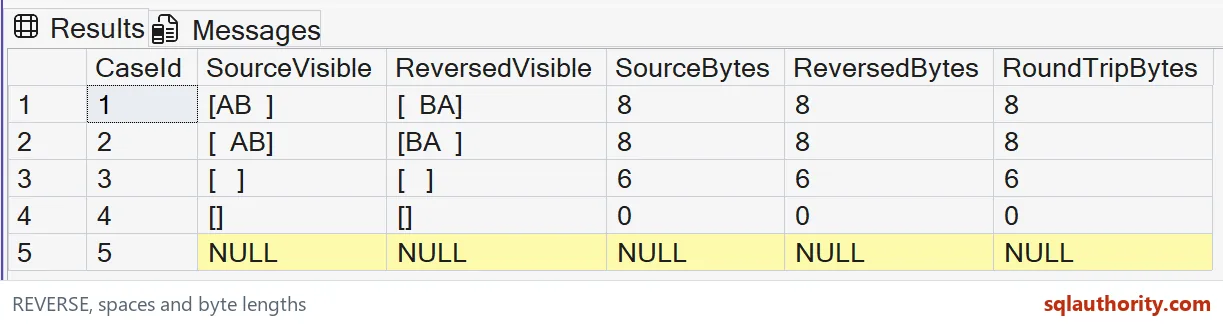
Separate all spaces, empty text and missing text
The third input contains three spaces and no letters. It is expected to remain three spaces after reversal. The bracketed display exposes a present value that a blank-looking cell can conceal.
The fourth input is an empty Unicode string. Its visible form is a pair of adjacent brackets. Its byte count is zero, unlike the six-byte all-space value.
The last input is typed NULL. Its expected visible and byte-count outputs are NULL. The query preserves absence rather than displaying it as an empty string.
These three states can have different application meanings. An unfilled field, an intentionally empty value and supplied spaces may require separate handling. Decide on any normalization policy before using a display to infer equality.

Measure preservation with the appropriate check
The final column measures bytes after reversing twice. For the supplied ordinary characters, its expected totals match the source totals. That check confirms the size model for these particular examples.
Matching lengths alone would not prove matching contents in a general test. Two different strings can occupy the same number of bytes. Keep the original value when exact reconstruction matters.
I avoid a simple text equality column as the only preservation witness here. String comparison rules can treat some differences as equal. Visible boundaries and explicit byte counts make this narrow spacing lesson easier to review.
The example uses bounded nvarchar values consistently. Introducing a fixed-width character type would introduce padding rules before reversal. That could obscure whether spaces came from the source or its declared type.
Keep character reversal within its limits
Character reversal is different from understanding a language or a filename. A reversed word is not a translation. A reversed path is not automatically a valid path with its parts reordered.
REVERSE can treat surrogate pairs specially under supplementary-character collations. That does not make this example a complete test of every Unicode text boundary. These samples deliberately use ordinary letters and spaces.
I’d test the actual character repertoire before applying reversal to arbitrary text. Combining marks and other visible text structures need their own contract. Byte preservation and readable linguistic order are different goals.
Do not reverse text merely to disguise sensitive values. Anyone applying the same operation again can reconstruct these examples. The function provides a transformation, not an access-control boundary.
The query reads made-up inputs and changes no tables or settings. Keep the bracketed display only where it helps explain boundaries. An application should return its actual value with whatever separate presentation rule the interface requires.
Brackets cost nothing and save a lot of guessing.
A blank cell is not always an empty string, it may be text that still holds spaces.
Published by Pinal Dave on SQLAuthority. More of my work at pinaldave.com.
Discover more from SQL Authority with Pinal Dave
Subscribe to get the latest posts sent to your email.