NOT and NULL preserve an Unknown comparison rather than turn it into a successful opposite match. I test missing values separately when they belong in the result. Negating equality does not automatically include every row that equality rejected.

Expose the three logical outcomes
The example supplies five, seven and a missing integer reading. The first comparison asks whether each reading equals five. Its expected outcomes are True, False and Unknown.
The second comparison negates that equality. Its expected outcomes are False, True and Unknown. The missing input still does not provide a known equality or inequality result.
The CASE expressions give each logical state an explicit display label. They test the positive and negative predicates separately before the final Unknown branch. That avoids presenting every non-True outcome as False.
I keep the original reading beside those labels. A blank grid cell can obscure the reason for the third outcome. The missing input remains missing rather than becoming a convenient substitute number.
WITH Inputs AS
(
    SELECT CaseId,Reading FROM (VALUES (1,CAST(5 AS int)),(2,7),(3,CAST(NULL AS int))) AS v(CaseId,Reading)
)
SELECT CaseId,Reading,
    CASE WHEN Reading=5 THEN 'True' WHEN NOT (Reading=5) THEN 'False' ELSE 'Unknown' END AS EqualsFive,
    CASE WHEN NOT (Reading=5) THEN 'True' WHEN Reading=5 THEN 'False' ELSE 'Unknown' END AS NotEqualsFive
FROM Inputs ORDER BY CaseId;
A WHERE condition keeps only successful matches
The second query filters with NOT applied to Reading equals five. Its expected result contains only the reading seven. The missing reading is not included because its predicate is Unknown.
Equality would keep only the reading five. The two filtered outputs therefore do not cover every input row. The missing reading belongs to neither ordinary comparison result.
That matters when interpreting a filter as the complement of another report. Three-valued logic introduces a third state. Negating one predicate does not erase the uncertainty in its operands.
I would compare the complete input identifiers with both expected outputs before calling the filters exhaustive. A test containing only present readings cannot reveal the missing third state. The NULL row is essential to this lesson.
WITH Inputs AS
(
    SELECT CaseId,Reading FROM (VALUES (1,CAST(5 AS int)),(2,7),(3,CAST(NULL AS int))) AS v(CaseId,Reading)
)
SELECT CaseId,Reading FROM Inputs WHERE NOT (Reading=5) ORDER BY CaseId;
Include missing values through an explicit policy
The final query adds Reading IS NULL as a separate alternative. Its expected result contains seven and the missing reading. The equality-to-five row still remains excluded.
That OR clause changes the reporting policy deliberately. It does not claim that the missing reading is known to differ numerically from five. It says missing readings are included in this chosen output.
An application may instead report missing readings in a separate category. Another report may legitimately exclude them. The important step is to state the missing-data rule rather than infer it from NOT.
I keep the explicit inclusion query separate from the ordinary negation query. Their different expected row sets are visible. A default-value substitution would hide which input was originally missing.
WITH Inputs AS
(
    SELECT CaseId,Reading FROM (VALUES (1,CAST(5 AS int)),(2,7),(3,CAST(NULL AS int))) AS v(CaseId,Reading)
)
SELECT CaseId,Reading FROM Inputs WHERE NOT (Reading=5) OR Reading IS NULL ORDER BY CaseId;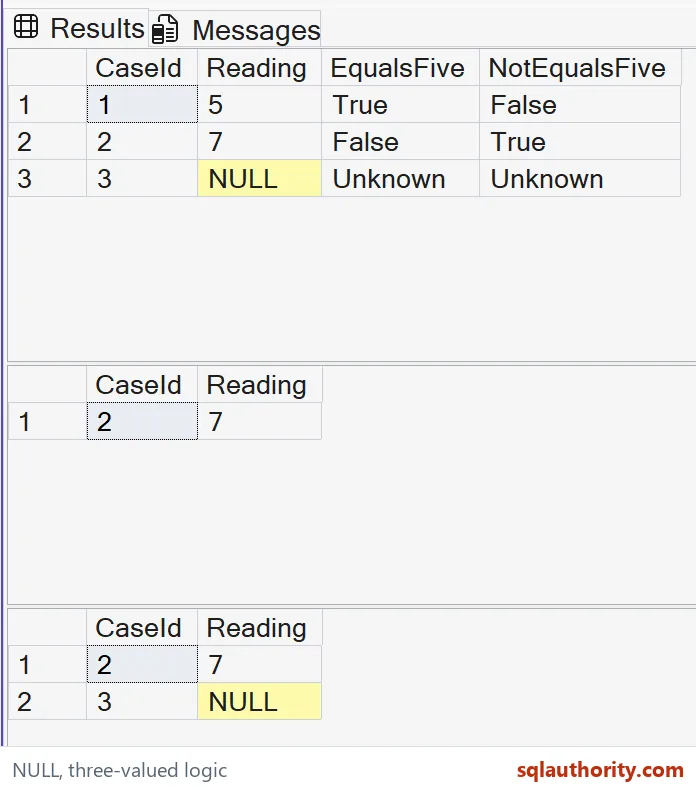
Keep negation separate from value replacement
SQL NULL is different from a numeric zero. Replacing it with zero before comparing would make a known comparison against that replacement. That is a source transformation rather than a property of NOT.
This example uses ordinary integer comparisons only. It does not rely on session-option changes or historical NULL behavior. The comparison and explicit IS NULL test each retain their own meaning.
Keep the three display states beside the two filtered row sets. Unknown belongs to neither ordinary equality nor its negation. Include it deliberately when the report requires complete input coverage.
When adapting a negated predicate, keep a matching value, a differing value and a missing value in the test data. Review which of those rows the receiver should see. Then express that requirement explicitly.
A report can be correct while leaving some input rows outside both compared categories. If completeness is required, add an Unknown category or a stated inclusion rule. The negation operator cannot supply that reporting decision on its own.
Say what happens to the missing rows, and the filter stays honest.
An unknown comparison is not a false one, it is still unknown after negation.
Published by Pinal Dave on SQLAuthority. More of my work at pinaldave.com.
Discover more from SQL Authority with Pinal Dave
Subscribe to get the latest posts sent to your email.