
Yesterday I wrote about SQL SERVER – Introduction to Three Important Performance Counters. I received few questions about how to use Perfmon. Here is very brief introduction to Perfmon.
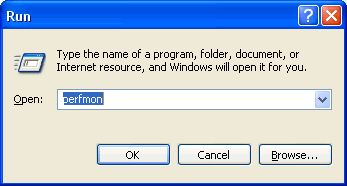
There are three ways to launch Perfmon.
1) Type “start perfmon” at the command prompt.
2) Go to Start | Programs | Administrative Tools | Performance Monitor.
3) Go to Start | Run | Perfmon.
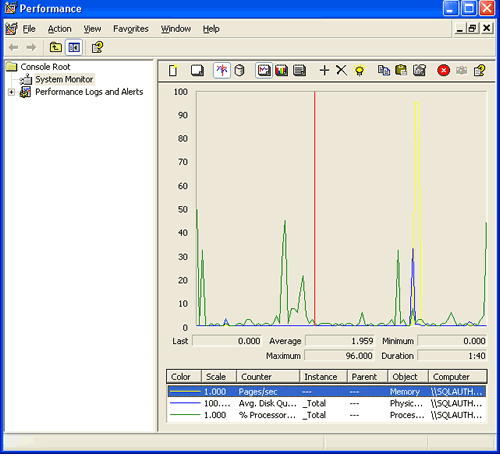
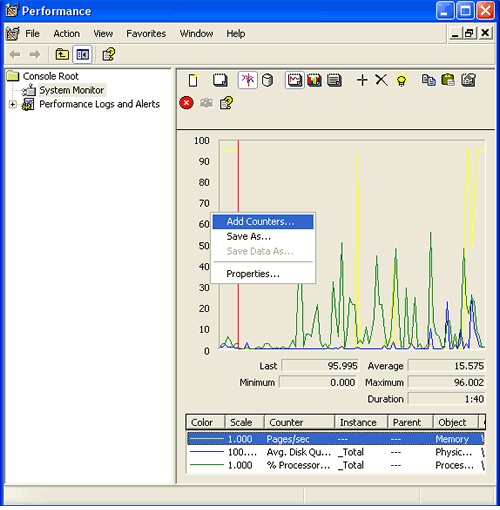
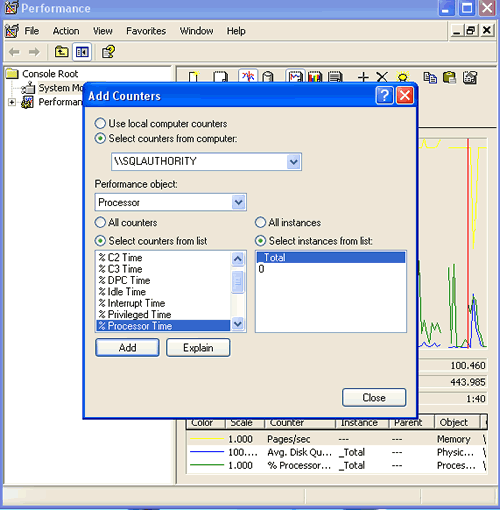
Follow the images which explains how to use Perfmon and add different counters.
Right click to bring up Add Counters Menu.
How to Use Perfmon for More Than a Quick Look
The live graph is fine for a quick look, but it only shows the last couple of minutes. For real troubleshooting, I log the counters to a file in the background, so I can collect a whole day and study it later. In newer versions of Windows, you set this up under Data Collector Sets, User Defined, in the left pane of Performance Monitor. Older versions call the same idea Counter Logs, under Performance Logs and Alerts.
A few tips that make the data easier to use:
- Pick a sample interval that fits the question. A few seconds is good for a short test, while a longer interval keeps a full day log small enough to open.
- Add only the counters you need. Hundreds of counters make the graph unreadable and the file large.
- Name each log with the server and the date, so you can find it later.
- When you add counters for another server, type its name in the Add Counters box instead of logging on to it.
- Save the log in the binary .blg format. You can open it later in Performance Monitor, or convert it to CSV with the
relogcommand if you want to work with it in Excel.
When you read the graph, watch the scale. Performance Monitor draws every counter on the same 0 to 100 axis and multiplies some of them by a scale factor, so a line that looks tall may be a small number. Select a counter and check its average, minimum and maximum values under the graph before you draw any conclusion.
Published by Pinal Dave on SQLAuthority. More of my work at pinaldave.com.




9 Comments. Leave new
HI Pinal,
I am having problems with actually writing this to a database via a DSN using SQL Authentication to a SQL 2005 express. Testing the DSN I connect no problem, but when running the Perfmon, it says that the SQL login fails due to the fact that it’s “not associated with a trusted SQL Server connection”. This seems to be some kind of error and researching the net did not divvy up much. What’s your opinion?
Thanks for the help
I’m having the trusted issue as well. Not on all machines, can’t figure it out.
In response to Jeff and Drikus I was wondering if they’d checked to see what account their Perfmon counters are running under. If it’s running as default then that might explain why they’re not writing to SQL. Try using a service account that has the necessary permissions to run Perfmon counters and write to the database and that should work
Hi pinaldave,
Is there any way to monitor a SQL server status using this performance counters through C++ or Java code.Plzz give me some idea regarding this.I want to monitor not only the sql server running on my system but also remote sql servers.
I got some sample codes which is done using ASP.Net.But am not sure whether it is possible in C++/java..
Thanks in Advance..
Malar
Hi Pinaldave,
I want to create my own charts based on permonce.
Please help me in determining which classes which i should use..
thanks
Sachin
Hi,
Thanks, it’s a very interesting arcticle and well written. I found a few, but yours is the best as it’s short and to the point!
This greatly assisted me in monitoring a clients sql server as per their request, but they have one other request, strange as it seems, it makes perfect sense. They have a small network of 5 computers, one of which is a server running Windows Server 2003 and SQL Server 2008. Their network has a domain, but they have simple logins and passwords, as they are only used for processing data on the sql server.
The problem is that even though everyone has their own sql login, and there is an activity log, we cannot stop people from logging in via windows authentication if they wish to do damage.
Is there any way to have a performance monitor that reports (e.g. net send or email) anyone logging into sql server via windows authentication, failing that is there any way to disable windows authentication, or stop them from running scripts?
Thanks
Nice post!!!