Weighted scores let you rank products by several columns at once, as long as every column speaks the same language first. Adding rating to units sold to margin is the classic mistake. One column shouts, the others whisper, and the ranking quietly becomes a sales chart. Here is the fix, in plain T-SQL.

Why a raw sum lies to you
Imagine a manager asking for a “best products” list from rating, units sold, margin percent and return percent. Seven products, four columns. Mouse Pad is new and has no rating yet. Stapler and Tape Dispenser have identical numbers on purpose. The weights live in their own one-row table, so nobody has to edit a query to change them.
DROP TABLE IF EXISTS #Weights;
DROP TABLE IF EXISTS #Products;
CREATE TABLE #Products (ProductId int PRIMARY KEY, ProductName varchar(20) NOT NULL, Rating decimal(3,1) NULL,
                        UnitsSold int NOT NULL, MarginPct decimal(4,1) NOT NULL, ReturnPct decimal(4,1) NOT NULL);
CREATE TABLE #Weights (RatingW decimal(3,2), UnitsW decimal(3,2), MarginW decimal(3,2), ReturnW decimal(3,2));
INSERT #Products VALUES
    (1, 'Desk Lamp',      4.6, 1200, 30.0, 2.0),
    (2, 'Monitor Stand',  4.2, 5200, 18.0, 4.0),
    (3, 'Keyboard',       4.8,  800, 42.0, 1.5),
    (4, 'Webcam',         3.9, 9000, 12.0, 9.0),
    (5, 'Stapler',        4.4, 2500, 25.0, 3.0),
    (6, 'Tape Dispenser', 4.4, 2500, 25.0, 3.0),
    (7, 'Mouse Pad',      NULL, 400, 35.0, 1.0);
INSERT #Weights VALUES (0.40, 0.20, 0.30, 0.10);
First, the tempting version. Add the good columns, subtract the bad one, and rank.
SELECT ProductName, Rating + UnitsSold + MarginPct - ReturnPct AS RawSum,
       RANK() OVER (ORDER BY Rating + UnitsSold + MarginPct - ReturnPct DESC) AS RawRank
FROM #Products
ORDER BY RawRank, ProductName;
Webcam wins. It has the worst rating, the lowest margin and the highest return rate, yet 9,000 units drown everything else. Mouse Pad lands last because NULL poisons the whole sum.
This is the report that gets questioned in a meeting. Someone points at the top line and asks why the product with the most returns is the star. You do not want to defend a sum of stars, units and percentages.
Put every column on a 0 to 1 scale
The cure is to rescale each column so its lowest value becomes 0 and its highest becomes 1. Subtract the minimum, then divide by the range. Window functions give you the minimum and maximum without a self join. For return percent, lower is better, so I flip it: the maximum minus the value, over the range.
Read the result like this: 0 is the weakest product in that column, 1 is the strongest, and everyone else sits in between. Now a point of rating and a point of margin can be compared fairly, because each is measured as a share of its own range.
NULLIF in the divisor turns a zero range into NULL instead of a divide by zero error. That protects you the day every product has the same value.
Apply the weights and rank
Each scaled value gets multiplied by its weight, and the weights add up to 1. The score then runs from 0 to 100. A missing rating gets a neutral 0.5. That is my choice, not a law, and the one place to change it.
WITH Scaled AS (
    SELECT ProductName,
           (Rating - MIN(Rating) OVER ()) / NULLIF(MAX(Rating) OVER () - MIN(Rating) OVER (), 0) AS RatingS,
           (UnitsSold - MIN(UnitsSold) OVER ()) * 1.0 / NULLIF(MAX(UnitsSold) OVER () - MIN(UnitsSold) OVER (), 0) AS UnitsS,
           (MarginPct - MIN(MarginPct) OVER ()) / NULLIF(MAX(MarginPct) OVER () - MIN(MarginPct) OVER (), 0) AS MarginS,
           (MAX(ReturnPct) OVER () - ReturnPct) / NULLIF(MAX(ReturnPct) OVER () - MIN(ReturnPct) OVER (), 0) AS ReturnS
    FROM #Products
), Scored AS (
    SELECT s.*, 100 * (w.RatingW * COALESCE(s.RatingS, 0.5) + w.UnitsW * s.UnitsS
                     + w.MarginW * s.MarginS + w.ReturnW * s.ReturnS) AS Score
    FROM Scaled AS s CROSS JOIN #Weights AS w
)
SELECT ProductName, CAST(RatingS AS decimal(4,2)) AS RatingS, CAST(UnitsS AS decimal(4,2)) AS UnitsS,
       CAST(MarginS AS decimal(4,2)) AS MarginS, CAST(ReturnS AS decimal(4,2)) AS ReturnS,
       CAST(Score AS decimal(5,1)) AS Score,
       RANK() OVER (ORDER BY Score DESC) AS RankWithTies,
       ROW_NUMBER() OVER (ORDER BY Score DESC, ProductName) AS ListPosition
FROM Scored
ORDER BY ListPosition;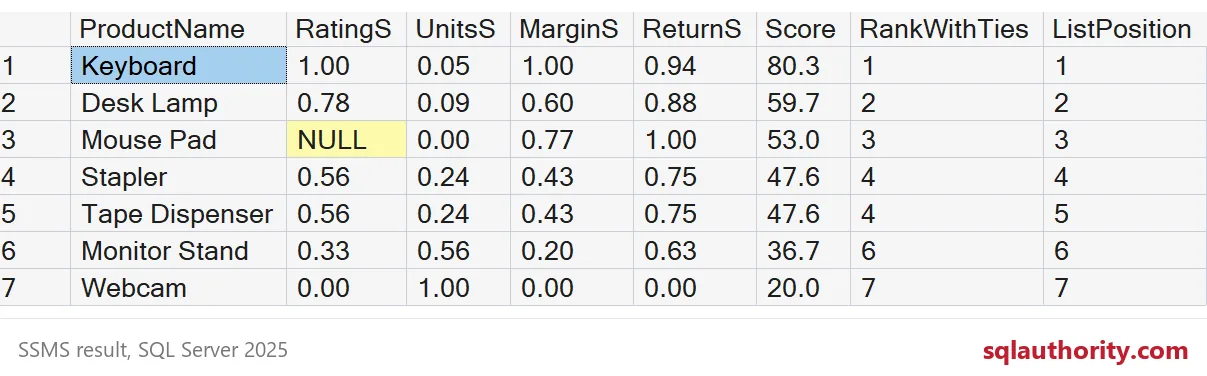
Now Keyboard wins and Webcam is last, which matches what a human would say after one look at the columns. The new Mouse Pad lands third on its margin and low returns, with no rating at all. Notice the UnitsS column. Even scaled, one big seller squeezes the others toward zero.

Ties and where this bites
Stapler and Tape Dispenser share a score, so RANK gives both the same number and skips the next one. ROW_NUMBER with the product name as a tie-breaker gives a stable list position instead. Use RANK to show the manager, and ROW_NUMBER when a job needs exactly one winner.
Three traps to remember. First, min and max move when your data moves, so a new outlier changes every score. Second, weights that do not add up to 1 still rank fine, but the score stops meaning a percentage. Third, a weight is an opinion. Write down who chose it, because someone will ask.
DROP TABLE IF EXISTS #Weights;
DROP TABLE IF EXISTS #Products;
Next time someone asks for a “best of” list, scale first, weigh second, and let the table of weights carry the argument.
A weighted score is not a calculation, it is an opinion written in numbers.
Published by Pinal Dave on SQLAuthority. More of my work at pinaldave.com.
Discover more from SQL Authority with Pinal Dave
Subscribe to get the latest posts sent to your email.