ASCII versus UNICODE answers two different questions about the beginning of a string. ASCII inspects its first encoded byte. UNICODE returns the Unicode code point of its first character. Ordinary letters can make the functions look interchangeable, but accented text shows why they are not.

Start with a familiar import problem
Suppose you import customer names from a CSV file. Most names begin with ordinary English letters, but some begin with an accented letter such as é. You want to investigate the first character because an import validation rule rejects some names. Comparing the byte value with the Unicode code point helps explain what the rule is actually reading.
Keep the imported text as nvarchar while you inspect it. The N prefix in the examples preserves the Unicode string literal. When testing the varchar representation, choose its encoding explicitly instead of relying on the database default.
These examples require SQL Server 2019 or later because they use a UTF-8 collation. The conversion applies Latin1_General_100_CI_AS_SC_UTF8 to this expression, without changing the database collation.
Try ordinary letters first
Copy this small example into a query window. AB stands in for the beginning of an imported name. Both functions inspect A; neither adds together the values of A and B.
WITH Samples AS
(
    SELECT CaseId,TextValue
    FROM (VALUES
        (1,CAST(N'AB' AS nvarchar(8)))
    ) AS v(CaseId,TextValue)
), Encoded AS
(
    SELECT *,CAST(TextValue COLLATE Latin1_General_100_CI_AS_SC_UTF8 AS varchar(16)) AS Utf8Text
    FROM Samples
)
SELECT CaseId,TextValue,ASCII(Utf8Text) AS FirstByteCode,
    UNICODE(TextValue) AS FirstUnicodeCodePoint,
    DATALENGTH(Utf8Text) AS Utf8Bytes
FROM Encoded
ORDER BY CaseId;| CaseId | TextValue | FirstByteCode | FirstUnicodeCodePoint | Utf8Bytes |
|---|---|---|---|---|
| 1 | AB | 65 | 65 | 2 |
ASCII and UNICODE both return 65 here. Under UTF-8, A uses one byte whose value matches its Unicode code point. DATALENGTH measures the complete converted string, so AB occupies two bytes. This matching result applies to the letters in this example, not every character you might import.
Make the UTF-8 difference visible
Now use éA with the same data types, conversion and functions. Keeping those choices unchanged makes the accented first character the useful difference between the two examples.
WITH Samples AS
(
    SELECT CaseId,TextValue
    FROM (VALUES
        (2,CAST(N'éA' AS nvarchar(8)))
    ) AS v(CaseId,TextValue)
), Encoded AS
(
    SELECT *,CAST(TextValue COLLATE Latin1_General_100_CI_AS_SC_UTF8 AS varchar(16)) AS Utf8Text
    FROM Samples
)
SELECT CaseId,TextValue,ASCII(Utf8Text) AS FirstByteCode,
    UNICODE(TextValue) AS FirstUnicodeCodePoint,
    DATALENGTH(Utf8Text) AS Utf8Bytes
FROM Encoded
ORDER BY CaseId;| CaseId | TextValue | FirstByteCode | FirstUnicodeCodePoint | Utf8Bytes |
|---|---|---|---|---|
| 2 | éA | 195 | 233 | 3 |
The first byte is 195, while the Unicode code point is 233. In UTF-8, é takes two bytes, 195 and 169. The following A adds one more byte, giving three bytes for the complete string. ASCII returns only the first byte, not the whole encoded character.
If your import rule needs the character’s Unicode code point, use UNICODE on the Unicode text. If you are investigating an encoded payload, the ASCII result needs the encoding alongside it. Do not interpret 195 as the Unicode identity of é. A different varchar encoding can produce a different byte value.

Run the complete comparison
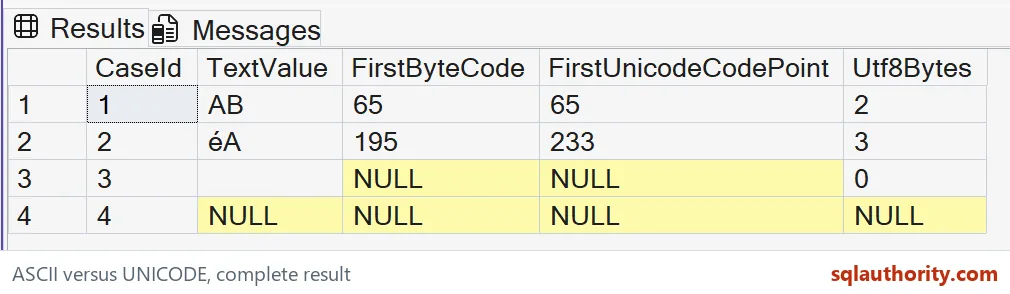
This copyable query keeps both examples and adds an empty string and a missing value. It retains the source text so you can see which input produced each result.
WITH Samples AS
(
    SELECT CaseId,TextValue
    FROM (VALUES
        (1,CAST(N'AB' AS nvarchar(8))),
        (2,CAST(N'éA' AS nvarchar(8))),
        (3,CAST(N'' AS nvarchar(8))),
        (4,CAST(NULL AS nvarchar(8)))
    ) AS v(CaseId,TextValue)
), Encoded AS
(
    SELECT *,CAST(TextValue COLLATE Latin1_General_100_CI_AS_SC_UTF8 AS varchar(16)) AS Utf8Text
    FROM Samples
)
SELECT CaseId,TextValue,ASCII(Utf8Text) AS FirstByteCode,
    UNICODE(TextValue) AS FirstUnicodeCodePoint,
    DATALENGTH(Utf8Text) AS Utf8Bytes
FROM Encoded
ORDER BY CaseId;| CaseId | TextValue | FirstByteCode | FirstUnicodeCodePoint | Utf8Bytes |
|---|---|---|---|---|
| 1 | AB | 65 | 65 | 2 |
| 2 | éA | 195 | 233 | 3 |
| 3 | '' (empty) | NULL | NULL | 0 |
| 4 | NULL | NULL | NULL | NULL |
Read empty strings and NULL correctly
Case 3 contains an empty string. Its UTF-8 byte count is zero, and both first-character functions return NULL because there is no first character. Case 4 contains SQL NULL, representing a missing value. Its byte count is also NULL.
A NULL first-character result therefore cannot tell you whether a name was blank or missing. Keep TextValue and handle those states explicitly in your import validation. Likewise, a first-character check cannot validate an entire name: AB and any longer text beginning with A share that initial code.
Preserve the complete input and its length when diagnosing imported text, so one number does not hide the rest of the value.
ASCII is not a character identity, it is only the first byte of an encoding.
Published by Pinal Dave on SQLAuthority. More of my work at pinaldave.com.
Discover more from SQL Authority with Pinal Dave
Subscribe to get the latest posts sent to your email.