RIGHT can make zero padding look correct while quietly removing significant digits. I validate the allowed numeric range before creating a fixed-width label. The suffix expression alone cannot tell whether the input fits.
The familiar expression adds zeros and keeps the final characters. That works for a bounded nonnegative integer. A wider value can produce the same label as a different, smaller value.

Make the width requirement explicit
This example allows integers from zero through 9999. Those values fit a four-character decimal label. Negative values, wider integers and missing values require their own handling.
The query returns both unchecked padding and contract padding. It also preserves the original number and its text representation. A status column explains why the checked expression leaves a result missing.
The text conversion allows twelve characters, enough for any int value including its sign. The later RIGHT expression is the deliberate narrowing step. Keeping those operations separate makes the potential information loss visible.
WITH Inputs AS
(
    SELECT CaseId, NumberValue
    FROM (VALUES (1, CAST(0 AS int)), (2, 7), (3, 1234),
                 (4, 2345), (5, 12345), (6, -7), (7, NULL)) AS v(CaseId, NumberValue)
)
SELECT CaseId, NumberValue, CAST(NumberValue AS varchar(12)) AS OriginalText,
       RIGHT('0000' + CAST(NumberValue AS varchar(12)), 4) AS UncheckedPadding,
       CASE WHEN NumberValue BETWEEN 0 AND 9999
            THEN RIGHT('0000' + CAST(NumberValue AS varchar(12)), 4)
       END AS ContractPadding,
       CASE WHEN NumberValue IS NULL THEN 'Missing'
            WHEN NumberValue BETWEEN 0 AND 9999 THEN 'Accepted'
            ELSE 'Outside contract' END AS InputStatus
FROM Inputs
ORDER BY CaseId;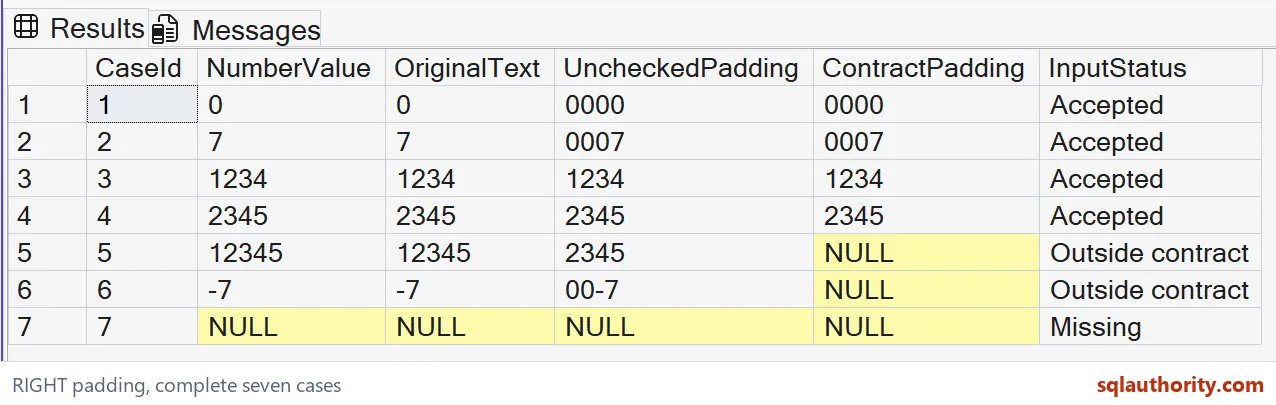
Read the collision in the result
Zero becomes 0000, while seven becomes 0007. Values 1234 and 2345 already occupy four characters. Their unchecked and checked labels should match their original text.
The input 12345 is the important failure case. Its unchecked label becomes 2345 because RIGHT keeps only the suffix. That is also the valid label for the distinct input 2345.
The checked result for 12345 is NULL with an Outside contract status. This does not mean the input was missing. The original value remains visible, so a caller can reject it or choose a wider representation.
Negative seven becomes 00-7 in the unchecked expression. Padding did not create a conventional signed four-digit number. The checked expression excludes negatives because this particular contract does not define signed labels.

Keep formatting separate from validation
RIGHT returns the requested final characters of text. It does not validate an identifier, count business digits or protect uniqueness. A syntactically valid string expression can still implement the wrong reporting rule.
I keep the range check beside the formatting expression. If the permitted width changes, both parts need review. Updating only the number of zeros can leave the accepted range inconsistent.
NULL input receives a Missing status in this example. The contract result remains NULL instead of becoming a zero label. Missing data and the numeric value zero therefore stay distinguishable.
The status is a query result, not a table constraint or an application rejection. An importing application must still decide what to do with excluded rows. Do not silently store the unchecked label when the status says otherwise.
Choose a contract for your actual input
These inputs are integers, so the example does not preserve leading zeros from an original text identifier. A code such as 0007 already has a text representation. Converting it to an integer first changes that representation.
For text identifiers, validate the required characters and width directly. Decide whether spaces, signs or leading zeros are meaningful before formatting. A numeric range check cannot establish every property of a text code.
The query is read-only and shows seven complete cases. It does not create objects or change session settings. Compare the original and both labels when adapting it to a wider field.
A padded label should represent an accepted value without ambiguity. If a value is outside the contract, expose that outcome explicitly. Choosing a larger width may be appropriate, but truncating the input needs a separate, deliberate requirement.
Want to run it yourself? Copy the query above into any query window. It needs no tables.
Check the range first and the labels will stay honest.
Zero padding is not validation, it is formatting that needs a range check first.
Published by Pinal Dave on SQLAuthority. More of my work at pinaldave.com.
Discover more from SQL Authority with Pinal Dave
Subscribe to get the latest posts sent to your email.