I use FORMATMESSAGE when I need formatted text without changing control flow. It returns a string for the caller. That lets me review the message before deciding where it belongs.

Start with returned text
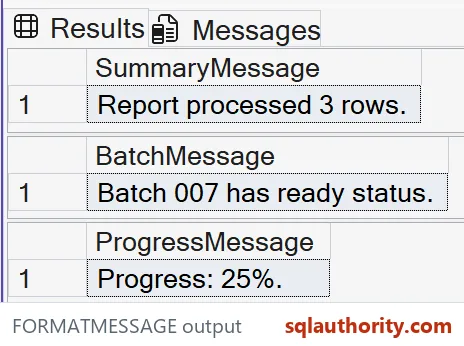
The first query supplies a format string and two arguments. The string placeholder receives Report, while the integer placeholder receives three. The output is a named text column, so it’s easy to compare with the intended message.
I don’t need a registered server message for this example. Literal format strings are supported in SQL Server 2016 and later. The query creates no message definition and makes no logging decision.
SELECT CAST(FORMATMESSAGE(N'%s processed %d rows.', N'Report', 3)
            AS nvarchar(100)) AS SummaryMessage;

SELECT CAST(FORMATMESSAGE(N'Batch %03d has %s status.', 7, N'ready')
            AS nvarchar(100)) AS BatchMessage;

SELECT CAST(FORMATMESSAGE(N'Progress: %d%%.', 25)
            AS nvarchar(100)) AS ProgressMessage;
Match placeholders to argument types
The arguments follow the order of their placeholders. Swapping the report name and row count would change the contract, even if the surrounding sentence looked harmless. I keep the format near its arguments during review.
A placeholder isn’t a general conversion request for any value. Prepare the intended argument type before formatting. For a decimal, choose an explicit text representation instead of assuming the integer placeholder will preserve its fraction.
Use padding deliberately
The second query formats batch seven with three digits. Its expected text contains 007 because the format requests leading zeros. That padding changes presentation; it doesn’t change the numeric batch value.
I’d keep the identifier as a number wherever calculations need it. The padded label belongs at the display boundary. A consumer that needs both should receive separate numeric and text columns, with names that make their roles clear.
Escape a percent sign
The third query needs a percent sign after the numeric value. Two percent characters in the format string produce one percent character in the returned message. The expected output ends with 25%.
This small case is worth retaining in the test. A format string copied from ordinary prose can contain characters with special meaning. Treat the format as controlled input, especially when an application supplies text from another source.
Separate formatting from error handling
FORMATMESSAGE returns nvarchar text. The example’s outer casts give these short demonstration outputs an explicit nvarchar(100) contract. All three statements are ordinary SELECT queries, so the text appears as data.
Returning a message doesn’t record an incident or stop a transaction. A later caller can print, store or raise that text through another mechanism. I review that later action separately rather than letting friendly wording imply successful processing.
Keep message size and language in view
The returned message has a size cap, and longer text is cut off. These short examples stay far below that cap. I wouldn’t use this function as a container for an entire document or an unlimited payload.
Messages looked up by numeric identifier also involve language selection. A supplied literal follows the wording supplied here. For localization, keep the format and its argument positions together. Compare the full returned text for each supported language.
Test the message contract
I compare all three complete strings, including punctuation and spaces. Checking only that an output isn’t NULL would miss a swapped argument or an unwanted padding change. The expected strings remain small enough to read directly.
I’d also keep the original numeric values available to the application. A human message is useful for display, but it’s a fragile place to recover structured data. Changes to wording should never silently become changes to a business calculation.

Keep the numbers as numbers, and let the message just be words.
Formatting is not error handling, it is a separate step that returns message text.
Published by Pinal Dave on SQLAuthority. More of my work at pinaldave.com.
Discover more from SQL Authority with Pinal Dave
Subscribe to get the latest posts sent to your email.