
While writing article about database collation, I came across sys.databases and DATABASEPROPERTYEX. It was very interesting to me that this two can tell user so much about database properties. One useful example is finding the database status, like ONLINE or SUSPECT.
Following are main database status: (Reference: BOL Database Status)
ONLINE
Database is available for access.
OFFLINE
Database is unavailable.
RESTORING
One or more files of the primary filegroup are being restored, or one or more secondary files are being restored offline.
RECOVERING
Database is being recovered.
RECOVERY PENDING
SQL Server has encountered a resource-related error during recovery.
SUSPECT
At least the primary filegroup is suspect and may be damaged.
EMERGENCY
User has changed the database and set the status to EMERGENCY.
Let us see how we can find out database status using this sys.databases and DATABASEPROPERTYEX.
1) Using T-SQL (My Recommendation)
Example:
SELECT DATABASEPROPERTYEX('AdventureWorks', 'Status')

DatabaseStatus_DATABASEPROPERTYEX

GO

SELECT state_desc DatabaseStatus_sysDatabase

FROM sys.databases

WHERE name = 'AdventureWorks'

GO
ResultSet:
DatabaseStatus_DATABASEPROPERTYEX
——————————————————
ONLINE
DatabaseStatus_sysDatabase
——————————————————
ONLINE
2) Using SQL Server Management Studio
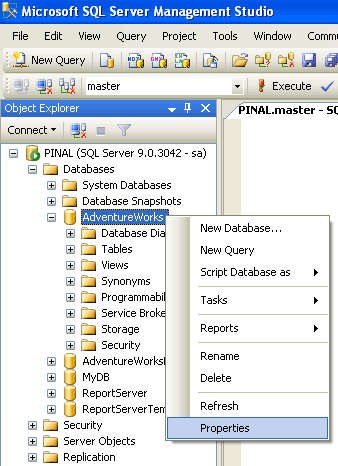
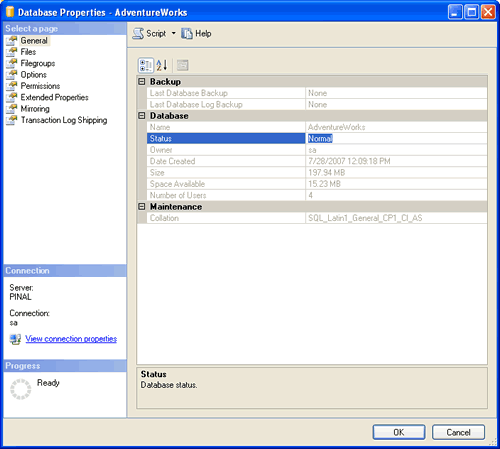
Turning the Database Status Query Into a Daily Check
The query in the post checks one database. I find it more useful to check them all at once and show only the ones that need attention: SELECT name, state_desc FROM sys.databases WHERE state_desc <> 'ONLINE'. If it returns no rows, every database is online.
Some states are normal in the right place. A database on a mirroring or log shipping standby server may show RESTORING all the time, and that is expected. RECOVERING right after a restart is also normal. Give it time and watch the error log for progress.
Two other columns in sys.databases are worth adding. user_access_desc tells you if a database is stuck in SINGLE_USER mode, and is_read_only tells you if someone made it read only. Both cause errors that look like a database problem but are really just a setting.
SUSPECT is the one to treat seriously. Do not detach a suspect database, as you may not be able to attach it again. Read the error log, check the storage, and restore from a good backup if you can. Once the database is back online, run DBCC CHECKDB to confirm it is clean.
Published by Pinal Dave on SQLAuthority. More of my work at pinaldave.com.
Discover more from SQL Authority with Pinal Dave
Subscribe to get the latest posts sent to your email.



30 Comments. Leave new
I got it and i am posting the aswer under my question
SELECT name FROM sys.databases WHERE state != 0;
——————————OR—————————————
SELECT name, state_desc FROM sys.databases WHERE state IN (0,1,2,3,4,5,6)
Where 0 = ONLINE ,1 = RESTORING,2 = RECOVERING,3 = RECOVERY_PENDING,4 = SUSPECT,5 = EMERGENCY, 6 = OFFLINE
Hi,
I am working on Sql Server 2005. I want to know System Scripts (Sql) for below task.
Data Monitoring – Data Buffering Quality, DD cache Quality, SQL Pin ratio, Alloc fault rate
Check System logs for errors or warning
Check failed update requests
Check for old pending locks or failed locks
Check Database Growth
Check Missing Indexes
Check table space used
Database growth and storage plan
Data Archival
Check DMS Status and connectivity
Applications Monitoring and Management
Application Alerts for Work Process Monitoring
Daily Monitoring checklist for DB
Buffer ,Cache Hits ,Clearing of Caches
SQL Hardening
If anyone know plz let me know.
Thanks…
how to check the last database shrinking status in sql server 2000 and 2005 history
How to make it work through linked server.
SELECT
name,DATABASEPROPERTYEX(name, ‘Status’)as status,FROM
[USPVL8C14].master.dbo.sysdatabases