
In this blog post we are going to fix the error which is related to Named Pipes Provider. The full error reads HResult 0x2, followed by could not open a connection to SQL Server.
Error:
HResult 0x2, Level16, State 1
Named Pipes Provider: Could not open a connection to SQL Server.
Sqlcmd: Error: Microsoft SQL Native Client : An error has occurred while establishing a connection to the server. When connecting to SQL Server 2005, this failure may be caused by the fact that under the default settings SQL Server does not allow remote connections..
Sqlcmd: Error: Microsoft SQL native Client : Login timeout expired
Solution/Fix/WorkAround:
By default SQL Server 2005 has TCP/IP connections disabled. To enable TCP/IP support, use the SQL Server Configuration Manager tool, select SQL Server 2005 Network Configuration, select Protocols, double-click on TCP/IP, and turn on Enabled.
AND
By default SQL Server 2005 has Named Pipes connections disabled. To enable Named Pipes support, use the SQL Server Configuration Manager tool, select SQL Server 2005 Network Configuration, select Protocols, double-click on Named Pipes, and turn on Enabled.
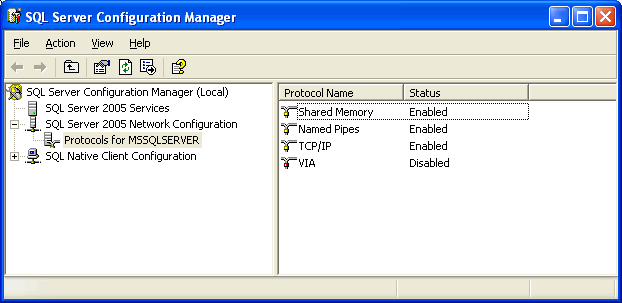
In the latest version of the SQL Server, I have not seen happening this error anymore. However, it is still relevant and if you are using SQL Server 2005 or 2008, I am sure you will find this error during installation and with the help of this blog you can fix it.
Published by Pinal Dave on SQLAuthority. More of my work at pinaldave.com.
Discover more from SQL Authority with Pinal Dave
Subscribe to get the latest posts sent to your email.




14 Comments. Leave new
hi, after made the changes as mentioned, im still having the same error..
actually my problem is:
want to run a query in Windows Task Scheduler as the microsoft server 2005 express do not have the job scheduler, hence would like to set it in bat file but the cmd seem unable to access to sql with sqlcmd…
any idea?
thanks!!
Thanks. I needed to do one more change and after that it worked for me. In the named pipes properties just change the path to “\\.\pipe\sql\query” instead of default path “\\.\pipe\MSSQL$SQLEXPRESS\sql\query” and you are good to go.
Jitendra
you made all my searching woth it :)
Thanks a lot, Jitendra. You are the man.
I was tearing my hair out over failed DB connections before finding this – thanks Jitendra!
Thanks @Nick
Ma ke lode
Jitendra was the winner.
Thanks a lot !!
thanks a lot!
Thanks Jitendra!
Thanks a lot Jitendra!!
Thanks Jitendra!!! No other solution on the web has worked for me…
Thanks Jitendra !!! It worked for me as well.