Silent truncation can occur before a value reaches an nvarchar(max) variable. SQL Server evaluates the right-hand expression first. A wide destination cannot restore characters already lost in a bounded expression.

Reproduce the loss, then promote an operand
Run these two examples as separate batches. Both create two 3,000-character pieces. The first expression is bounded; the second makes a max operand part of the concatenation before it occurs.
DECLARE @A nvarchar(3000) = REPLICATE(N'A',3000);
DECLARE @B nvarchar(3000) = REPLICATE(N'B',3000);
DECLARE @Script nvarchar(max) = @A + @B;
SELECT LEN(@Script) AS CharacterLength,
       DATALENGTH(@Script) AS StoredBytes;
DECLARE @A nvarchar(3000) = REPLICATE(N'A',3000);
DECLARE @B nvarchar(3000) = REPLICATE(N'B',3000);
DECLARE @Script nvarchar(max) = CAST(@A AS nvarchar(max)) + @B;
SELECT LEN(@Script) AS CharacterLength,
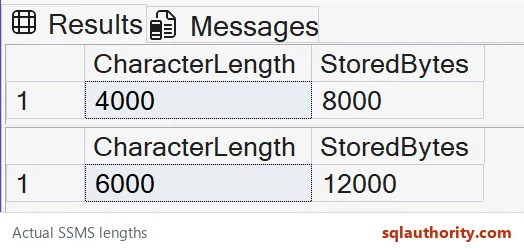
DATALENGTH(@Script) AS StoredBytes;On SQL Server 2025, the first result was 4,000 characters and 8,000 bytes. The promoted expression returned all 6,000 characters and 12,000 bytes. LEN excludes trailing ordinary spaces; DATALENGTH reports stored bytes. These inputs deliberately avoid trailing spaces.
Casting the completed bounded result is too late. Parentheses can also create a bounded subexpression before it meets a max operand. Check each intermediate expression rather than widening only the last variable.
Check the function that creates the long piece
SELECT DATALENGTH(REPLICATE(N'X',6000)) AS BoundedBytes,
       DATALENGTH(REPLICATE(CAST(N'X' AS nvarchar(max)),6000)) AS MaxBytes;
REPLICATE limits a non-max result to 8,000 bytes. The example returned 8,000 bytes for the bounded Unicode input and 12,000 for the max input. Promote the function input when the intended result exceeds its bounded limit.

Separate stored loss from display limits
PRINT displays at most 8,000 varchar characters or 4,000 nvarchar characters. SSMS has separate result-display settings. A clipped message or grid cell therefore does not prove that the stored value is incomplete.
Check the length and a known ending first. For a generated statement, verify its expected final clause and important middle sections too. Correct length alone does not prove correct SQL.
Inspect diagnostic chunks without executing the text
DECLARE @Text nvarchar(max) = REPLICATE(CAST(N'X' AS nvarchar(max)),6000);
DECLARE @Position bigint = 1;
DECLARE @Length bigint = LEN(@Text + N'#') - 1;
WHILE @Position <= @Length
BEGIN
 PRINT SUBSTRING(@Text,@Position,3000);
 SET @Position += 3000;
END;
This example prints two 3,000-character chunks. The suffix in the length expression includes trailing ordinary spaces in the count. The loop leaves the value unchanged and never executes it. Use a file export for very large text rather than treating copied message-pane output as an authoritative source.
Keep the statement builder deliberate
Review bounded intermediate variables, literals and function inputs. Keep data values in sp_executesql parameters. Validate identifiers separately and quote them with QUOTENAME; fixing truncation is not a reason to concatenate untrusted values.
Test just below and above the suspected limit, then test a longer value. Compare the complete intended result, including its ending. A max accumulator protects later concatenation only after its earlier inputs are intact.
Promote the expression before it narrows, then inspect the complete value.
A wide variable is not a safety net, it is only where an already narrowed value lands.
Published by Pinal Dave on SQLAuthority. More of my work at pinaldave.com.
Discover more from SQL Authority with Pinal Dave
Subscribe to get the latest posts sent to your email.