
SQL Server does not support arrays or a dynamic length storage mechanism like list. Absolutely there are some clever workarounds and few extra-ordinary solutions but everybody can;t come up with such solution. Additionally, sometime the requirements are very simple that doing extraordinary coding is not required. Here is the simple case. I only need a temporary array or list to hold a few values.
Let us say here are the values: a, 10, 20, c, 30, d. Now the requirement is to store them in a array or list. It is very easy to do the same in C# or C. However, there is no quick way to do the same in SQL Server. Every single time when I get such requirement, I create a table variable and store the values in the table variables. Here is the example:
For SQL Server 2012:
DECLARE @ListofIDs TABLE(IDs VARCHAR(100));

INSERT INTO @ListofIDs

VALUES('a'),('10'),('20'),('c'),('30'),('d');

SELECT IDs FROM @ListofIDs;

GO
When executed above script it will give following resultset.
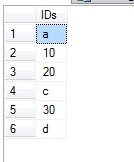
Above script will work in SQL Server 2012 only for SQL Server 2008 and earlier version run following code.
DECLARE @ListofIDs TABLE(IDs VARCHAR(100), ID INT IDENTITY(1,1));
INSERT INTO @ListofIDs
SELECT 'a'
UNION ALL
SELECT '10'
UNION ALL
SELECT '20'
UNION ALL
SELECT 'c'
UNION ALL
SELECT '30'
UNION ALL
SELECT 'd';
SELECT IDs FROM @ListofIDs;
GO
Now in this case, I have to convert numbers to varchars because I have to store mix datatypes in a single column. Additionally, this quick solution does not give any features of arrays (like inserting values in between as well accessing values using array index).
Well, do you ever have to store temporary multiple values in SQL Server – if the count of values are dynamic and datatype is not specified early how will you about storing values which can be used later in the programming.
Published by Pinal Dave on SQLAuthority. More of my work at pinaldave.com.
Discover more from SQL Authority with Pinal Dave
Subscribe to get the latest posts sent to your email.

35 Comments. Leave new
How can I convert missing values across different columns in a table to zero value in SQL server 2012. I can do it easily in SAS by referring to an array.
Or just create a temp table and use that in your script.
how I can do to get the first element?
How can I identify the below loop and insert into another table
Loop should be
REM BEN
1 2
2 1
1 2
2 3
3 1
1 2
2 3
3 4
4 1
and so on
and insertion should be
1 2
1 2 3
1 2 3 4
Can you tell us the logic behind this so that it is easy to help you?