Answer simple quiz at the end of the blog post and -
Every day one winner from India will get Joes 2 Pros Volume 2.
Every day one winner from United States will get Joes 2 Pros Volume 2.
Identity Fields
For students new to the database world, it helps to begin thinking about ID fields in the context of larger organizations with lots of activity. A customer service department has a constant flow of activity and many representatives are entering data in the system simultaneously. The same is true for large billing departments. These are examples where an identity field helps to ensure the entities you care about get tracked properly. A CustomerID value that is automatically generated with each new record makes sure each new customer gets a unique number – even if you have many reps all entering data at the same time.
The CustomerID field is one we wouldn’t want accidentally duplicated, altered, or deleted. Similarly, the billing department would not want to have mistaken entries in the InvoiceID field. A missing InvoiceID could indicate a serious error (e.g., a customer wouldn’t get billed and JProCo wouldn’t get paid for that order) or even fraud. A duplicate InvoiceID value might result in a customer’s payment being applied to the wrong customer.
Identity fields help prevent these unwanted scenarios of ambiguity. For larger tables, like JProCo’s CurrentProducts, having ProductID as an identity field ensures each ProductID value will be unique and sequential. It also saves JProCo’s product managers from having to track down which ProductID to use each time they quickly need to add new products.
One hint about the identity property is to count the number of times we’ve used the words “large” and “active” in this section. For large tables where new records get added daily, the identity property saves time and helps enforce data integrity. But with smaller tables where records don’t often change, using the identity property to create your ID field is unnecessary and its automatic incrementing can make extra work for you.
Tables where records are frequently deleted also make poor candidates for the identity property. In our next example, we will see that an identity field’s ability to auto-increment and keep track of the next expected value can require extra maintenance tasks when fields are deleted. The example were going to use is the CurrentProducts table which has 480 records (see figure below).
Click on Images to see it in in original size.
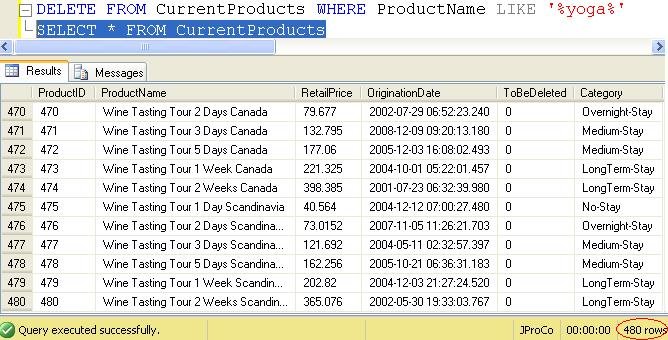
There are exception cases when you will need to alter a value in the identity field. When training a new database user, you might temporarily allocate them a few empty invoice records to practice on. Later the practice records will be deleted, but you’ll want to make sure your next invoice numbers appears in proper sequence. The ProductID field is auto populated each time a record is created since it has an identity property set to count by 1.
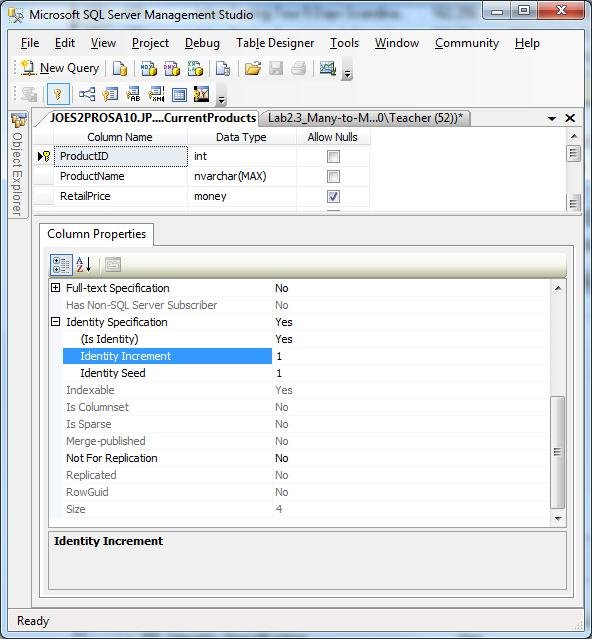
Let’s step through an example and pretend we don’t already know that ProductID field is an identity field, so we can read the error message SQL Server generates when you attempt to enter an ID into the identity field. Note: There is a reason this example is inserting by position and not by name and we will get to that later.
Notice we tried to enter 481 instead of letting SQL pick the next value? This results in an error message.

When you remove the 481 value (ProductID) from the code, and then the insert statement works correctly.

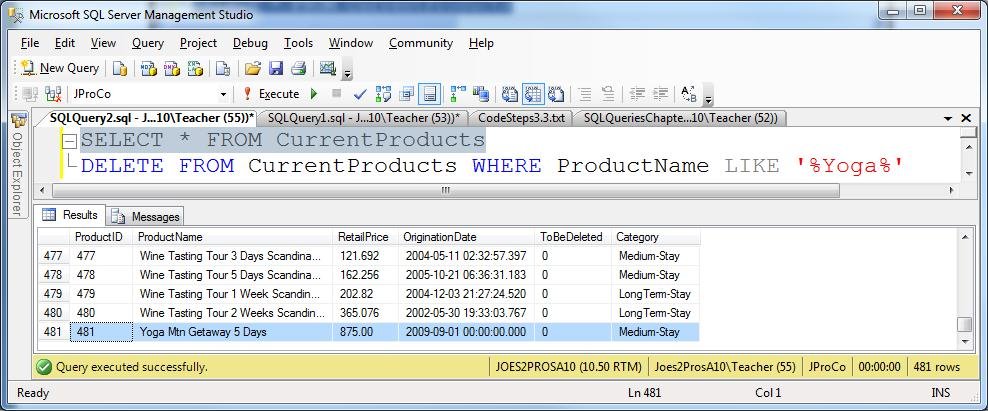
Check to see you have ProductID 481 inserted at the “Yoga Mtn Getaway 5 Days”. Once verified, delete all the yoga products, in order to simulate the accidental deletion scenario.
Overriding Identity Fields
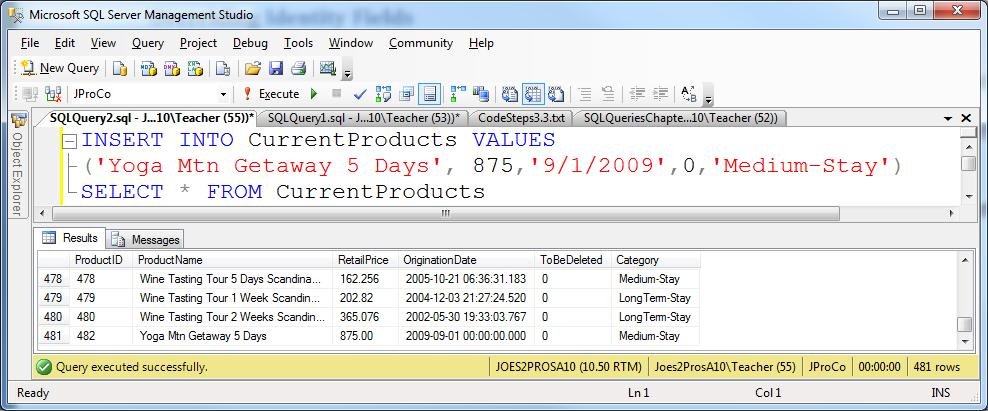
If you run the insert statement again you won’t get ProductID 481. You will get 482. There is no 481 and there won’t be unless you take charge and put it there.
Our next goal it to re-insert this Yoga trip with a value of 481. To do our next step we need to temporarily set the IDENTITY_INSERT property to ON. We successfully ran the first command setting IDENTITY_INSERT to ON for the CurrentProducts table. We next attempted to run the INSERT statement for the three yoga records.
Click on Images to see it in in original size.
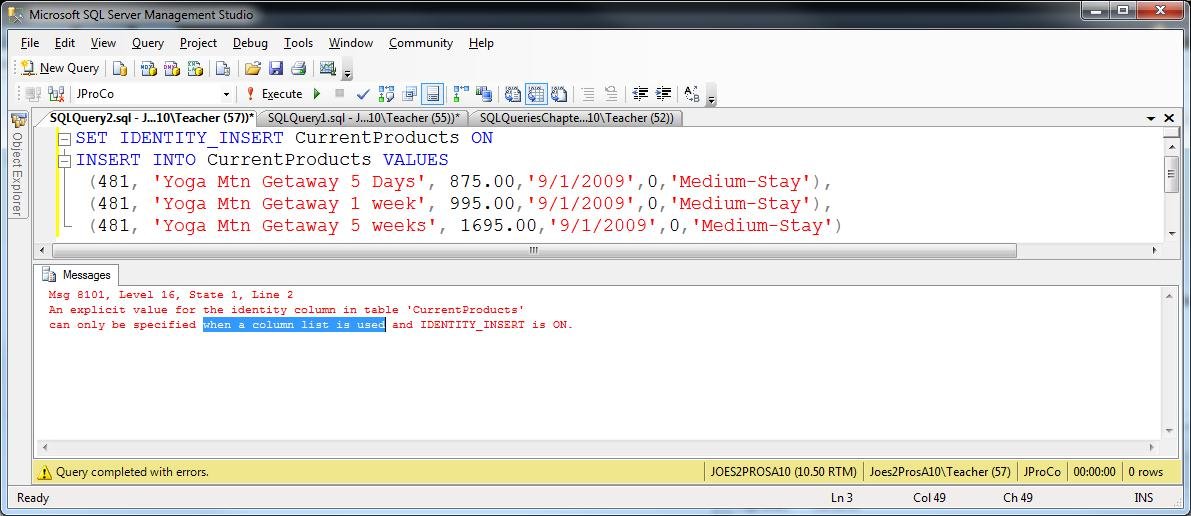
In the error message prompts us to include a column list whenever we manually insert records to a table with an identity field. In other words, when manually inserting records, we have to pass the values by name and not position.
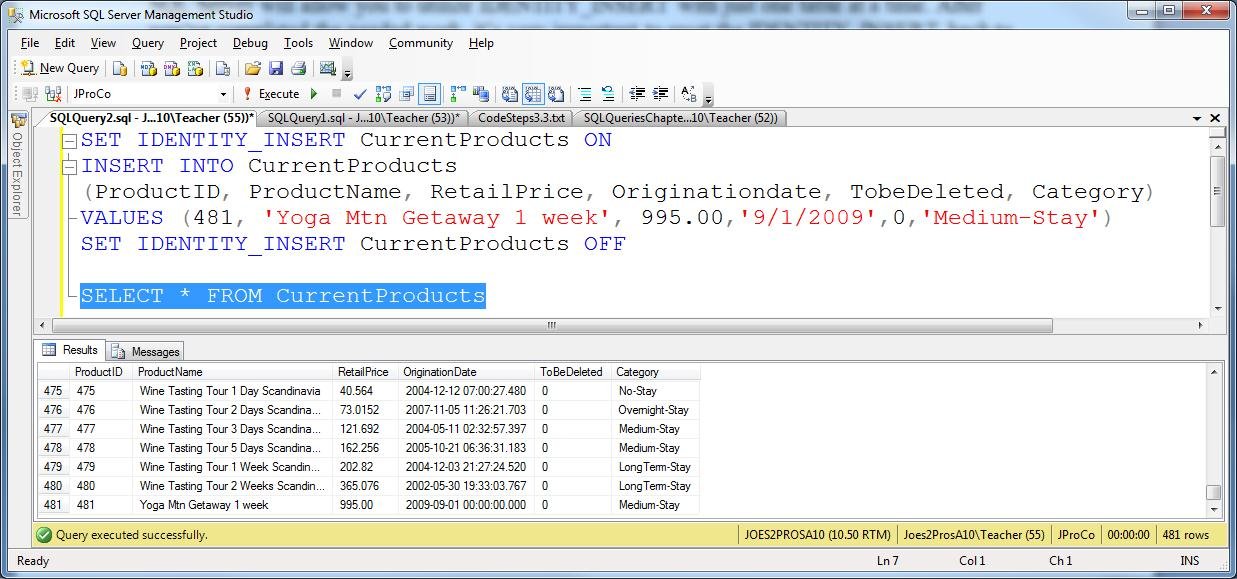
SQL Server will allow you to utilize IDENTITY_INSERT with just one table at a time. After you’ve completed the needed work, it’s very important to reset the IDENTITY_INSERT back to OFF. Just to check it worked we ran a SELECT statement and confirm the yoga records show in the table and can see the last record has a ProductID of 481.
Note: If you want to setup the sample JProCo database on your system you can watch this video. For this post you will want to run the SQLQueriesChapter3.0Setup.sql script from Volume 2.
Question 9
You need to explicitly insert a value into an identity field for the SalesInvoice table. What two things must you do in order for your insert statement to successfully execute? (Choose two)
- Turn the IDENTITY_INSERT to ON for the SalesInvoice table
- Turn the IDENTITY_INSERT to OFF for the SalesInvoice table
- Insert your values by position
- Insert your values by name
Please post your answer in comment section to win Joes 2 Pros books.
Rules:
Please leave your answer in comment section below with correct option, explanation and your country of resident.
Every day one winner will be announced from United States.
Every day one winner will be announced from India.
A valid answer must contain country of residence of answerer.
Please check my facebook page for winners name and correct answer.
Winner from United States will get Joes 2 Pros Volume 2.
Winner from India will get Joes 2 Pros Volume 2.
The contest is open till next blog post shows up at http://blog.sqlauthority.com which is next day GTM+2.5.
Reference: Pinal Dave (http://blog.SQLAuthority.com)


Correct answer is options 1 & 4.
New Delhi
(Choose two)
1) Turn the IDENTITY_INSERT to ON for the SalesInvoice table
—this will temporairily set the identity on
4) Insert your values by name
– since there is an identity column identity is set to off and we are manually deeding the identity column we have to insert by name and not position.
Leo Pius
USA
Question 9
You need to explicitly insert a value into an identity field for the SalesInvoice table. What two things must you do in order for your insert statement to successfully execute? (Choose two)
answer is 2:
2. Turn the IDENTITY_INSERT to OFF for the SalesInvoice table
Thanks for the post :-)
Country: India
Misunderstood:….
Answer is:
1. Turn the IDENTITY_INSERT to ON for the SalesInvoice table
4. Insert your values by name
To insert value in identity field explicitly we should use option first –
1.Turn the IDENTITY_INSERT to ON for the SalesInvoice table
and again make it implicitly insertion we should use option two –
2.Turn the IDENTITY_INSERT to OFF for the SalesInvoice table
Neelesh Jain
India
The correct options are 1 and 4. In order to override the identity field, you must set IDENTITY_INSERT to ON and insert the values by name. After the insert is done, it is important to set the IDENTITY_INSERT back to OFF.
Country of Residence: USA
Number 1 and Number 4.
1.) Turn the IDENTITY_INSERT to ON for the SalesInvoice table
4.) Insert your values by name
Tim
Texas, USA
Correct answers are 1 and 4, because two things must be done in order to get the insert statement successfully executed:
* Turn the IDENTITY_INSERT to ON for the SalesInvoice table
* Insert your values by name
Rene Castro
El Salvador
Correct answers
option 1 and 4
1.Turn the IDENTITY_INSERT to ON for the SalesInvoice table
4.Insert your values by name
Thanks.
Country – India
The correct answers are 1 and 4:
1 .Turn the IDENTITY_INSERT to ON for the SalesInvoice table — correct
2.Turn the IDENTITY_INSERT to OFF for the SalesInvoice table – not
3. Insert your values by position – not
4. Insert your values by name — correct
I am from USA
Correct Answer is Option 1 and 4.
1.) Turn the IDENTITY_INSERT to ON for the SalesInvoice table
4.) Insert your values by name
Cheers,
Prasad Yangamuni
INDIA (Pune)
Correct answer is options 1 & 4.
1) Turn the IDENTITY_INSERT to ON for the SalesInvoice table
4) Insert your values by name
Pratik Raval
India
Answers
option 1 and 4
Kulwant kumar
Delhi india
The Answer is
1.Turn the IDENTITY_INSERT to ON for the SalesInvoice table
4.Insert your values by name
Country : India [Ahmedabad]
Correct answer:
1. Turn the IDENTITY_INSERT to ON for the SalesInvoice table
4. Insert your values by name
Country of residence: India
generally the steps should be
1.) SET IDENTITY_INSERT ON
2.) INSERT the value you want
3.) SET IDENTITY_INSERT OFF
as per defined in our blogs :)
http://www.sqlhub.com/2009/03/set-identity-insert-how-to-insert-value.html
http://blog.sqlauthority.com/2007/03/28/sql-server-fix-error-8101-an-explicit-value-for-the-identity-column-in-table-can-only-be-specified-when-a-column-list-is-used-and-identity_insert-is-on/
but for this question, we should go for following choices from the given options in your post.
1.) Turn the IDENTITY_INSERT to ON for the SalesInvoice table
4.) Insert your values by name
Ritesh (India)
Option Number 1 and 4.
1.) Turn the IDENTITY_INSERT to ON for the SalesInvoice table
4.) Insert your values by name
Nikhildas
Cochin, India
Correct answer was 1st then 4th option to get respective result.
The Correct Answer is Option 1 and 4:
1.Turn the IDENTITY_INSERT to ON for the SalesInvoice table
4.Insert your values by name
As you mentioned above, An explicit value for the Identity column should be specified only when its IDENTITY_INSERT is set to ON and when manually inserting records, we have to pass the values by name and not position.
India.
Correct Answer is:
1. Turn the IDENTITY_INSERT to ON for the SalesInvoice table
4. Insert your values by name
Varinder Sandhu (India)
The correct options are 1 and 4
In order to insert any value where in table any identity column is defined first you need to set “IDENTITY_INSERT ON” then need to insert your desired value. After this you also need to set the “IDENTITY_INSERT TO OFF”.
Mahmad Khoja
INDIA
AHMEDABAD
1. Turn the IDENTITY_INSERT to ON for the SalesInvoice table
Ghanshyam
India (Bangalore)
Correct answers
option 1 and 4
1.Turn the IDENTITY_INSERT to ON for the SalesInvoice table
4.Insert your values by name
Malay Shah,
City – Ahmedabad
Country – India
Correct answers are:
1. Turn the IDENTITY_INSERT to ON for the SalesInvoice table
4. Insert your values by name
Country: India
Ans:
1.Turn the IDENTITY_INSERT to ON for the SalesInvoice table
4.Insert your values by name
This two steps are mandatory to insert value in the column. After you’ve completed the needed work, it’s very important to reset the IDENTITY_INSERT back to OFF.
2.Turn the IDENTITY_INSERT to OFF for the SalesInvoice table
This step is optional as per requirement.
Partha
Country:India
Question 9
You need to explicitly insert a value into an identity field for the SalesInvoice table. What two things must you do in order for your insert statement to successfully execute? (Choose two)
1 Turn the IDENTITY_INSERT to ON for the SalesInvoice table
4 Insert your values by name
Answers is 1 and 4
1 will auto add IDENTITY Value
2 User need to insert value by Name so both are correct answers.
I am from India
1) Turn the IDENTITY_INSERT to ON for the SalesInvoice table
By doing this we can manually insert into identity column
4) Insert your values by name
For adding record (manually adding identity column), we have to insert the value by name not by position.
India
Correct answer is option 1 & 4
For identity column, in case you need to enter values in identity column explicitly, you have to turn ON identity_insert for that table.
Than you insert values by name into that table
Sumit
India
Correct answer in option 1 and 4.
India
Correct answer is 1 and 4.
Turn the IDENTITY_INSERT to ON for the SalesInvoice table
Insert your values by name
City : Baroda
Country: INDIA
Thanks
GurjitSingh
For The Question – 9 , Answer is Option – 1 and 4
1.Turn the IDENTITY_INSERT to ON for the SalesInvoice table
4.Insert your values by name
Thanks,
Narendra(India)
The answer :
1. Turn the IDENTITY_INSERT to ON for the SalesInvoice table
4. Insert your values by name
After insert, the IDENTITY_INSERT must be set to OFF for SalesInvoice table
- Sandhya Musalkol
Bangalore, India
Hi, If we will go with description we have to find:
1)we need to temporarily set the IDENTITY_INSERT property to ON and 2)we have to pass the values by name and not position.
So its very clear that Answer 1and 4 are right answers.
1.Turn the IDENTITY_INSERT to ON for the SalesInvoice table
4.Insert your values by name
Thanks….
Rajneesh Verma
(INDIA)
correct option :- 1 & 4
1.Turn the IDENTITY_INSERT to ON for the SalesInvoice table and
4.Insert your values by name
Shilpa
India.
Hi Sir,
The correct options are 1 and 4
To insert the values correctly into an identity field
First we should Turn the IDENTITY_INSERT to ON for the SalesInvoice table
Second we should Insert the values by name
Third we should remember to reset the IDENTITY_INSERT back to OFF.
P.Anish Shenoy
INDIA,Bangalore,Karnataka
The answer is option 1 and 4
1.Turn the IDENTITY_INSERT to ON for the SalesInvoice table
4.Insert your values by name.
Thank You,
Rama chandra sahu
Bangalore,India
Answer 1 and 4 is correct.
1 . Turn the IDENTITY_INSERT to ON for the SalesInvoice table.
2. Insert your values by name
Rajesh Garg
From India
[...] Q 9) SQL SERVER – Tips from the SQL Joes 2 Pros Development Series – Overriding Identity Fields – T… [...]
Correct Answer is :
1.Turn the IDENTITY_INSERT to ON for the SalesInvoice table
Allows explicit values to be inserted into the identity column of a table.
4.Insert your values by name
INDIA
Correct Answer is :
1.Turn the IDENTITY_INSERT to ON for the SalesInvoice table
Allows explicit values to be inserted into the identity column of a table.
4.Insert your values by name
INDIA
the correct answer is
1) and 4) ie.
1) .Turn the IDENTITY_INSERT to ON for the SalesInvoice table
4).Insert your values by name
because you need to enable identity insert on in order to insert into identity enable column…
then you have to insert the values by name…
India
Correct answers :-
Option No. -> 1 and 4
1.Turn the IDENTITY_INSERT to ON for the SalesInvoice table
4.Insert your values by name
Shekhar Gurav.
Country – India
Correct answers are 1 and 4 options
1. Turn the IDENTITY_INSERT to ON for the SalesInvoice table
4. Insert your values by name
I’m from INDIA
Option no :- 1 and 4.
1) Turn the IDENTITY_INSERT to ON for the SalesInvoice table
4) Insert your values by name
Somnath Desai
India
Option 1 and 4 are Right
1. Turn the IDENTITY_INSERT to ON for the SalesInvoice table
4. Insert your values by name.
Yeou Sunn
India
The answer is Option 1 & 4
In order to explicitly insert the deleted field into SalesInvoice table we would need to
- First turn the IDENTITY_INSERT to ON for the SalesInvoice table
- then Insert the values by name as its required for the column list of the table to be specified in the INSERT statement for he insert to execute correctly
After the value is inserted always remember to SET IDENTITY_INSERT OFF for the SalesInvoice table.
-Annie
frm Bangalore
The correct answer in 1 and 4.
1.Turn the IDENTITY_INSERT to ON for the SalesInvoice table
4.Insert your values by name
Karan,
India
The two must remembered points are option 1 and option 4.
Because as you explained above,
* we need to temporarily set the IDENTITY_INSERT property to ON
* when manually inserting records, we have to pass the values by name and not position.
Country: India
Option 1 then Option 4
1.Turn the IDENTITY_INSERT to ON for the SalesInvoice table
4.Insert your values by name
Thanks
Vivek Srivastava
Country:- India
The correct answer is: 1 and 4
1. Turn the IDENTITY_INSERT to ON for the SalesInvoice table
This will specify that we are going to insert values in IDENTITY column
4. Insert your values by name
We have to specify the column Name where we need to populate that value
Country: INDIA
Tejas
Hi all
Ans :
1. and 4.
INDIA
Answer is Options 1 and 4
Abhishek Bhat,
India
Correct answer is 1 and 4
I am from Kolkata, india
Correct Options are 1 and 4.
Krunal K. Doshi
INDIA
1 and 4 are correct options
The corrects Answer is :
1.Turn the IDENTITY_INSERT to ON for the SalesInvoice table
4.Insert your values by name
To insert data manually for identity field we need to set IDENTITY_INSERT to ON.
Whenever we manually insert records to a table with an identity field, we have to pass the values by name and not position.
correct answer is 1 and 4
India
The correct answers are 1 and 4.
Once complete it is important to set the IDENTITY_INSERT back to OFF.
Country of Residence: UK
In order to explicitly insert a record you’d need to
1.Turn the IDENTITY_INSERT to ON for the SalesInvoice table
4.Insert your values by name
#1 allows you to set the identity for the column and #4 lets SQL know which values to place in which fields. It is also important to note that in the end you’ll want to turnd IDENTITY_INSERT OFF, but this isn’t required in order to get the record into the table.
oops….from the USA
The answers are #1 and #4
USA
Mike Michalicek
Question 9 : You need to explicitly insert a value into an identity field for the SalesInvoice table. What two things must you do in order for your insert statement to successfully execute?
The Correct Answer for the Question 9 is Option 1 and Option 4.
Reason:
A) We need to insert Identity field so we should make to Identity insert on on that particular table because when we insert the values or in a network multiple insertions happens then we must give correct next height value to make it work correctly.
so option 1) Turn the IDENTITY_INSERT to ON for the SalesInvoice table
so we are making sure that we insert identity value for the identity column.
then when coming to inserting values explicitly we any how made the IDENTITY_INSERT to ON so no need to give it a value for we can now insert by name and without having to worry about the insert values in to identity field will be taken care by SQL Server.
So the option 4) Insert your values by name.
Holds good.
hence above Question is solved by both option 1 and 4 respectively.
Pinal Sir, you are doing a great work continue this makes me more and more happy.
Diljeet Kumari
Country Of residence : India
The correct steps are:
1.Turn the IDENTITY_INSERT to ON for the SalesInvoice table
Then
4.Insert your values by name
Country: United States
Correct answer, option 1 and 4.
India
Correct answer is 1 and 4
Correct answer is options 1 & 4. is correct
1. Turn the IDENTITY_INSERT to ON for the SalesInvoice table
4. Insert your values by name
by kkmishra(jssate)
INDIA
Correct Option 1 and 4
1.Turn the IDENTITY_INSERT to ON for the SalesInvoice table
4.Insert your values by name
To explicitly insert a value into an identity field for the SalesInvoice table we have to set IDENTITY_INSERT to ON and we have to specify the Value by names
Yasodha.N(India)
1 & 4 – IDENTITY_INSERT ON and by Name
JP Davey
USA
1. Turn the IDENTITY_INSERT to ON for the SalesInvoice table
4. Insert your values by name
USA
Hi Pinal,
Challenge:
Question 9
You need to explicitly insert a value into an identity field for the SalesInvoice table. What two things must you do in order for your insert statement to successfully execute? (Choose two)
1.Turn the IDENTITY_INSERT to ON for the SalesInvoice table
2.Turn the IDENTITY_INSERT to OFF for the SalesInvoice table
3.Insert your values by position
4.Insert your values by name
Correct Answer:
The correct answer if only selecting two choices is #1 and #4:
1.Turn the IDENTITY_INSERT to ON for the SalesInvoice table
4.Insert your values by name (including the Identity column)
You should followthat up by running #2 to turn off the IDENTITY_INSERT:
2.Turn the IDENTITY_INSERT to OFF for the SalesInvoice table
Explanation:
Item #1 allows you to explicitly insert a value into the Identity column. In item #4, we must list all of the columns that we have provided data for. After the insert, you should also run item #2 to turn off the IDENTITY_INSERT.
Country:
United States
Thanks for the knowledge!
Regards,
Bill Pepping
Answers 1 and 4.
1.) Turn the IDENTITY_INSERT to ON for the SalesInvoice table
4.) Insert your values by name
Country : India
Set IDENTITY_INSERT SalesInvoice ON
Insert by name
country: POland
Correct Answers are Option 1 & 4
Country: USA
Answers 1 and 4.
1.) Turn the IDENTITY_INSERT to ON for the SalesInvoice table
4.) Insert your values by name
(Sale, Nigeria)
1) Turn the IDENTITY_INSERT to ON for the SalesInvoice table
4) Insert your values by name
To Complete the operation we need to do
1. Turn the IDENTITY_INSERT to ON for the SalesInvoice table
4. Insert your values by name
India
1.Turn the IDENTITY_INSERT to ON for the SalesInvoice table
4.Insert your values by name
Gordon Kane
Allen TX
USA
The script should run in follow order
1.- Activate the indentity ( turn on )
2.- insert the value by name
So the answer in this case is :
options 1 and 4
1 . Turn the IDENTITY_INSERT to ON for the SalesInvoice table
4. Insert your values by name
Leonardo Guerrero
from: Chile
Correct Options Are
1. Turn the IDENTITY_INSERT to ON for the SalesInvoice table
2. Insert your values by name
Alok Chandra Shahi
India
The correct options for the above provided are
#1
#4
#1 –> The explicit value to insert in identity column, you should have turn identity_insert ON and do the work to add explicit value.
#4 –> Insert your values by name –> and after its inserted, Turn identity Off if there is no more records to insert explicitly.
Thanks,
Nishit Badani
Chicago, USA
Answers are :
1.Turn the IDENTITY_INSERT to ON for the SalesInvoice table
4.Insert your values by name
Vinay
Pune, India
ans
1.Turn the IDENTITY_INSERT to ON for the SalesInvoice table
lalit
india
Answer: Option 1 and Option 4
Because whenever we want to explicitly insert value to Identity column we have to turn Identity Insert on and must specify all the column names whose values are to be inserted.
Country: India
Question 9
You need to explicitly insert a value into an identity field for the SalesInvoice table. What two things must you do in order for your insert statement to successfully execute? (Choose two)
1-Turn the IDENTITY_INSERT to ON for the SalesInvoice table
4-Insert your values by name
Chennai, INDIA
If I need to explicitly insert a value into an identity field for the SalesInvoice table,
i need to perform the following two steps:
1.)Turn the IDENTITY_INSERT to ON for the SalesInvoice table
2). Since when manually inserting records to a table with an identity field, we have to pass the values by name and not position thus my next step would be:
Insert values by name
Thus the answers would be:
1. Turn the IDENTITY_INSERT to ON for the SalesInvoice table
4. Insert your values by name.
After the work is complete it is very important to turn the IDENTITY_INSERT off.
My country for Residence is — India
The 2 things you must do to explicitly insert a value into an identity field for the SalesInvoice table are:
SET IDENTITY_INSERT SalesInvoice ON
and
Insert your values by name.
This corresponds to answers 1 and 4.
David
USA
The Correct answers the above question is
Option 1 and 4.
1)Turn the IDENTITY_INSERT to ON for the SalesInvoice table
4)Insert your values by name
Explanation:
When we want to explicitly insert a value into an identity field for the SalesInvoice table first we need to enable it or set it to on as described by the option 1.
Then when it comes to inserting values we cannot insert values into the table with reference to the identity field because it automatically gets inserted.
Hen the other option we are remain is the 4th option by name and when we do that we insert into the table easily.
Hence 4th and 1 st option is correct.
DILIP KUMAR JENA
Country : INDIA
Actually 3 steps.
First, Option 1: Turn the IDENTITY_INSERT to ON for the SalesInvoice table. (Allows values to be explicitly inserted into the ID column.)
Second, Option 4: Insert your values by name. (Required by SQL Server syntax. Use “Script Table as” feature to get list of column names. Use “SELECT” option not “INSERT” option.)
Third, Option 2: Turn the IDENTITY_INSERT to OFF for the SalesInvoice table. (You are the guardian of the data. Be tidy!)
Country: United States of America
Option 1 and Option 4. We need to enable identity insert on the table and also we need to insert values into the table with column names, for the identity insertion to Succeed.
Venkataraman R
USA
The answer is:
1 – Turn the IDENTITY_INSERT to ON for the SalesInvoice table
4 – Insert your values by name
Thanks!
Jerry – USA
The correct options are 1 and 4
In order to insert any value where in table any identity column is defined first you need to set “IDENTITY_INSERT ON” then need to insert your desired value. After this you also need to set the “IDENTITY_INSERT TO OFF”.
The correct options are 1 and 4
In order to insert any value where in table any identity column is defined first you need to set “IDENTITY_INSERT ON” then need to insert your desired value. After this you also need to set the “IDENTITY_INSERT TO OFF”.
Country : USA
Turn the IDENTITY_INSERT to ON for the SalesInvoice table
Insert your values by name
Have to turn the IDENTITY_INSERT on as we want to explicitly insert the value into the identity column
insert the values by name as sql server through an error if tried to insert by position
USA
1.Turn the IDENTITY_INSERT to ON for the SalesInvoice table
4.Insert your values by name
Texas, USA
The correct options are 1 and 4
In order to insert any value where in table any identity column is defined first you need to set “IDENTITY_INSERT ON” then need to insert your desired value. After this you also need to set the “IDENTITY_INSERT TO OFF”.
Amit Bansal
INDIA
SONIPAT
Option 1, 4 are correct
But After Successful insertion we need to set IDENTITY_INSERT OFF
Answer is :1. Turn the IDENTITY_INSERT to ON for the SalesInvoice table
4. Insert your values by name
Country:India
Answer: Option 1 & 4
1) .Turn the IDENTITY_INSERT to ON for the SalesInvoice table
4).Insert your values by name
Country: India(sikha)
the answer i option 1 and Option 4
kaushik
india
The correct answers are
1) Turn the IDENTITY_INSERT to ON for the SalesInvoice table
4) Insert your values by name
–As we have to explicitly insert value in the identity column the IDENTITY_COLUMN need to be set on and to overcomecerror ‘ An explicit value for the identity column in table SalesInvoice can only be specified when a column list is used and IDENTITY_INSERT is ON’ we need to insert the values by name
Name: Krishnakant Joshi
Country: INDIA
Nit pick: the correct term is not “Field,” it’s “Column.” A field is a box on a form where you provide user input. A column is part of a table in a database. Usually one populates the other :-)
Otherwise, great idea for a post!
The answers are :
1.Turn the IDENTITY_INSERT to ON for the SalesInvoice table
4.Insert your values by name
Francisco,
Miami
Yesterday the RANDOM algorithm picked two winners from USA so
today – we will have additional winner from India who will win
Pluralsight FREE subscription.
Pluralsight Subscription Winner
Winner from India: Ritesh Shah
I thank you all for participating here. The permanent record of this update is posted on facebook page.
What do you mean by value by Name and position?
To my knowlwdge
Option 1 and 4 are true.
Azhar Iqbal
Country Pakistan.
It’s good to know how to do this, but it’s just as important to know when to do it. I can’t think why it matters to have a gap in your sequence of identity values, and I can’t think of a reason to do what you’ve suggested in this blog post. You now have hundreds of readers who may think that this is the right thing to do, just because you’ve shown them how to do it.
John
Option 1 and 4 are correct.
Uday
USA
Answer is #1 and #4
1. Turn the IDENTITY_INSERT to ON for the SalesInvoice table
4. Insert your values by name
Thanks,
Wayne (USA)
[...] Q 9) SQL SERVER – Tips from the SQL Joes 2 Pros Development Series – Overriding Identity Fields – T… [...]
The correct anwers are;
1.Turn the IDENTITY_INSERT to ON for the SalesInvoice table
4.Insert your values by name
Bulent (USA)
Option 1 and 4 are correct.
Azhar Iqbal
From pakistan.
[...] SQL Joes 2 Pros Development Series – Overriding Identity Fields – Tricks and Tips of Identity Fi… [...]