
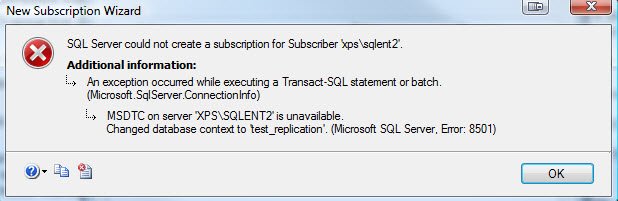
During configuring replication on one of the server, I received following error. This is very common error and the solution of the same is even simpler. SQL Server reported Error 8501, MSDTC on server is unavailable.
MSDTC on server is unavailable. Changed database context to publisherdatabase. (Microsoft SQL Server, Error: 8501)
Solution:
Enable “Distributed Transaction Coordinator” in SQL Server.
Method 1:
- Click on Start–>Control Panel->Administrative Tools->Services
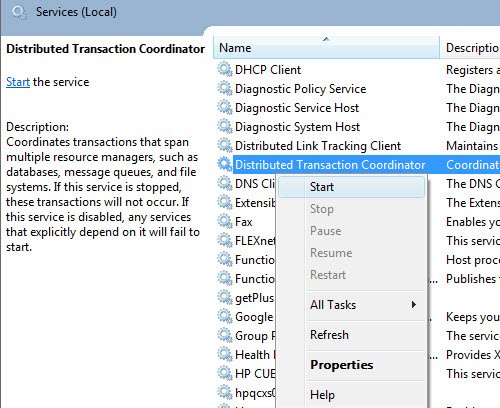
- Select the service “Distributed Transaction Coordinator”
- Right on the service and choose “Start”
Method 2:
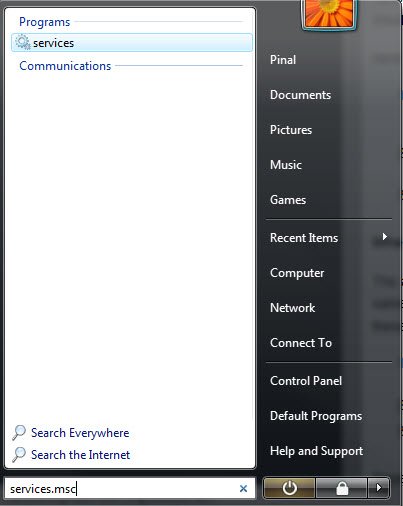
- Type services.msc in the run command box
- Select “Services” manager; Hit Enter
- Select the service “Distributed Transaction Coordinator”
- Right on the service and choose “Start”
Published by Pinal Dave on SQLAuthority. More of my work at pinaldave.com.


24 Comments. Leave new
Thanks this help me a lot
but why this service stops, when i use transcation scope in my code.