
Quite often, we need to know how many any particular objects have been executed on our server and what their execution plan is. I use the following handy script, which I use when I need to know the details regarding how many times any query has ran on my server along with its execution plan. You can add an additional WHERE condition if you want to learn about any specific object.
SELECT cp.objtype AS ObjectType,
OBJECT_NAME(st.objectid,st.dbid) AS ObjectName,
cp.usecounts AS ExecutionCount,
st.TEXT AS QueryText,
qp.query_plan AS QueryPlan
FROM sys.dm_exec_cached_plans AS cp
CROSS APPLY sys.dm_exec_query_plan(cp.plan_handle) AS qp
CROSS APPLY sys.dm_exec_sql_text(cp.plan_handle) AS st
--WHERE OBJECT_NAME(st.objectid,st.dbid) = 'YourObjectName'
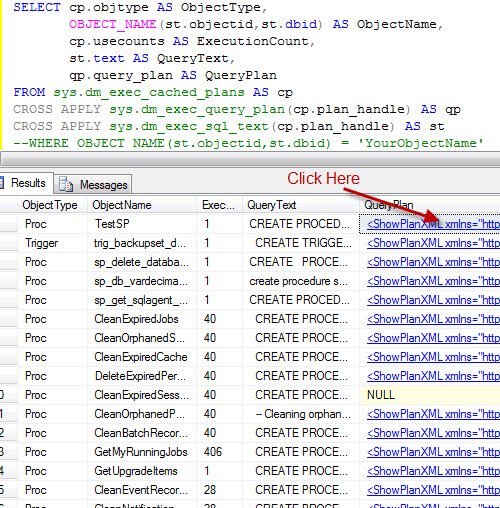
In result set, you will find the last column QueryPlan with XML text in it. Click on it, and it will open a new tab displaying the graphical execution plan.
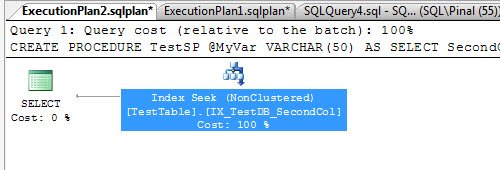
You can also save the newly opened tab in XML format with the extension .sqlplan. When this new file is opened in SQL Server Management Studio, it will automatically display the graphical representation of the XML Plan.
It is a quite simple script, but it works all the time.
Published by Pinal Dave on SQLAuthority. More of my work at pinaldave.com.




22 Comments. Leave new
Hello sir,
very useful and nice feature.
what is the command to clear all cache plans ?
so we can get last query plan.
I think this gonna work…
DBCC FREEPROCCACHE
no utility to clear the cache
instead you ‘ll force the DBMS engine to recompile your SP so a load Additional
Thanks Ashish.
Hi Pinal
When I executed the query you mentioned above on SQL Server 2005, it throws an error saying…
“Msg 174, Level 15, State 1, Line 2
The object_name function requires 1 argument(s).”
Does it work on SQL Server 2008?
Thanks
Sy
Hi Pinal,
When I executed this is the error msg i got for a particular object.
Msg 6335, Level 16, State 101, Line 1
XML datatype instance has too many levels of nested nodes. Maximum allowed depth is 128 levels.
Pls advise.
Thanks,
Gautham
You can also receive this error when trying to retrieve a query plan as XML, and the query plan is so complex that it has over 128 nesting levels. If you return the query_plan column from sys.dm_exec_text_query_plan instead of from sys.dm_exec_query_plan, you can avoid the error and still get the query plan text. Save the results as an xml file and open it with a tool like SQL Sentry Plan Explorer.
@Gautham: In SQL Server XML data type accepts only up to 128 levels of nodes nesting. Probably there is a plan that is too complicated to be stores in XML data type :-)
@Sy: What build of SQL Server 2005 do you have? It works for me on 9.00.4207.00. Also, check if your database is in compatibility level 90.
Thank you! This saved me so much time.
Thanks again.
Behzad
Well in SQL SSMS if you goto activity monitor and go to “Recent expensive queries” pane, right click and you will get the “Show execution plan” for a selected query..you will get the same result.
When I tryied in the SQL 2008 R2 the query plan is not displaying with GUI instead display as XML code
Me too, I am seeing the XML plan in SQL 2008 R2, but the graphical plan in SQL 2005. I want to get 2008 R2 to return the graphical version but cannot find anything that shows how to do it. Please help!
Thank you
Gary
Very much usful info. thank you very much for sharing
Thanks
Ramzan
Helped me a lot. Keep writing!
this is totally new for me thanks
Hi Pinal,
Can we get the user name also who excecuted the query?
Regards
the execution count here is cumulative since the sql services started…..if so then can we have a way to cumulate execution count/per hr or so…..!!
Please advise…..
Thank You,
Vaibhav
Hi Pinal,
I am getting the following error in my error log.
43003 2014-02-03 16:01:43.590 spid87 The query processor ran out of internal resources and could not produce a query plan. This is a rare event and only expected for extremely complex queries or queries that reference a very large numbe
r of tables or partitions. Please simplify the query. If you believe you have received this message in error, contact Customer Support Services for more information.
I have to know the query which is giving the above error. Could you please help me to find the query which is producing this error. I am facing this error from last few days but I am unable to find the query..
Thanks and Regards,
Raja Kumar Chikkala.
like it.
Hi, anyone knows how to get the execution plan of only one query inside a procedure? In my procedure, I know which query takes a long time, but want to see the execution plan. It is an UPDATE statement.
If you know the statement then run it as a adhoc via SSMS to get the plan. You may want to do that in a transaction and rollback to avoid adhoc modification of data.
For the query I’m interested in, the QueryPlan column is NULL. Why would that be?