
My present article covers two fundamental questions. One is about the maximum columns per primary key, and the other is Msg 1904.
1) What is the maximum number of columns included in Primary Key Index/Constraint?
2) What is fix/solution for the following error:
Msg 1904, Level 16, State 1, Line 1
The index ” on table ‘dbo.Table_2’ has 17 column names in index key list. The maximum limit for index or statistics key column list is 16.
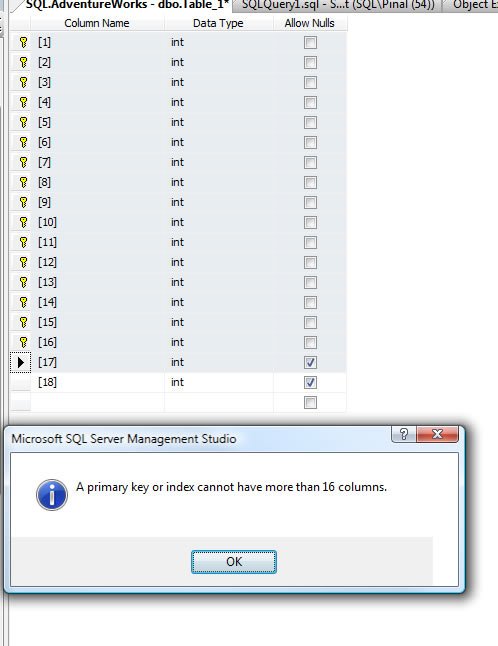
The same error surfaces when example is created using SSMS.
Fix/Solution/Workaround:
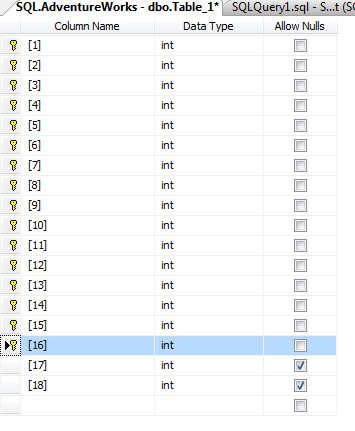
Maximum columns per Primary Key Index is 16. In fact, 16 is the limit for columns per Foreign Key and Index Key.
You cannot have more than 16 columns per Index Key, Primary Key or Foreign Key. So, reduce the columns in those column to less than or equal to 16 columns.
Why You Rarely Need the Maximum Columns per Primary Key
If you hit this error, the limit is usually not the real problem. A key with more than a handful of columns is a sign that the table is missing a simpler identifier. When a wide key is also the clustered key, it gets copied into every nonclustered index, and every foreign key pointing to the table has to carry all those columns too.
A common fix is to add a surrogate key, such as an INT IDENTITY column, as the primary key. Then protect the real business rule with a UNIQUE constraint on the natural columns. That keeps joins small and still stops duplicate data. If the business rule needs more columns than an index key allows, that is a strong hint to revisit the table design.
There is also a size limit, not just a column count. Index keys have a maximum total length in bytes. With variable length columns, SQL Server warns you when the index is created and then fails any insert or update that goes over the limit.
If you only need extra columns to cover a query, a nonclustered index can use INCLUDE. Included columns are stored at the leaf level and do not count toward the key column limit.
These limits have changed in newer versions of SQL Server, so check the maximum capacity specifications for your version before you design around a number.
Published by Pinal Dave on SQLAuthority. More of my work at pinaldave.com.
Discover more from SQL Authority with Pinal Dave
Subscribe to get the latest posts sent to your email.




13 Comments. Leave new
I really like it. This makes you one special blogger as no one in world writes about this kind of details.
Good Work Sir!
What would be your advise in situations (such as mine) where you just can’t reduce the number of columns you’d like to use as PK? My main data table should ideally contains 20+ columns for its PK.
My options would be to create a composite key.
Other options? Creating a hash of the composite key and store that hash?
I’m really puzzled and investigating for the time being…
Thanks for any answer.
Olivier
Please help me to understand
You are talking about index.
there can be on primary key on a table???
@Olivier
The simplest method would be as you said. CREATE another TABLE and put 4 to 16) of the COLUMNs there with a UNIQUE CONSTRAINT. And ADD an id COLUMN as the PK. Now the 20 COLUMN key is Id and the rest of the COLUMNs.
Most likely there is some form of grouping amongst those COLUMNs anyway. If that is the case, this form of lookup TABLE is nice. No longer the netural key, but it will do. :)
@New techie Praveen
A PRIMARY KEY automatically CREATEs a UNIQUE INDEX. So, when talking about a PRIMARY KEY we can talk about the implicit INDEX as well.
Did you find a solution for this problem.I am facing a similar scenario
Hi NewBie,
There is no solution for this problem I guess. Please read following paragraph in article.
Fix/Solution/Workaround:
Maximum columns per Primary Key Index is 16. In fact, 16 is the limit for columns per Foreign Key and Index Key.
You cannot have more than 16 columns per Index Key, Primary Key or Foreign Key. So, reduce the columns in those column to less than or equal to 16 columns.
This Fix is of no use. Find some workaround. Of No Help
I wonder if this limit still applies in the new version of SQL Server coming out in 2012?
Remove PK and add clustered index on all 20 columns….that may work….
Gentlemen, to work around this problem, to create a PK (ID_TABLE), the result of it will be the concatenation of FKs. Exemple: example: FK1 = 10, FK2 = 30, Fk25 = 40, the result PK = 103040.
Marcius – Thanks!
When doing this, you should cast to varchar and use a separator for the values. Why? Because for instance the following key values would result in the same concatenation:
FK1 = 10, FK2 = 30, Fk25 = 44
FK1 = 10, FK2 = 304, Fk25 = 4
So the PKs should be something like 10|30|44 and 10|304|4 or a hash value of that.