
A database backup is a copy you can restore from, and nothing else counts. Not a copy of the data files, not a script of the tables, not a spreadsheet somebody exported. SQL Server gives you three kinds, they work together, and the differences decide how much you lose on a bad day.
The Three Kinds
Full copies everything. It is the base, and you cannot restore anything else without one.
Differential copies what changed since the last full backup. Not since the last differential, which catches people out. Each one is bigger than the last until you take a new full.
Log copies the transactions since the last log backup. This is the one that lets you restore to 2:47 this afternoon instead of to last midnight.
What the Sizes Look Like
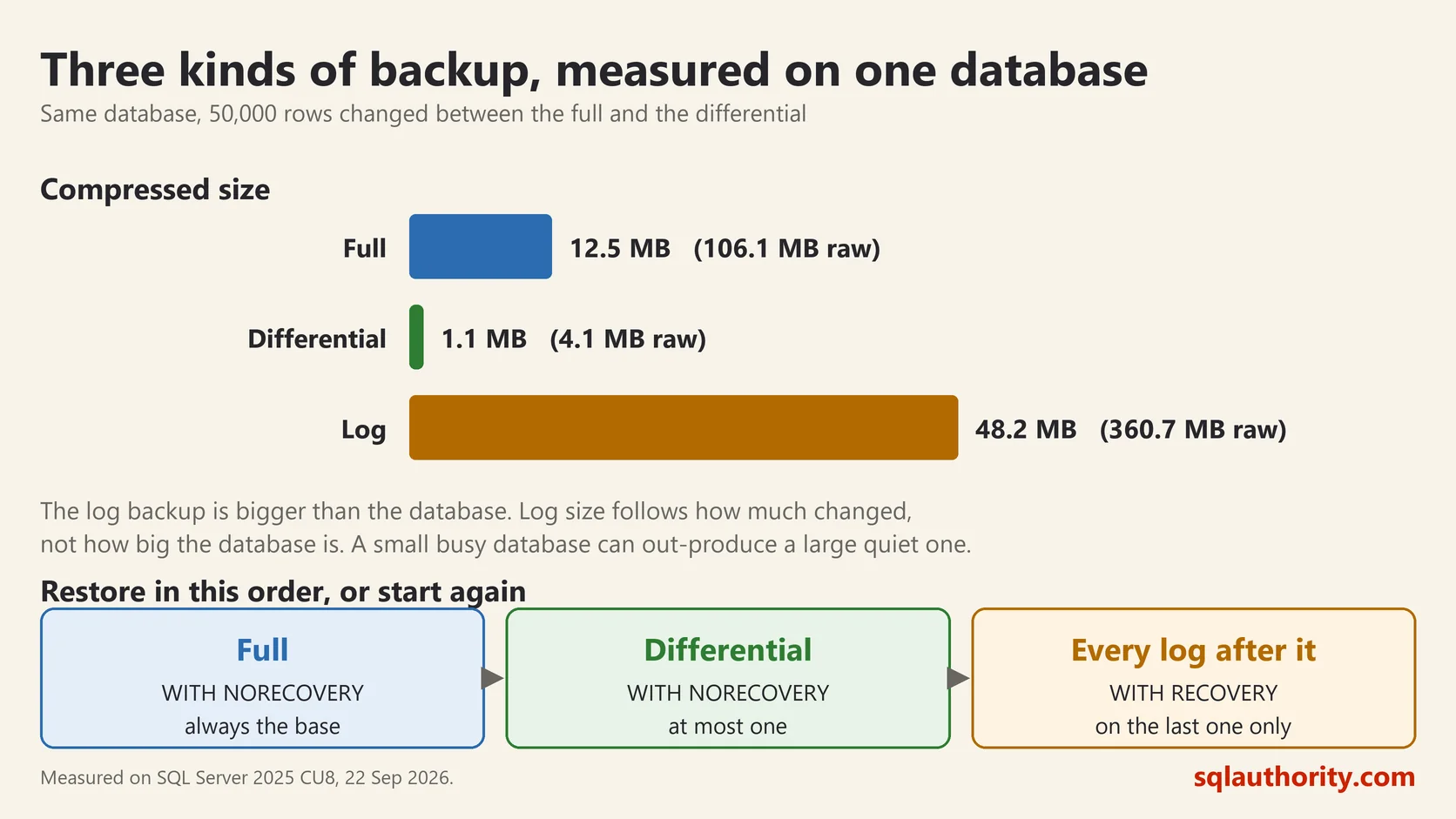
I took all three on SQL Server 2025 against the same database, changing 50,000 rows between the full and the differential.
backup_type   size_mb  compressed_mb
Full          106.1    12.5
Differential  4.1      1.1
Log           360.7    48.2
Two things are worth pointing out.
The differential is 4 MB against a 106 MB full, because it holds only what moved. That is the whole appeal. A full backup every night with differentials through the day gives you frequent restore points without copying everything each time.
The log backup is larger than the database. That is not a mistake. The log holds every change since the last log backup, and I had been hammering this database all morning. Log size follows how much changed, not how big the database is. A small busy database can produce far more log than a large quiet one.
Compression is doing real work here too, 106 MB down to 12.5 MB. It costs some processor time and it is almost always worth turning on.
The Recovery Model Decides Everything
Before any of this matters, check one setting.
SELECT name, recovery_model_desc, log_reuse_wait_desc
FROM sys.databases WHERE database_id > 4;
In SIMPLE recovery you cannot take log backups at all. Your best case is restoring the last full or differential, so everything after it is gone. That is a fine choice for a reporting copy you can rebuild.
In FULL recovery you can take log backups and restore to a point in time. It also means the log keeps growing until you back it up. Databases where somebody set FULL and never scheduled log backups are the most common reason a log fills a drive.
Choose FULL only if you are actually going to take log backups. Otherwise choose SIMPLE deliberately and accept what it means.
The Commands
BACKUP DATABASE Sales TO DISK = 'D:\Backups\Sales_full.bak'
    WITH INIT, COMPRESSION, CHECKSUM;

BACKUP DATABASE Sales TO DISK = 'D:\Backups\Sales_diff.bak'
    WITH INIT, DIFFERENTIAL, COMPRESSION, CHECKSUM;

BACKUP LOG Sales TO DISK = 'D:\Backups\Sales_log.trn'
    WITH INIT, COMPRESSION, CHECKSUM;
CHECKSUM is worth the keystrokes. It verifies pages as they are read, so a corrupt page is caught while you are making the backup rather than while you are restoring it.
One warning about INIT. It overwrites the file. On a real schedule you want a new filename each time, usually with a timestamp in it, or you will have exactly one backup no matter how often the job runs.
Restoring Is Where the Order Matters
RESTORE DATABASE Sales FROM DISK = 'D:\Backups\Sales_full.bak'
    WITH NORECOVERY;

RESTORE DATABASE Sales FROM DISK = 'D:\Backups\Sales_diff.bak'
    WITH NORECOVERY;

RESTORE LOG Sales FROM DISK = 'D:\Backups\Sales_log.trn'
    WITH RECOVERY;
NORECOVERY on every step except the last. It means more is coming, so leave the database closed. RECOVERY on the final step opens it for use. Get this wrong and you start again from the full backup.
You need the full, then at most one differential, then every log backup after that differential in order. Miss one log file and the chain stops there.
A Backup You Have Not Restored Is a Rumour
This is the part everyone agrees with and few people schedule.
Restore your backups somewhere else, regularly, and automatically. I have watched a backup job report success for months while writing files nobody could read. The job was green. The backups were useless. Nobody knew until the day it mattered.
RESTORE VERIFYONLY FROM DISK = 'D:\Backups\Sales_full.bak' WITH CHECKSUM;This is better than nothing and it is not a restore. It checks that the file is readable and complete. Only an actual restore proves you can get your database back.
Two Questions to Answer Out Loud
How much data can we afford to lose? That number decides how often you take log backups. If the answer is fifteen minutes, take them every fifteen minutes.
How long can we be down? That decides your restore strategy, because restoring a 4 TB database takes as long as it takes no matter how good your backups are.
Answer those two and the schedule writes itself. Skip them and you find out what your schedule was worth at the worst possible moment.
A backup is not a file you have, it is a restore you have already practised.
This post was rewritten from scratch in September 2026. The original, published on 2009-04-02, was a short announcement about something that no longer exists. The address is the same, the subject is now a basic idea worth keeping.
Published by Pinal Dave on SQLAuthority. More of my work at pinaldave.com.
Discover more from SQL Authority with Pinal Dave
Subscribe to get the latest posts sent to your email.




40 Comments. Leave new
Dear Sir
I tried for local it woking fine for me..but when i am going to take remote server backup
its shoing me warning msg there may be error came
do at ur own risk..so i am affraid ..so left in between
as it is huge and very imp..
so what i have to do sir…
plz hellp me..
how to take remote server bkp..
awaiitng for your kind reply..
thks in advance..
Pradeep Kulkarni
S/w engg, Pune
Dear Pradeep,
The message means that remote backup feature is in permanent Beta because we can not guarantee your restore 100%. You should try the restore for yourself.
You can read more about it at
This will be very good tools. I am going to try this anyway. I got RedGate Backup already but that might be something I will need for development server. Thanks.
Thanks for sharing this production information.
However I am looking for tools to allow me restore BAK file from FTP server to SQL 2008 name instance directly (No file copy).
Does anyone has similar experience? Thanks ahead.
Dear Pinal,
Zip fomate corrupts file and it’s not opening. Kindly help
@Frank Lan – You could use a scriptable FTP Server to restore the BAK files as they are uploaded. Here is an example script:
I used this software for several months, I found this software is weak on database recovery, and not a real free software, No DBA runs only 2 scheduled job. Finally ,I turn to other server backup software ,such as databk, it works very well for all my 25 database servers
Hello Pinal Sir:
Thank you soo much for such a fantastic article. I was searching this kind of tool and now I got this tool that you suggested. I respect your suggestion and guidance blindly because i think you are the GURU in SQL world.
I use SQL native tools to do the backup. After I install this tool, I found the existing backup files has a blue icon next to it. Only for the full backup.
what does the blue icon mean?
Pinal,
AWESOME TOOL and cost effective as well!!!
I’ve a situation where TDE requires for security of database of course not looking to do it at cell level, however utilizing this SQL Feature to enabled security of database backup files & physical files.
Catch in this scenario is doesn’t want to leave “SQL Native Compression” ability as it saves a lot of space/SAN Cost.
As TDE & Backup compression features are mutually exclusive by Microsoft documents, ready to invest in 3rd party tool which can achieve aforesaid mutually exclusive features. Please let me know if you any product.
Any help is really really appreciated.
not bad, but use drop box and take manual & auto back….
to bad free version is limited to 2 databases
Yup a Good tool……
Too bad it does not have one must have functionality…. Verifying the database integrity… no matter what state the database is in… it will back it up… when you restore it… you realize that the database was corrupt and you can restore it…
so get a tool which verifies the database and backups before and after backups.
Thanks
hummmmm…
Didnt realize, the option was buried under its lame flow of menus…. until it read it here..
http://blog.sqlauthority.com/2014/02/03/sql-server-9-things-you-should-be-doing-with-your-backups/
Thanks again…
Hi, it seems SQLBackupAndFTP released version 11 with the completely new UI. Have you checked it? This article is good but it reviews the old version.
Yeah, need to find some time to do that. This article was written back in 2009.