
This is one very interesting issue which I have started to follow recently. Just like any other organization my company has many servers. Some are production and some are development. It is very much necessary that query which are written for developer environment does not run for production environment accidentally.
In SQL Server 2008 there is special feature which can change the color of the task bar. This will alert developer to run query on server.
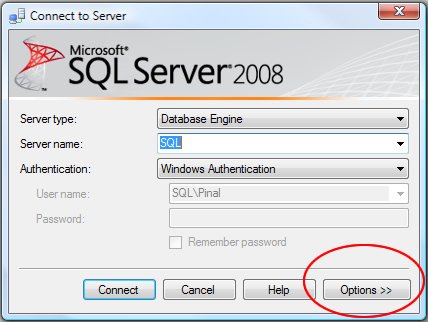
Let us see quick tutorial with images which explains how the color of the status bar in SQL Server management studio can be changed.


Another example of different color status bar.

Reference : Pinal Dave (https://blog.sqlauthority.com)




13 Comments. Leave new
Good to see status bar colors changing.
Is it possible in SQL Server 2005?
I like this; sometimes the simplest of features can prevent a major accident.
I believe it works for Central Management Servers group as well
so a Production group can be RED while Development group can be GREEN
It’ll be PINK if you try to run multi-server script
Sometimes I find it doesn’t store the colour settings all the time…. didn’t bother to figure out why
hello
I want to change the color in results when we select some data tha use case by this we got some filter data which i want to chage color .
how can we did in sql 2005
I believe this could be a great feature, if not for a glaring bug, reported here:
https://docs.microsoft.com/en-us/collaborate/connect-redirect
If you have a query window open under a certain connection, then change that windows connection (i.e. right click, disconnect, connect), then the color from the first connection will remain in the status bar.
Anyone that cares enough about the proper implementation of what could be a great and helpful feature should consider going to this website and voting “Yes” to bump up its priority.
Sir I need a query by which i can result with change background color
Any idea if there is a way to resize the items in the status bar? The reason I ask is because my login is always too long and I need to mouse over it to see my SPID (a real pain!).
Thanks Pinal Dave! I am using this in SSMS R2 and it works perfectly when I right click and select change connection and if I connect via the upper left connect drop down. This is VERY useful. Production bar is red for me, my localhost server is green, and I have a key to the other server’s colors posted on my wall until I learn them.
Is it possible to change the status bar color automatically based on the result of the query?