
CLR is abbreviation of Common Language Runtime. In SQL Server 2005 and later version of it database objects can be created which are created in CLR. Stored Procedures, Functions, Triggers can be coded in CLR. CLR is faster than T-SQL in many cases. CLR is mainly used to accomplish task which are not possible by T-SQL or can use lots of resources. CLR can be usually implemented where there is intense string operation, thread management or iteration methods which can be complicated for T-SQL. Implementing CLR provides more security to Extended Stored Procedure. Below is a simple example of a CLR Stored Procedure built in Visual Studio.
Let us create one very simple CLR where we will print current system datetime.
1) Open Microsoft Visual Studio >> Click New Project >> Select Visual C# >> Database >> SQL Server Project
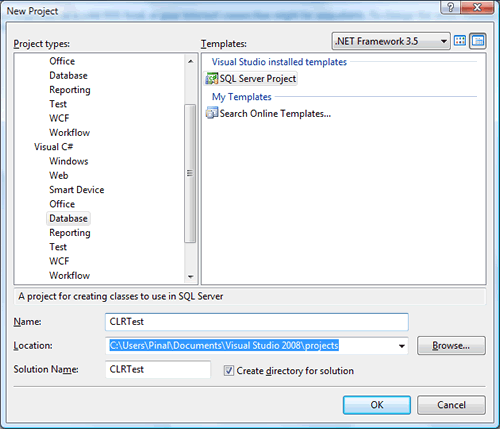
2) Either choose from existing database connection as reference or click on Add New Reference. In my example I have selected Add New Reference.
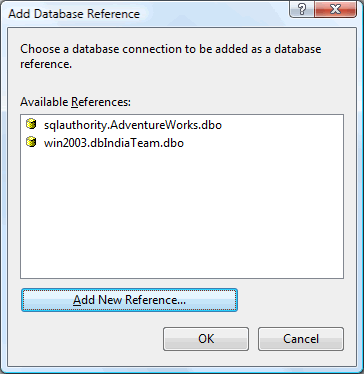
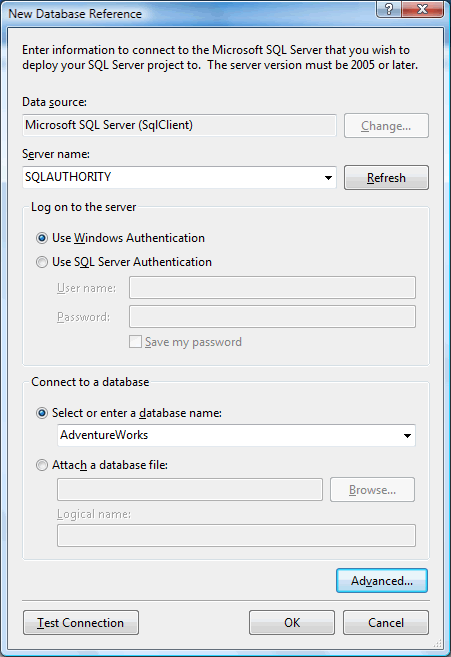
3) If you have selected existing reference skip to next step or add database reference as displayed in image.
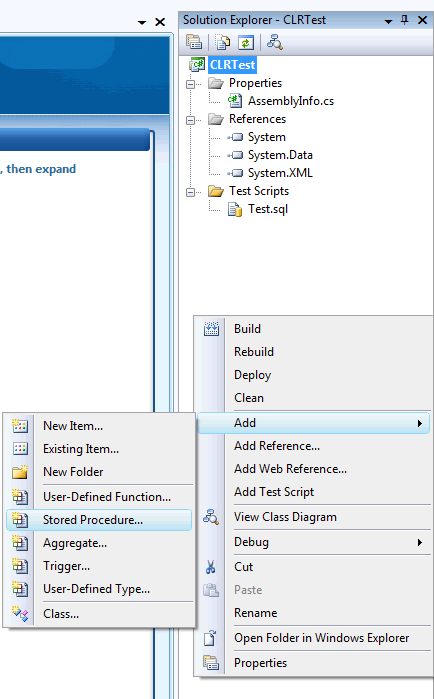
4) Once database reference is added following project will be displayed in Solution Explorer. Right click on Solution Explorer >> Click on Add >> Stored Procedure.
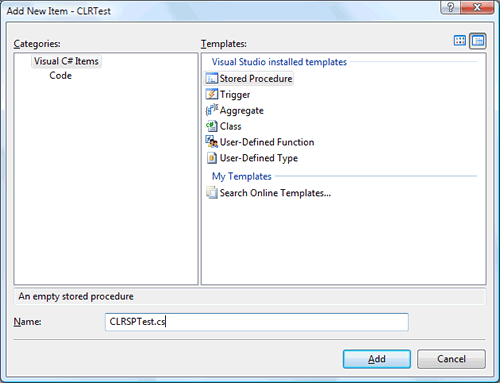
5) Add new stored procedure template from following screen.
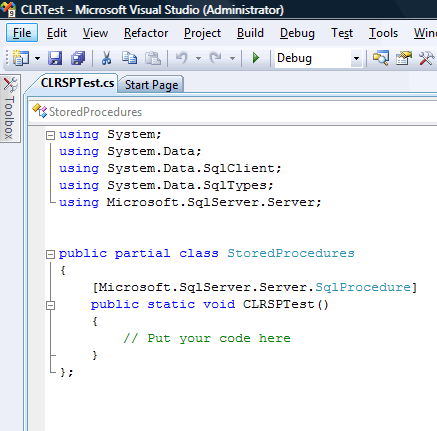
6) Once template added it will look like following image.
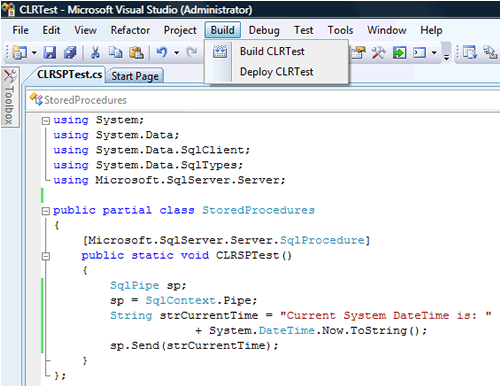
7) Now where it suggest to //Put your code here. Replace it with code displayed in the image. Once the code is complete do following two steps.
a) Click on menu bar >> Build >> Build ProjectName
b) Click on menu bar >> Build >> Deploy ProjectName
Building and Deploying project should give successful message.
using System;
using System.Data;
using System.Data.SqlClient;
using System.Data.SqlTypes;
using Microsoft.SqlServer.Server;
public partial class StoredProcedures
{
[Microsoft.SqlServer.Server.SqlProcedure]
public static void CLRSPTest()
{
SqlPipe sp;
sp = SqlContext.Pipe;
String strCurrentTime = “Current System DateTime is: “
+ System.DateTime.Now.ToString();
sp.Send(strCurrentTime);
}
};
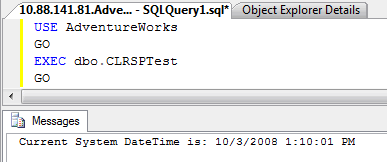
8) Now open SQL Server Management Studio and run following script in Query Editor. It should return current system datetime. Running it again the time will change.
USE AdventureWorks
GO
EXEC dbo.CLRSPTest
GO
Published by Pinal Dave on SQLAuthority. More of my work at pinaldave.com.
Discover more from SQL Authority with Pinal Dave
Subscribe to get the latest posts sent to your email.



46 Comments. Leave new
Hi i am facing issue after clr deployment
my user has sysadmin right
but i am not dbowner of database
i change sp_changedbowner to my user and deploy that and then re change to original one.
Assembly is UNSAFE, database is Trustworthy on and clr is on
but execution with dbowner user stored procedure gives below error
dbowner is not sysadmin.
Msg 10314, Level 16, State 11, Line 4
An error occurred in the Microsoft .NET Framework while trying to load assembly id 65672. The server may be running out of resources, or the assembly may not be trusted with PERMISSION_SET = EXTERNAL_ACCESS or UNSAFE. Run the query again, or check documentation to see how to solve the assembly trust issues. For more information about this error:
System.IO.FileLoadException: Could not load file or assembly ‘pssqlcustmization, Version=0.0.0.0, Culture=neutral, PublicKeyToken=null’ or one of its dependencies. An error relating to security occurred. (Exception from HRESULT: 0x8013150A)
System.IO.FileLoadException:
at System.Reflection.Assembly._nLoad(AssemblyName fileName, String codeBase, Evidence assemblySecurity, Assembly locationHint, StackCrawlMark& stackMark, Boolean throwOnFileNotFound, Boolean forIntrospection)
at System.Reflection.Assembly.InternalLoad(AssemblyName assemblyRef, Evidence assemblySecurity, StackCrawlMark& stackMark, Boolean forIntrospection)
at System.Reflection.Assembly.InternalLoad(String assemblyString, Evidence assemblySecurity, StackCrawlMark& stackMark, Boolean forIntrospection)
at System.Reflection.Assembly.Load(String assemblyString)
if i change that dbowner and gives right to sysadmin then it works.
but that’s not what i am looking for.
i tried to set permission on database that execure, create assembly and alter any assembly but error continues.
Can you let me know which right need to assign when it’s not sysadmin
I already checked MSDN and other blogs but not get good idea for practical situations.
i create stored procedure with EXECUTE AS CALLER.
Hi Pinal
Thanks for detail help on Extended stored procedure, I have a query related to build. My client does not allowed me to install visual studio on production environment so there is any option to generate DLL on local PC with Local database and implement at production server.
Pl. help me on this issue.
Regards
Rajesh Sheth
Hi,
You can copy DLL file from VS project BIN folder, and register this DLL asembly on SQL Server using SQL commands. Example:
create ASSEMBLY SQLCLRTest1 from ‘c:\temp\SQLCLRTest1.dll’ WITH PERMISSION_SET = SAFE
go
create procedure YOURCLRPROCEDURENAME(@YOYRPARAMETERNAME int)
as
external name
[SQLCLRTest1].[StoredProcedures].[YOURC#PROCEDURENAME]
go
After that you can delete DLL file from SQL Server. Regards.
Mariusz
Excellent article and I got it to work with no problem.
What I need to do is pass in 1 parameter and then do a select from a table and return exactly 1 value. What would be the preferred means of doing this? Do you have an example? I can’t find any on the net for this.
How can we fetch SahrePoint List data in CLR server solution??
Thanks!
Shantanu Choudhary
I had created clr using T-SQL but when i am executing the store procedure in T-SQL query window i am getting an
”
Msg 6522, Level 16, State 1, Procedure CLRSPTest, Line 0
A .NET Framework error occurred during execution of user-defined routine or aggregate “CLRSPTest”:
System.Security.SecurityException: Request for the permission of type ‘System.Security.Permissions.SecurityPermission, mscorlib, Version=2.0.0.0, Culture=neutral, PublicKeyToken=b77a5c561934e089’ failed.
System.Security.SecurityException:
at System.Security.CodeAccessSecurityEngine.CheckNReturnSO(PermissionToken permToken, CodeAccessPermission demand, StackCrawlMark& stackMark, Int32 unrestrictedOverride, Int32 create)
at System.Security.CodeAccessSecurityEngine.Assert(CodeAccessPermission cap, StackCrawlMark& stackMark)
at System.Security.CodeAccessPermission.Assert()
at StoredProcedures.CLRSPTest()
”
In CLR fuction i had written a code
string MachineName = System.Environment.MachineName.ToString();
Can any one suggest me why this is happing
thanks a lot for the valuable essay, could u help me in the below error
Could not find stored procedure
Really superbbbbbbbbbb
Good Article
Can you Post about assemblies?….
Great article! However I’m having trouble getting Database templates to show up in Visual Studio 2008. I have SQL Server 2008 R2. The initial install may have been Express – the instance indicates it is. I’ve tried updating SQL Server, and installed newer versions of VS, but cannot get database templates to show up. I’ve also run devenv.exe /installvstemplates at the VS command prompt (32 & 64). Is my version of SQL Server the issue maybe? I’ve spend days on this :-(
Hi pinal please me out i am stuck in “HOW TO HANDLE ERRORS IN USER-DEFINED FUNCTION”.
i know we can’t handle the errors in functions but how to handle error occurred at nth line of function?
—— Build started: Project: CLRTest, Configuration: Debug Any CPU ——
CLRTest -> F:\Amod\Application\CLR\CLRTest\CLRTest\bin\Debug\CLRTest.dll
—— Deploy started: Project: CLRTest, Configuration: Debug Any CPU ——
Build started 22/09/2015 12:18:39.
SqlClrDeploy:
Beginning deployment of assembly CLRTest.dll to server 192.168.1.3 : astdmc2_amazon_backup
C:\Program Files (x86)\MSBuild\Microsoft\VisualStudio\v10.0\TeamData\Microsoft.Data.Schema.SqlClr.targets(96,5): error : Could not connect to server 192.168.1.3 astdmc2_amazon_backup : Login failed for user ‘astdmcprod’.
Build FAILED.
Time Elapsed 00:00:00.10
========== Build: 1 succeeded or up-to-date, 0 failed, 0 skipped ==========
========== Deploy: 0 succeeded, 1 failed, 0 skipped ==========
Hello Sir,
i have created a CLR project when i debug from visual studio it’s working fine but when same CLR call from SQL store procedure it’s throw object reference exception, this only happen with large data but debug working fine but CLR call from Procedure not throw error, can you please help me out for this issue.
Thanks in advance.
I am using Visual Studio 2015 and .NET 4.5.2. I have builded the c# code, however when I click to ‘deploy’ nothing happens. I can not call the function from sqlserver too.
Great Article
I am glad you liked it @Saba
I’m with Jonathan – I cannot find the database template under C# templates (I’m using Visual Studio 2015). Any guidance on how to get that template installed would be great.
Pinal, is there any way for us to pull the CLR code back from the SQL server, the way we would export an SSIS Ispac file, for example? We have a CLR whose original build we can’t locate. Thank you.
Sir
if i have written like this
i have a Class Library project (Dotnet) and it Generates DLL
i reffered that DLL inside this Sql Server Dotnet project and i made some changes to my code
now while deploying DLL to Assembly folder do i need to deploy both Class Library Project DLL and Current Sql Server Dotnet Project DLL or doing only one will be helpful
please help solve this problem with your clarification