
Full Text Index helps to perform complex queries against character data. These queries can include words or phrase searching. We can create a full-text index on a table or indexed view in a database. Only one full-text index is allowed per table or indexed view. The index can contain up to 1024 columns. Software developer Monica Monica, who helped with screenshots also informed that this feature works with the RTM (Ready to Manufacture) version of SQL Server 2008 and does not work on CTP (Community Technology Preview) versions. Let us learn about Creating Full Text Catalog and Full Text Search in this blog post.
To create an Index, follow the steps:
- Create a Full-Text Catalog
- Create a Full-Text Index
- Populate the Index
1) Create a Full-Text Catalog
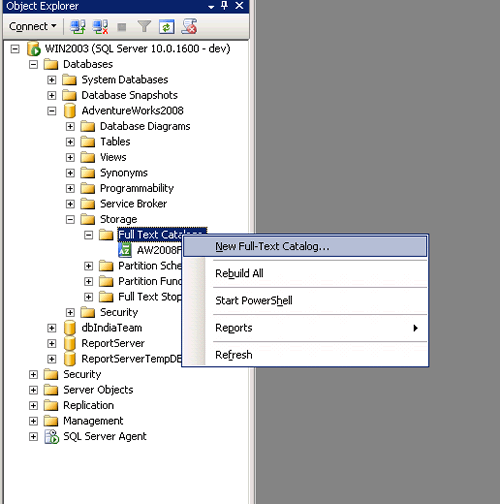
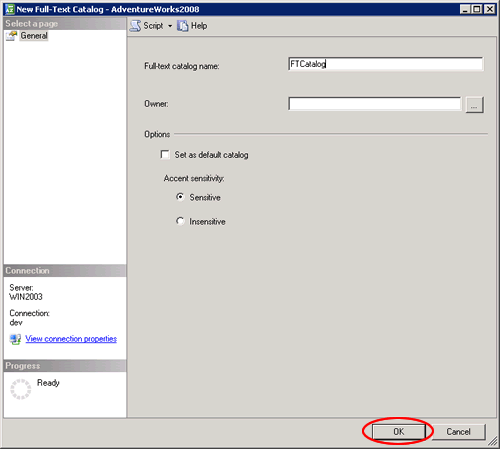
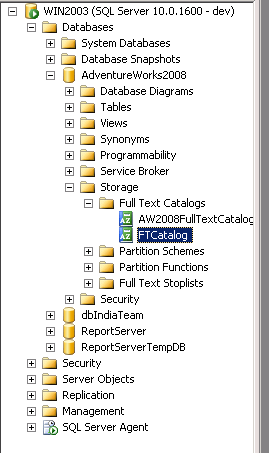
Full – Text can also be created while creating a Full-Text Index in its Wizard.
2) Create a Full-Text Index
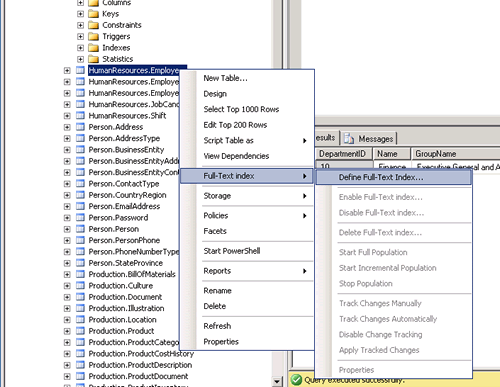
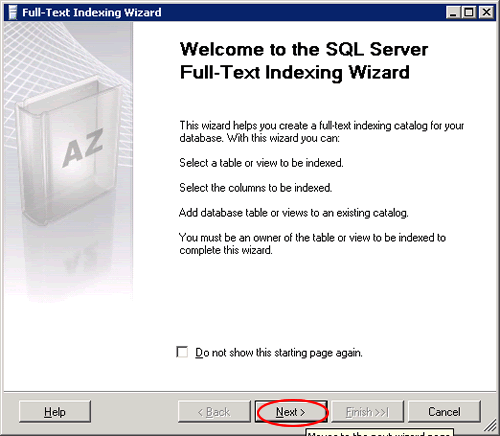
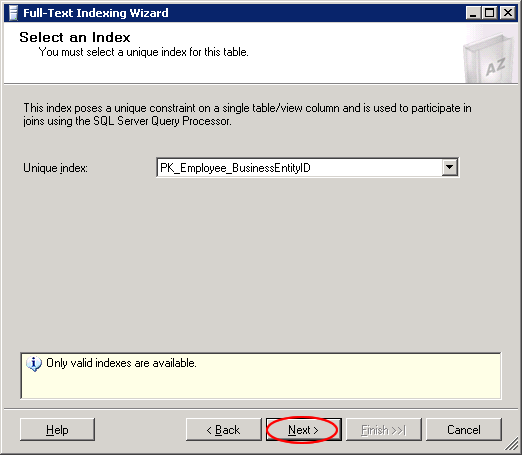
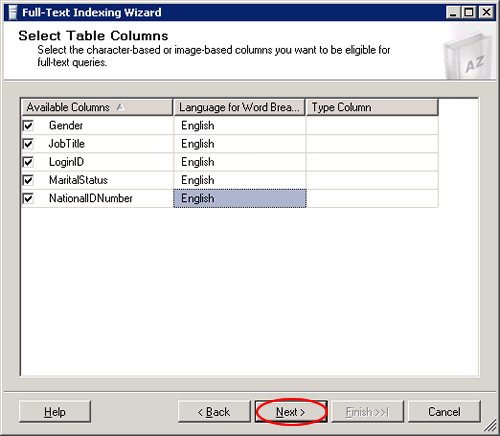
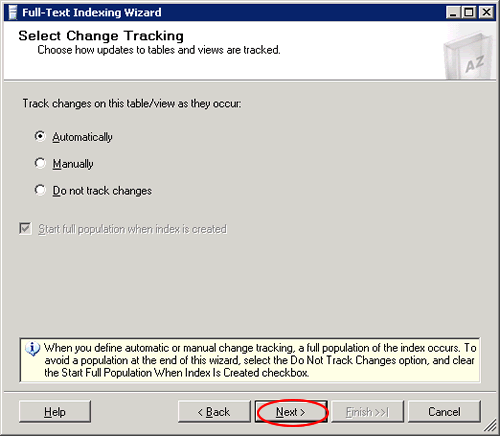
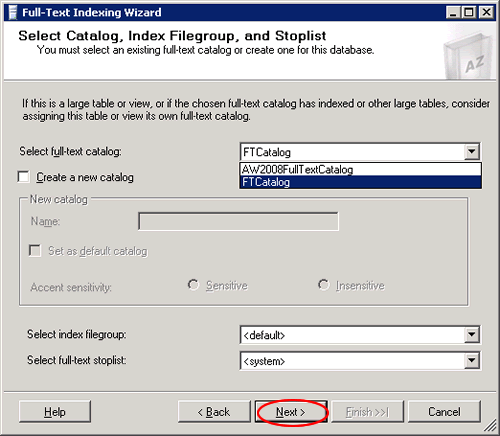
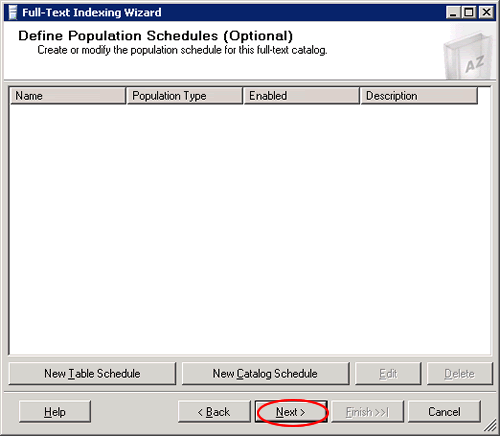
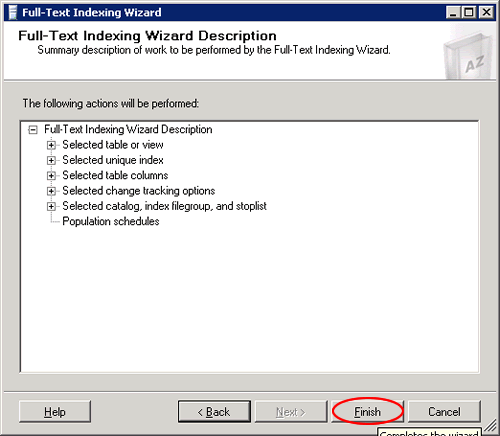
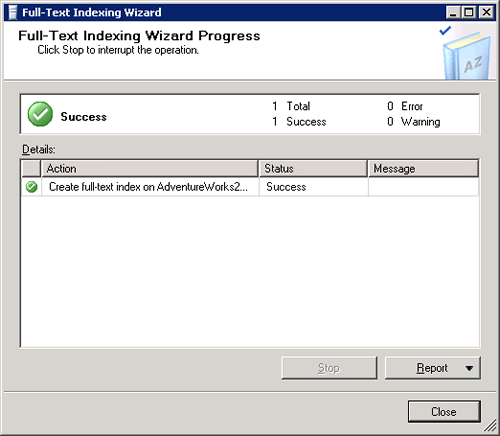
3) Populate the Index
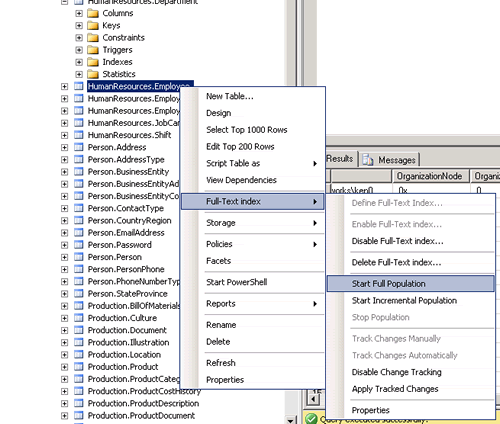
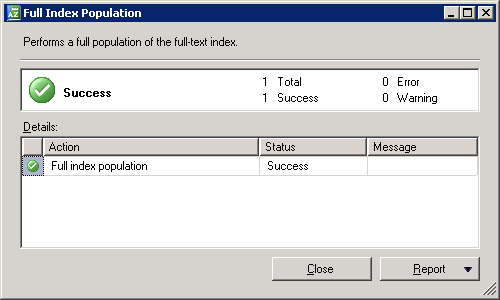
As the Index Is created and populated, you can write the query and use in searching records on that table which provides better performance.
For Example,
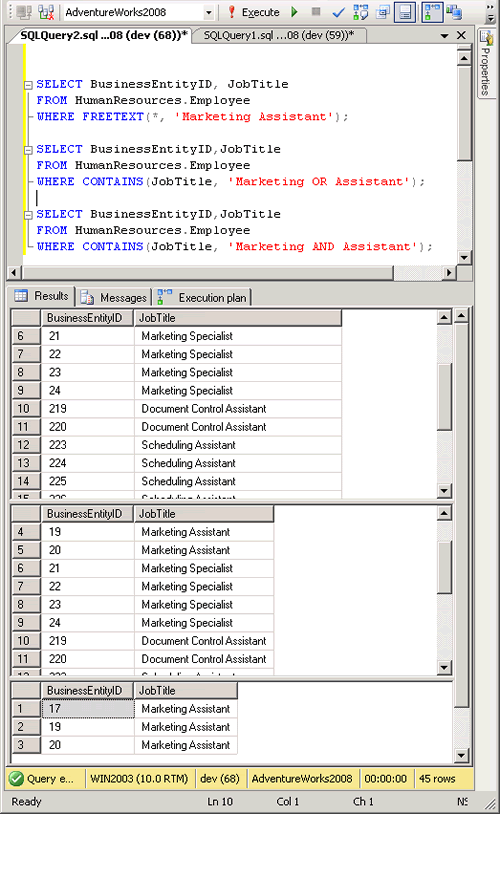
We will find the Employee Records who has “Marking “in their Job Title.
FREETEXT( ) Is predicate used to search columns containing character-based data types. It will not match the exact word, but the meaning of the words in the search condition. When FREETEXT is used, the full-text query engine internally performs the following actions on the freetext_string, assigns each term a weight, and then finds the matches.
- Separates the string into individual words based on word boundaries (word-breaking).
- Generates inflectional forms of the words (stemming).
- Identifies a list of expansions or replacements for the terms based on matches in the thesaurus.
CONTAINS( ) is similar to the Freetext but with the difference that it takes one keyword to match with the records, and if we want to combine other words as well in the search then we need to provide the “and” or “or” in search else it will throw an error.
USE AdventureWorks2008
GO

SELECT BusinessEntityID, JobTitle
FROM HumanResources.Employee
WHERE FREETEXT(*, 'Marketing Assistant');

SELECT BusinessEntityID,JobTitle
FROM HumanResources.Employee
WHERE CONTAINS(JobTitle, 'Marketing OR Assistant');

SELECT BusinessEntityID,JobTitle
FROM HumanResources.Employee
WHERE CONTAINS(JobTitle, 'Marketing AND Assistant');
GO
Conclusion
Full text indexing is a great feature that solves a database problem, the searching of textual data columns for specific words and phrases in SQL Server databases. Full Text Index can be used to search words, phrases and multiple forms of a word or phrase using FREETEXT () and CANTAINS () with “and” or “or” operators.
Want to try this yourself? Here is how to install AdventureWorks.
Published by Pinal Dave on SQLAuthority. More of my work at pinaldave.com.
Discover more from SQL Authority with Pinal Dave
Subscribe to get the latest posts sent to your email.



154 Comments. Leave new
Thanks its very helpful to me
hello sir.
i am trying to search “emailid@member.be” using contain. but getting no result. can you help me.
how to search email id using fulltext. or how can i prevent stoplist on particular column ?
here email id can be “@member.be” or “emailid@member”.
Hello Sir,
Can we count the number of occurances of a word in a sentence with full text search?
Thank You..
Can we count the number of occurances of a word in a sentence using full text search?
thanks million
Hello Sir,
I am working on keyword search and that’s require around 9 table fields(varchar) to search. Can I use full text on multiple table for keyword search?
Do you have example?
Hello Sir,
I am working on keyword search and that’s require around 9 table fields(varchar) to search. Can I use full text on multiple table for keyword search?
Do you have example?
hi pInal Dave, i have sql server 2012 and the Full Text Filter Daemon launcher send me a message: “SQL Server encountered error 0x80070005 while communicating with full-text filter daemon host (FDHost) process. Make sure that the FDHost process is running. To re-start the FDHost process, run the sp_fulltext_service ‘restart_all_fdhosts’ command or restart the SQL Server instance.” . At the event viewer of windows the message is: “SQL Server failed to communicate with filter daemon launch service (Windows error: Access is denied.
). Full-Text filter daemon process failed to start. Full-text search functionality will not be available.” I need help about this. Thanks
Hi,
I need to find the right side term of the given input in a string.
Example :
String Data –
1) “CHROME SOFTWARE LOST”
2) “ABLE RUN SOFTWARE”
If I give the keyword as “Software”, it needs to give me the output as “Lost” for 1st scenario and blank or nothing for second scenario.
I have tried writing a query-
DECLARE @Keyword varchar(100)= ‘software’
Query-
select rtrim(ltrim(SUBSTRING(Description, CHARINDEX(@Keyword, Description, 0)+ LEN(@Keyword ) ,
case when(
(CHARINDEX(‘ ‘, Description, CHARINDEX(@Keyword, Description, 0)+ LEN(@Keyword)+1)) –
(CHARINDEX(@Keyword, Description, 0)+ LEN(@Keyword)) ) >0 then
(
(CHARINDEX(‘ ‘, Description, CHARINDEX(@Keyword, Description, 0)+ LEN(@Keyword)+1)) –
(CHARINDEX(@Keyword, Description, 0)+ LEN(@Keyword)) )
else 0 end
) ))[RightWord]
from tablename
where contains(Description,@Keyword)
Here “Description” is the column name. I need to find out all the terms to the right side of the given input.
Kindly help me on this.
Hey Pinal,
I have requirement of keyword search and faceted search. I have to choose between SOLR Searchand SQL Server Full Text Search. I can pass upto 40 parameters to pass filters in refine search. Which one would be good to go ahead for my website
Hi,
Currently i want to know that without creating a Full Text Index can Full Text Catalog Populate the Indexes from the table it is pointing to? In our project database on one table Full Text Index option is greyed out but still when we create a Full Text Catalog which is refering to the index of that table we are able to rebuild the catalog. My question here is when we can populate using the catalog then why we need to create a Full Text index? Please reply me as i’m new to this Full text index concept. Thanks in advance.
Full text index is used when you use special type of queries which has “CONTAINS”, “FREETEXT” etc. You can configure the population method for full text indexes.
Handling Full Text Index errors:
During data loads and with our FT catalog Change Tracking is set to “AUTO”, we sometimes get these errors raised and entered into the log:
> An internal query to load data for a crawl on database… and table… failed with error code 1205. Check the sql error code for more information about the condition causing this failure. The crawl needs to be restarted after this condition is removed.
> Error: 30059, Severity: 16, State: 1.
> A fatal error occurred during a full-text population and caused the population to be cancelled. Population type is: AUTO; database name is… Fix the errors that are logged in the full-text crawl log. Then, resume the population. The basic Transact-SQL syntax for this is: ALTER FULLTEXT INDEX ON table_name RESUME POPULATION.
Apparently error code 1205 indicates that the crawl/population process was declared a deadlock victim. But what state is the full text index now in? Confusingly, the recommended “resume population” alter command suggests that it is suspended while Microsoft documentation states that this alter “can only be used for full populations”, which is not what we are doing here. I can find no documentation to tell me that after an error a) the change tracking is in tact vs an inconsistent state, b) after resume the index will fully recover and process all missing rows, or c) whether or not we should do a full rebuild.
Any direction greatly appreciated!
Hi, is it possible to create full index with 2 different languages each one in different column?
Hi Pinal Dave, I had implemented the full text search by using the above reference. When i am searching for “AC” keyword its giving me irrelevant result. Any Suggestion?