
MERGE is a new feature that provides an efficient way to perform multiple DML operations. In previous versions of SQL Server, we had to write separate statements to INSERT, UPDATE, or DELETE data based on certain conditions, but now, using MERGE statement we can include the logic of such data modifications in one statement that even checks when the data is matched then just update it and when unmatched then insert it.
One of the most important advantage of MERGE statement is all the data is read and processed only once. In previous versions three different statement has to be written to process three different activity (INSERT, UPDATE or DELETE), however using MERGE statement all update activity can be done in one pass of database table. This is quite an improvement in performance of database query.
Syntax of MERGE statement is as following:
MERGE
[ TOP ( expression ) [ PERCENT ] ]
[ INTO ] target_table [ WITH ( <merge_hint> ) ] [ [ AS ] table_alias]
USING <table_source>
ON <merge_search_condition>
[ WHEN MATCHED [ AND <clause_search_condition> ]
THEN <merge_matched> ]
[ WHEN NOT MATCHED [ BY TARGET ] [ AND <clause_search_condition> ]
THEN <merge_not_matched> ]
[ WHEN NOT MATCHED BY SOURCE [ AND <clause_search_condition> ]
THEN <merge_matched> ]
[ <output_clause> ]
[ OPTION ( <query_hint> [ ,…n ] ) ]
;
Example:
Let’s create Student Details and StudentTotalMarks and inserted some records.
Student Details:
USE AdventureWorks
GO
CREATE TABLE StudentDetails
(
StudentID INTEGER PRIMARY KEY,
StudentName VARCHAR(15)
)
GO
INSERT INTO StudentDetails
VALUES(1,'SMITH')
INSERT INTO StudentDetails
VALUES(2,'ALLEN')
INSERT INTO StudentDetails
VALUES(3,'JONES')
INSERT INTO StudentDetails
VALUES(4,'MARTIN')
INSERT INTO StudentDetails
VALUES(5,'JAMES')
GO
StudentTotalMarks:
CREATE TABLE StudentTotalMarks
(
StudentID INTEGER REFERENCES StudentDetails,
StudentMarks INTEGER
)
GO
INSERT INTO StudentTotalMarks
VALUES(1,230)
INSERT INTO StudentTotalMarks
VALUES(2,255)
INSERT INTO StudentTotalMarks
VALUES(3,200)
GO
In our example we will consider three main conditions while we merge this two tables.
- Delete the records whose marks are more than 250.
- Update marks and add 25 to each as internals if records exist.
- Insert the records if record does not exists.
Now we will write MERGE process for tables created earlier. We will make sure that we will have our three conditions discussed above are satisfied.
MERGE StudentTotalMarks AS stm
USING (SELECT StudentID,StudentName FROM StudentDetails) AS sd
ON stm.StudentID = sd.StudentID
WHEN MATCHED AND stm.StudentMarks > 250 THEN DELETE
WHEN MATCHED THEN UPDATE SET stm.StudentMarks = stm.StudentMarks + 25
WHEN NOT MATCHED THEN
INSERT(StudentID,StudentMarks)
VALUES(sd.StudentID,25);
GO
There are two very important points to remember while using MERGE statement.
- Semicolon is mandatory after the merge statement.
- When there is a MATCH clause used along with some condition, it has to be specified first amongst all other WHEN MATCH clause.
After the MERGE statement has been executed, we should compare previous resultset and new resultset to verify if our three conditions are carried out.
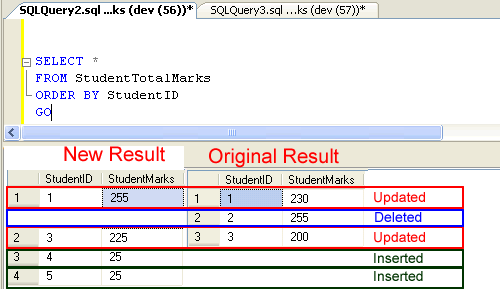
AS we can see there are 5 rows updated. StudentID 2 is deleted as it is more than 250, 25 marks have been added to all records that exists i.e StudentID 1,3 and the records that did not exists i.e. 4 and 5 are now inserted in StudentTotalMarks .
MERGE statement is very handy improvement for T-SQL developers who have to update database tables with complicated logic. MERGE statement also improves the performance of database as it passes through data only once.
Published by Pinal Dave on SQLAuthority. More of my work at pinaldave.com.
Discover more from SQL Authority with Pinal Dave
Subscribe to get the latest posts sent to your email.




127 Comments. Leave new
Very nice
Hi how this will work on business layer like this
public List GetMemberList()
{
try
{
return (new DALMember()).GetMemberList();
}
catch (Exception ex)
{
throw ex;
}
}
public BOMember GetMemberById(int memberId)
{
try
{
return (new DALMember()).GetMemberById(memberId);
}
catch (Exception ex)
{
throw ex;
}
}
========================================================================================
public class DALMember
{
SqlHelper oSqlHelper;
public List GetMemberList()
{
List returnList = new List();
try
{
List parameterList = new List();
oSqlHelper = new SqlHelper();
DataSet ds = oSqlHelper.ExecuteDataSet(“GetMemberList”, parameterList);
if (ds != null && ds.Tables.Count > 0)
{
foreach (DataRow drItem in ds.Tables[0].Rows)
{
returnList.Add(new BOMember()
{
MemberId = Convert.ToInt32(drItem[“MemberId”]),
FirstName = Convert.ToString(drItem[“FirstName”]),
LastName = Convert.ToString(drItem[“LastName”])
});
}
}
oSqlHelper = null;
}
catch (Exception ex)
{
throw ex;
}
return returnList;
}
public BOMember GetMemberById(int memberId)
{
BOMember returnData = new BOMember();
try
{
List parameterList = new List();
parameterList.Add(SetSqlParameter.GetSqlParameter(“@MemberId”, SqlDbType.Int, memberId));
oSqlHelper = new SqlHelper();
DataSet ds = oSqlHelper.ExecuteDataSet(“GetMemberById”, parameterList);
if (ds != null && ds.Tables.Count > 0)
{
foreach (DataRow drItem in ds.Tables[0].Rows)
{
returnData.MemberId = Convert.ToInt32(drItem[“MemberId”]);
returnData.FirstName = Convert.ToString(drItem[“FirstName”]);
returnData.LastName = Convert.ToString(drItem[“LastName”]);
}
}
oSqlHelper = null;
}
catch (Exception ex)
{
throw ex;
}
return returnData;
}
}
========================================================================================
can we use selected columns from a table in MERGE statement ?