I often get requests from blog reader for T-SQL script to rename database table column name or rename table itself.
Here is a video demonstrating the discussion
The script for renaming any column :
sp_RENAME 'TableName.[OldColumnName]' , '[NewColumnName]', 'COLUMN'
The script for renaming any object (table, sp etc) :
sp_RENAME '[OldTableName]' , '[NewTableName]'
This article demonstrates two examples of renaming database object.
- Renaming database table column to new name.
- Renaming database table to new name.
In both the cases we will first see existing table. Rename the object. Test object again with new name.
1. Renaming database table column to new name.
Example uses AdventureWorks database. A small table with name “Table_First” is created. Table has two fields ID and Name.
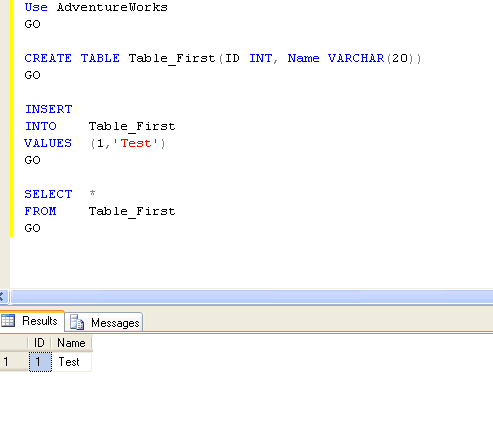
Now, to change the Column Name from “Name” to “NameChange” we can use command:
USE AdventureWorks
GO
sp_RENAME 'Table_First.Name', 'NameChange' , 'COLUMN'
GO
Following Fig. show use of SP_RENAME Command
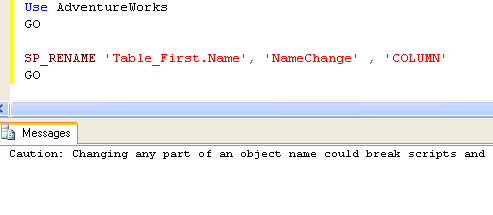
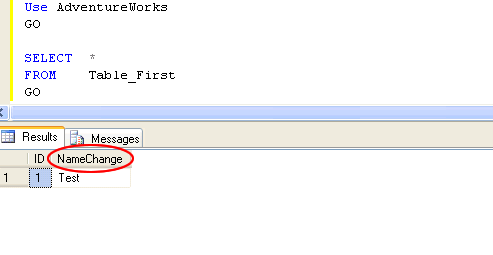
You can see the column name “Name” is now changed to “NameChange“.
USE AdventureWorks
GO
SELECT *
FROM Table_First
GO
Following fig. verify that the column name has been changed.
2.Renaming database table to new name.
We can change the table name too with the same command.
sp_RENAME 'Table_First', 'Table_Last'
GO
Following fig. Shows how we can change Table Name.
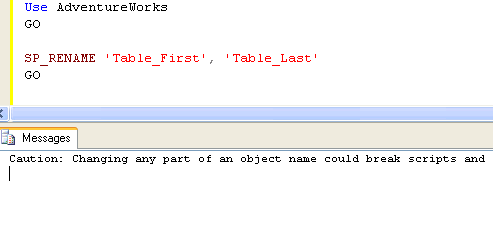
Now, the table name “Table_First” is renamed as “Table_Last”.
“Table_First” will no longer be available in database. We can verify this by running script:
USE AdventureWorks
GO
SELECT *
FROM Table_First
GO
The Messages shows an error “Invalid object name ‘Table_First’.”
To check that the new renamed table exist in database run script:
USE AdventureWorks
GO
SELECT *
FROM Table_Last
GO
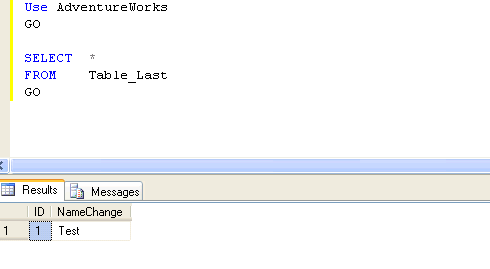
You can see the same data now available in new table named “Table_Last”
Reference : Pinal Dave (http://blog.SQLAuthority.com)


That is winning info!
Hi Pinal,
If we change the cloumn name, suppose if the column has a index on it, will the change of name effect the index already created.
hi,
This is use full info
If the column have a constraints how can rename the column
You need to disable the contraints, renmae and enable it
If u r having constraint also, U can use the same syntax. It will work
CREATE TABLE Employee
(
Empid int not null
,Empname varchar(20)
)
alter table Employee add constraint pk_simple primary Key(empid)
sp_rename ‘employee.empname’,'EmployeeName’,'column’
Thanks for the info.
Will u guide me how to alter existing constraint
Hi,
Yes if we have not null constraint in column we can able to change the column name.
Hi,
Thanks it works.
Hi Guys,
This is very Useful Information.Thank you.
without using Sp_Rename Stored procedure how can i
rename the table?
Is any other Query to do this?
You need to make use of Management studio
[...] 2008 by pinaldave I have written many articles about renaming a tables, columns and procedures SQL SERVER – How to Rename a Column Name or Table Name, here I found something interesting about renaming the stored procedures and felt like sharing it [...]
Thank you for sharing. This is a great glob post. Great info and rendering (live the screens etc).
thnq very much sir………
Thank you sir for giving a valuable information
Thank you very much sir for giving a valuable information
I read your articles it is fabulous!!!!
pls try to understand following coding in sql server 2005
SELECT C.NAME,C.ADDRESS,SUM(O.QUANTITY*P.PRICE)
FROM MYCUSTOMER C JOIN ORDERS O
ON C.NAME=O.NAME JOIN PART P
ON O.PARTNUM=P.PARTNUM
Its giving error:–column ‘MYCUSTOMER.NAME’ is invalid in the select list because it is not contained in either an aggregate function or the group by clause
I tried many thing but nothing works
plz look into it…..
thanks in advance!!
– You must add the “Group By” clause inorder to use the Sum Function
SELECT C.NAME,C.ADDRESS,SUM(O.QUANTITY*P.PRICE)
FROM MYCUSTOMER C JOIN ORDERS O
ON C.NAME=O.NAME JOIN PART P
ON O.PARTNUM=P.PARTNUM
Group By C.NAME,C.ADDRESS
Cheer,
Momo
Glory be to God!
Alam,
Just add GROUP BY C.NAME,C.ADDRESS at the end and try.
All the best…
Sree sir,
or Anyony
plz tell me how I rename the 2 or more than column name at a one time from a one query.
You need to use Management studio. It can’t be done in a single query
thanx a lot it works fine
thanks SREE…….
GROUP BY clause has to be used since c.name and c.address columns have one to many relationship with other columns.
This is not supported going forward. Avoid using SP_RENAME where possible or you will have to edit your code when you upgrade to SQL 2008..
hii….bhai tera bahut bahut dhanyawad….
hi,
i want to rename the table column using sql queries. can anyone help me ?
Thanks,
Ramesh
Hi,
Even I am in search of the solution for the same requirement.
could u please share the same with me once got the solution.
Thanks in advance
SP_RENAME ‘TABLENAME.COLUMNNAME’,'NEW COLUMN NAME’
sp_RENAME ‘Table_First’, ‘Table_Last’
SP_RENAME ‘TABLENAME.COLUMNNAME’,’NEW COLUMN NAME’,’COLUMN’
hi
thanx sir this is very nice
Hi,
This Script is Running Correctly.
Thanks Sir.
Hi pinal,
thnx for the info.
Hi Pinal,
I think there is no need to pass third parameter as ‘column’ for renaming the column.
sp_rename ‘Table_First.Name’, NameChange
i have just tried without mentioning ‘column’ and it works fine.
May i know what is the importance of the third parameter ‘column’? Is it required or not?
If you omit, by default it is column. Otherwsie you need to specify where it is column, index, database, etc
This is really useful info
Thanks for providing very good and to the point info
Thanx a lot these is really helpfull, You really can make articles very simple to understand….
Once again Pinal Dave’s blog to the rescue! Thanks again for a great blog.
I have used the renaming mistakenly and my column name now looks like this “[column]” without the quotation mark but including the [] charecters. How can I reissue the command to rename the column? what escape sequence should I use.
i want 2 change a column name that contains a point(.). e.g . using the sp_rename it is giving an error. plz. solve d problem guys
Plz write this query ur problem will be solved.
sp_rename ‘[table name].[oldcolumn name]‘, ‘newcolumnname’
I have used the renaming mistakenly and my column name now looks like this “[column]” without the quotation mark but including the [] charecters. How can I reissue the command to rename the column? what escape sequence should I use.
eg:: if coloumn name is txtname
after renaming using sp_rename with new coloumn name it is showing [txtname_new].
Now I cant even retrieve the values for that coloumn.
Please help me guys on this…
Thanks in advance.
@Uttam
Use the visual editor. Right click on the TABLE and choose “design”. You can change the name there.
Thanks Brian Sir.
It really helped.
Really appreciate your quick help.
THanks once again.
thanks sir,
it was urgent to me find the ans. for my exam
Thanks for this information
This is a great find, but it’s not exactly what I need.
We’re looking at upgrading our servers from 2005 to 2008. This will also involve a name change for our servers. Is there an easy way we can update the cross server links in our views, sp etc withouth having to go into each view and sp?
Thanks,
Eloise
thx sir
Thanks pinaldave for a great blog! So much useful information you’ve gained through hard experience you share with us all!
Here’s a note I would like to add to this article. Do not use square brackets in your target column name or it will put them in there literally! For example:
sp_rename ‘[my table].[my col]‘, ‘[my col2]‘, ‘COLUMN’
is WRONG! Instead say:
sp_rename ‘[my table].[my col]‘, ‘my col2′, ‘COLUMN’
And what to do if you have columns with brackets that need renaming? You have to use 2 brackets up front and 3 brackets behind!!
sp_rename ‘[my table].[[my col2]]]’, ‘my col2′, ‘COLUMN’
Another thing, I figured out this syntax by trial and error (on SQL Server 2008.) It also is needed when doing an aggregate on a column with brackets in its name:
select SUM([[my col2]]])
Thank you very much for the “2 brackets up front and 3 brackets behind” discovery!
The square brackets are actually not needed.
Another example when google “sp_rename”:
EXEC sp_rename ‘Sales.SalesTerritory.TerritoryID’, ‘TerrID’, ‘COLUMN’;
thank u……….
Can we change the name and the data type of a column at the same time. I know that we can change the data type first and then rename the column. Can we club these 2 actions together in SQL Server 2005?
Pinal Sir,
Thank you.
Regards,
Sandhya M. Potdar.
thank u sir,
It is easy to learn.
Nice information…Thank u
i get my problem solved here thnx 4 it
Just what I needed, thanks :D
Hi Thanks !!!!
sp_rename ‘Mkt_Mart_vw.flat_site1′,’@tablename’
does not seem to work..
the new tablename is basically a parametrized table name to be input by user
Hello Sriniwas,
Following code is working:
declare @name varchar(100)
set @name = ‘tblNewName’
exec sp_rename ‘dbo.tblName’, @name
Regards,
Pinal Dave
Thanks so much. I can always count on you to come through when I need some help. Keep up the good work!
If you rename a table, what happens to the constraints, triggers, etc?
Hi…..
Thanks you very much, it has save my lot of time :-)
Does sp_rename depend on how huge the table and data is? Would it take the same amount of time if I did the rename of a columns containing 1 row and 10 million rows?
I tested it and it is instantaneous
As always you contribute GREAT SQL stuff, Pinal!
thanks!
Thankyou sir
Hello srinivas,
Your doing great job.It’s really very very useful for all the developers..
Thanks a lot srinivas.
Thanx for the info….
I have 2 questions :
1. Suppose we have 20 tables which all of them have got the same columns (the number of the columns and the name of the columns are all same ). How can I combine and convert all of them into a single Table.
2. Imagine we have the same case as explained above( 20 tables with same columns ), so we want to change the name of each tables to the same name which is in first row of Third column of each table.
any one have got some codes or solution for that ?
Thx
1) use select into. you need to define the relation between all tables which you can use in your where condition.
So lets assume you have 3 table with same columns and …….
then select a.*(or any perticualr clolumn name), b.*,c.*
where a.id=b.id(whatever matching column) and a.id = c.id(again matching column) into temp
from table1 a, table2 b, table3 c
you can modify matching and column name as per your requirement.
2) Lets say you have third column name as ‘name’
then
declare @name as varchar(250)
select top 1 @name = name from table 1
sp_rename ‘table1′, ‘@name’
Now again, how to get the requried top 1 is depend as per your requirement. I have just assumed that whatever comes in top without sorting or filtering
just a bit modification…..
just replace this line
sp_rename ‘table1′, ‘@name’
with
exec sp_rename ‘table1′, ‘@name’
i mean
sp_rename ‘table1′, @name
no codes are requried with variable as its already varchar type
Dear Ashish :
Thank you so much . Im gonna try ur solution. If any question regarding this issue ,shall I write here or just mail to you ?
thx
nice to hear it worked.
just post here because:-
1) it will be have more visibility and more quick chance to reply
2) I have configured this blog in my office mail so I will get it in my office mail box automatically whenever there is new item added.
Thanks for this. You’re da man
Hi Pinal,
I’m new to SQl, and am trying to convert all the column names of a table to UPPERCASE. There are around 80 columns. What is the code for that?
Thanks in advance!
thank u, from me and davesh chaudhary
Dave, your site has been a great help over the past few months as I’m learning new things about Sql Server. I’ve learned many things from you. Thank you very much! I appreciate the easy access to knowledge and hope to contribute back down the road a bit when I’m able.
doing very great job, keep moving
thanks!
Thanq its working and is very usefull for me
Hi
When i am trying to change the column name of the table containing some data its giving me the below caution
Query: sp_rename ‘products1.prodname’,'productsname’
Caution: Changing any part of an object name could break scripts and stored procedures.
what does this caution mean.
Will be waiting for reply.
Thanks in advance
If that column is referred in any procedures, functions,etc, they will be affected so you need to change there too
Madhivanan
Thanks for the reply. But names used in the example ie “products1.prodname’,’productsname’” are not any procedures.
But still its giving me problem.
Please let me know how to change the column name
it is not working, it is not working
it’s take too long time to execute this command..
it worked thank….and there is no need to add COLUMN at last…
Thanks u so much.
Hi Sir,
I understood abt how to rename a column. But I want to know, how can i rename the data type.. Has it to be done before renaming the column or can it be done even after that?
I need to know the query of renaming the data type.
Thanks & Regards,
Ramya
Alter table table_name alter column column_name new_datatype
I renamed a table with sp_rename. It changed the table name but not constraints. The constraints remain with the old table name eg.PK_OldName. Is it can effect the other things.
Thanks. This info was very helpful.
when i m changing the column name in hash table it gives me error like this..is it possible to change column name by using hash table values??
Either the parameter @objname is ambiguous or the claimed @objtype (COLUMN) is wrong.
Hi! Don’t use hash table to rename, try temp schema if you have like TEMP. then use SP_RENAME, this could help you
EXEC sp_rename’[#Result][Normalized_Domain]‘,’Domain’,'COLUMN’
getting error when i execute this;
EXEC sp_rename’[#Result].[Normalized_Domain]‘,’Domain’,'COLUMN’
error:
Either the parameter @objname is ambiguous or the claimed @objtype (COLUMN) is wrong.
Hi Dear,
sp_RENAME ‘TableName.[OldColumnName]‘ , ‘[NewColumnName]‘, ‘COLUMN’
sp_RENAME ‘[OldTableName]‘ , ‘[NewTableName]‘
both query will run.
Md Jiaul Islam
Hi,
I am trying to write a code to update a column of the table using the results of an inner join… can anybody help me out??
vihar
Post some sample data with expected result
Hi I have renamed the column with following command.
sp_RENAME ‘dbo.tCust.CustomerID’ , ‘[CustID]‘, ‘COLUMN’
now it sets the column name [CustID] with braces, now I am unable to remove the braces. Please help me out.
Thanks
Its been solved with following command :)
sp_RENAME ‘dbo.tCust.[[CustID]]]’ , ‘CustID‘, ‘COLUMN’
Thanks for great article
Always informative and productive
This is really awesome. i had been searching for this for a long time. thanks a lot
this really good.It worked for me…Thanks
Thanx for this important article…its very helpful
You suck pradheeph.
This is very BORING.
We rockkkk!
it works.. thanks
Hi Pinal,
Could you please help me in below scenario-
I need to modify a column length in a big table (300,000,000) records.
What approach is good-
1. Drop and recreate the table
2. ALTER the column with the new length?
If the column to be altered has index, try disableing the idex and re-create it after column length is modified
I ran this command and it changed the column name fine. But then when I tried to change the column reference in one of my stored procedures, I would get an error that it couldn’t find the column when I ran the ALTER. I even closed the connection and opened it again it still had the same problem. It was really weird, I ended up just recreating the table
Hi Pinal,
Could you please help me with the following?
I’m trying to rename all the column names of my date dimension, from lower case to Title case. There’re around 110 columns, and I don’t want to manually rename them.
Could you please offer the code to do this?
Thanks in advance!
Mate ur simply superb !!!! Terrific Blog Pinal ….
Thanks for exploration ohow torename tables in sql!
Hai thnz dear, itz relly nice knowledge
Thanks, this was very useful!
Only…Thanks.
Useful & Helpful
how to rename one column in sql server 2008?
Use sp_renmae procedure. Also beware that your application may break if you dont modify it.
Muchas Gracias, Thank you, Merci,!
Hi Sir,
How can we fetch 1000 rows from table?
I used this but how can I used in store procedure.
Select from
ORDER BY DESC
FETCH FIRST 1000 ROWS ONLY
Regards
Dharmendra
You need to use OFFSET too
Select from
ORDER BY DESC
OFFSET 0 ROWS
FETCH FIRST 1000 ROWS ONLY
Hi Sir,
Which one is faster? Truncating a table and doing a fresh insert of nearly 2million rows OR inserting the 2million into a new table, delete the original table and rename the new table to the original table.
Oh den do an incremental population of the fulltext index afterwards.
Switch partition will work effectively. Read about this
http://beyondrelational.com/justlearned/posts/556/using-partition-switching-you-can-move-millions-of-rows-from-one-table-to-another-in-less-than-a-second.aspx
thnks sir………..
Thanks a lot…
Dear Sir,
Firstly Thanks a lot for your guidance. I am able to write query in sql just because of your notes. Your tutorials are very helpfull for me. I want to go for DBA, but i am not aware how i can achieve it. Please guide me for it and for the oracle certification. So please guide me for it.
here the code ,What is the SP_RENAME ?
It is a system stored procedure which is used to rename the objects
how to apply uper code in C#
You need to ask this in forums like http://www.asp.net
No. I am from Nirma.
Hi,
What all can we include in SSAS Cube Design documentation
I have included the data model,facts,dimensions,surrogate keys,Hierarchies and levels within hierarchies.
Reports that we can pull from the cube,Proactive caching.
What else can we include.
I’m confused.Please help me out.
Thanks in Advance,
Samyuktha
You just saved me hours of vague search and trial and error. I used sp_rename like a charm, and it works great. Thanks.
hi,
I had backup using select * into table tablename_bak from tablename
after that i rename table using your script
sp_RENAME ‘tablename’, ‘Ttablename_old’
GO
sp_RENAME ‘tablename_bak’, ‘Ttablename’
GO
when I open from web application the page is white blank,
I i rename back to original
sp_RENAME ‘tablename’, ‘Ttablename_bak’
GO
sp_RENAME ‘tablename_old’, ‘Ttablename’
GO
The page displayed data correctly,
please advice how this can happen.
thanks before.
Liliek
what does it mean by sp in sp_RENAME
It means Stored Procedure
Great , worked well….thanks a lot
Not able to change column name as existing column name has Square brackets [ ] say column name is [student_id]
Worked. Thanks!
thanks sir.it’s working
thanksssssssssss
hi;
thanks for simple query
THANX A LOT. IT IS RUNNING AND SO DO MY WORK.
Thanks it worked for me too. And this blog is very informative.
Hi Pinal Dave,
Is there a way to alter columns’ name which contain a certain characters (i.e. ‘asset’) in all tables , instead of altering it manually one by one?
Thank you.
Make use of the result
select ‘exec sp_rename ”’+table_name+’.asset”,”new_name”,”column”’ from information_schema.tables
Hi , I renamed a table by mistake using the F2 key in SSMS and forgot the old table name :(. Is there any way I could get the old name or undo the rename?
I would really really appreciate any help.
If the server’s version is 2005 or later, try looking ar modify_date column from sys.tables
Hi,
i did check the sys.tables. It has the new table name and not the original table name.
thank you so much sir its really very helpful to the learners
Any idea how can I run it for multiple column name updates … I was trying to use excel to update the SQL, and then run it at once, but it gives an error (they work fine separately) :(..
Trying something like
sp_RENAME ‘[IRIOnly].Geography’ , ‘Location’, ‘COLUMN’
sp_RENAME ‘[IRIOnly].PriceCat’ , ‘SKU’, ‘COLUMN’
sp_RENAME ‘[IRIOnly].Brand-adj’ , ‘Brand’, ‘COLUMN’
sp_RENAME ‘[NetList].PriceCat’ , ‘SKU’, ‘COLUMN’
Any help will be appreciated..
When you execute multiple statements you need to use EXEC command
EXEC sp_RENAME ‘[IRIOnly].Geography’ , ‘Location’, ‘COLUMN’
EXEC sp_RENAME ‘[IRIOnly].PriceCat’ , ‘SKU’, ‘COLUMN’
EXEC sp_RENAME ‘[IRIOnly].Brand-adj’ , ‘Brand’, ‘COLUMN’
EXEC sp_RENAME ‘[NetList].PriceCat’ , ‘SKU’, ‘COLUMN’
Brother, help my in script !!!
Locate error the script, please …
select ‘exec sp_rename “‘+table_name+’”,”‘+substring(table_name,1,3)+’990′ +’”‘ from information_schema.tables
Tank’s
Try this
select ‘exec sp_rename ”’+table_name+”’,”’+substring(table_name,1,3)+’990′ +”” from information_schema.tables
Hi Pinal,
This is my first comment on your blog so let me start with thanking you for tremendous blog, of your’s, that has saved countless hours of head banging for me.
So here’s my question..
One of our DBAs has accidentally renamed a table by clicking on that in SSMS. We do have a backup of the database to retrieve the DB and getting the table name restored. But I was wondering if there was a quick UNDO option for name changes like these.
There is no quick way of undoing the changes. You should the original name from old backup
thank you very much sir…
sir how we can change the temporary table column name???
its useful..
sp_RENAME ‘[department_info]‘ , ‘[maintenence.info]‘
after that i am not able to view below query
select * from maintenence.info
ALTER TABLE table_name
RENAME COLUMN old_name to new_name;
Hello Pinal,
I have list of tables like A,B,C,D,E..
All this tables i have to rename with different names
e.g.
SP_Rename
‘A’ to ‘AB’,
‘B’ to ‘BC’,
‘C’ to ‘DE’,
‘D’ to ‘DE’
Is it Possible with SP_Rename?
Urgent Reply please i m in big trouble..
Thanks in advance..
Hi PinalDave,
My question was ” how to rename the multiple tablenames as dynamically”.
See for example my db having five tables with same structure and these tables contails data also: temp_site1,temp_site2,temp_site3,temp_site4 and temp_site5.
I need to change all table name as ” site1,site2,site3,site4 and site5 “. Is any query or some other way to solve.
Thanks in advance….
This is a evergreen site .It is beneficiary for all user
[...] I have written the article on this subject over here: SQL SERVER – How to Rename a Column Name or Table Name. I have revised the same article over here and created this [...]
i need a solid example of foreign key in mysql….
Hi,i I want to know that the message “caution :Changin g any part of the object can break the script ” would be there any impact if the data is very large.
Ya is der any constraints related to that column you shd change there also or else it will cause some issues.
thanks .. it helped me..
Hi,
Thanks it works.
your’s every syntax in sql is very good and simple for remembering. Thanks u very much.
sp_RENAME ‘TableName.[OldColumnName]‘ , ‘[NewColumnName]‘, ‘COLUMN’
this works great if you want brackets around your new column name
tnx brother
thanks,it would be great help for me
thnx for giving exact info ….
Thanks for giving the solution ….
Can we know related store procedures also
THANKU GENIUS
Thank for sharing….
Hello, I used the sp_rename to rename my column name like:
sp_RENAME ‘copyTableTo.[date]‘ , ‘[date1]‘, ‘COLUMN’
But now when I wants to change my column name from “date1″ to “date” like:
sp_RENAME ‘copyTableTo.[date1]‘ , ‘[date]‘, ‘COLUMN’
It is giving following error:
**”Either the parameter @objname is ambiguous or the claimed @objtype (COLUMN) is wrong.”**