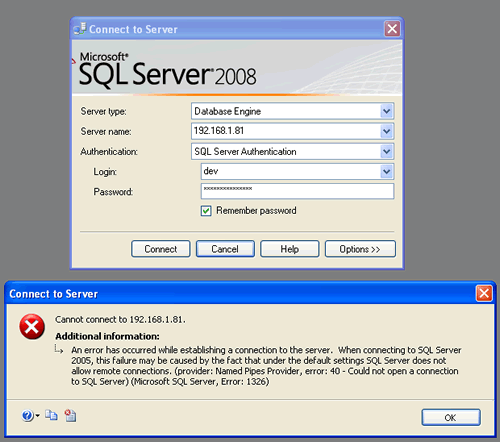
If you are receiving following error:
TITLE: Connect to Server
——————————
Cannot connect to Database Server.
——————————
ADDITIONAL INFORMATION:
An error has occurred while establishing a connection to the server. When connecting to SQL Server 2005, this failure may be caused by the fact that under the default settings SQL Server does not allow remote connections. (provider: Named Pipes Provider, error: 40 - Could not open a connection to SQL Server) (Microsoft SQL Server, Error: 1326)
I suggest that you read previous article first as that describes how to fix the problem and has worked for many cases.
SQL SERVER - Fix : Error : 40 - could not open a connection to SQL server
Now if SQL Server can be connected perfectly from local system but can not be connected from remote system, in that case firewall of the server where SQL Server is installed can be issue.

Follow instructions of this article to fix the issue.
Go to control panel >> Firewall Settings >> Add SQL Server’s Port to Exception List.
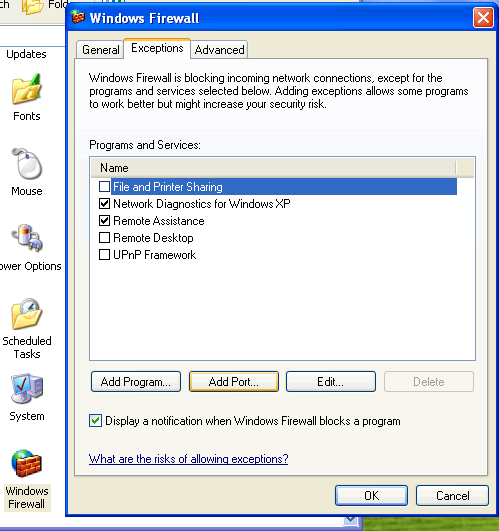
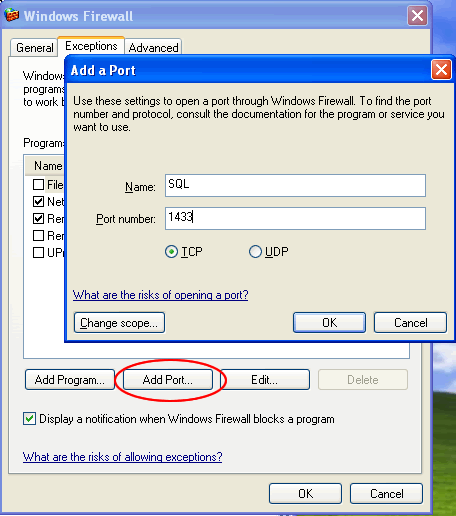
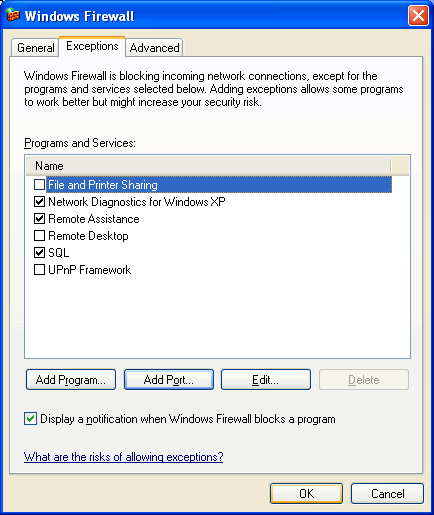
Now try to connect to SQL Server again. It will allow you to connect to server successfully.
Reference : Pinal Dave (http://www.SQLAuthority.com)


Hello,
Just to add 2 cents to your notes,
I came across same problem last week, and I came to know that we have to do the following things in order to solve the above issue,
1. Disable windows firewall, or make an exception and add port number for SQL, this works well if you have only one instance of SQL Server, if you have more than one SQL Server instance then I guess you have to enable all other ports used by SQL Server.
2. In “Client Network Utility” tool of SQL Server add the server name of ip address of the server you are trying to register in the Alias section and most important choose which type of protocol you want to choose, either named pipes or TCP/IP
3. If you are using 2005, then use SAC to enable, allow remote connections to server and to use both TCP/IP and named pipes to connect.
Please correct me if I am wrong.
Thanks,
Imran.
There are couple of to troubleshoot this problem. The one you should use depends on how your databse server was configured.
For example, if you configure the database engine to use dynamic port allocation, make sure that sql browser is runnning.
SQL browser provides the connection information about the database engine to the the client.
If the sql browser is not running and you have restarted sql server and port 1433 is being used by other applications,
database engine will be allocated a different port number. Imagine that the client has been configured to use port 1433
to connect and the database engine is using a different port number. The client wont be get the connections properties to the database engine from sql browser
because sql browser is not running.
To avoid this type of problems, when the database engine has been configured to use dynamic ports, make sure that your sql browser
is always running.
Sorry–
There are couple of ways to troubleshoot this problem. The one you should use depends on how your databse server was configured and some other factors as well.
For example, if you configure the database engine to use dynamic port allocation, make sure that sql browser is runnning.
SQL browser provides the connection information about the database engine to the the client.
If the sql browser is not running and you have restarted sql server and port 1433 is being used by other applications,
database engine will be allocated a different port number. Imagine that the client has been configured to use port 1433
to connect and the database engine is using a different port number. The client wont be get the connections properties to the database engine from sql browser
because sql browser is not running.
To avoid this type of problems, when the database engine has been configured to use dynamic ports, make sure that your sql browser
is always running.
I swear, I have absolutely exhausted every concievable solution to this problem, and I’m still stuck.
I’m getting this error in CRM 4.0 when embedding an ASP page with a gridview of information from a stored procedure on my database.
I’m pretty sure it’s Kerberos related, because the page connects fine on my development workstation, but fails on the CRM web server (where there’s a double-hop between my credentials and the SQL server) It’s been broken for weeks now. Here is a (partial) list of the fixes that have NOT worked:
Surface Area configuration: Both Named Pipes and TCP/IP enabled.
SQL Server Browser is running
Added the server name, and the server\instance into my HOSTS file on the server.
Changed my connection string to the IP address, just the hostname, and the hostname\instance name
Added SPNs for every possible permutation of: hostname, host\instance and IP address.
Confirmed that both the NT AUTHORITY\NETWORK SERVICE and HOSTNAME$ accounts have connect rights to the database.
The final weirdness: I wrote another page and put it into another web application on the same web server. It DOESN’T have the error, but it doesn’t work either. The gridview just comes through as an empty tag. Other ASP controls, like labels and buttons, work fine.
At this point, I will give either pinky to get this working.
Forgot: the windows firewall is disabled, and besides, the app works when running in the ASP development server of VS 2005 n my workstation, and of course, all of CRM works (although it mostly uses web services).
I’m getting this same error message ONLY when I specify the IP address as the server name. Everybody else in the office can hit the SQL Server — using the IP address — on my partner’s PC except me! And I can connect if I use the machine name instead of the IP address.
This just started this week, after I installed SQL Server 2008 on MY machine — my partner’s box, the one I’m trying to connect to, is still 2005. It worked fine with EITHER machine name or IP address before that.
It’s not a firewall issue, since everybody else can connect to his server using machine name _OR_ IP address. I can only connect using machine name.
It’s not a protocols issue on his server, because — again — everybody else can connect to him except me. And I ONLY get that error message if I specify the IP address instead of the machine name.
And yes, the IP address is correct. :)
Anyone have a clue?
provider: Named Pipes Provider, error: 40 - Could not open a I was getting this error:
connection to SQL Server) (Microsoft SQL Server, Error: 1326)
I changed the protocol from Named Pipe to TCP /IP and it worked. Thanks.
I was getting this error:
provider: Named Pipes Provider, error: 40 - Could not open a connection to SQL Server) (Microsoft SQL Server, Error: 1326)
I changed the protocol from Named Pipe to TCP /IP and it worked. Thanks.
Thanks for the tip about the firewall Dave. I was struggling with this.
Dear sir, i have read your threads for following error :
“An error has occured whil establishing a connection to the server. When connecting to SQL Server 2005, this failure may be casued by the fact that under the default settings dose not allow remote connection.(Provider : Named Pipes Provider, error:40-Could not open a connection to SQL Server)(Microsoft SQL Server Error : 5)”
so please send me possible solutions which i can try.
regards,
ritesh
Dear sir,
i agreed with Ritesh… i m facing same problem, so please send me solutions.
i have read your threads for following error :
“An error has occured whil establishing a connection to the server. When connecting to SQL Server 2005, this failure may be casued by the fact that under the default settings dose not allow remote connection.(Provider : Named Pipes Provider, error:40-Could not open a connection to SQL Server)(Microsoft SQL Server Error : 5)”
so please send me possible solutions which i can try.
regards,
yatin