
One of the JR. Developer asked me a day ago, does SQL Server has similar operation like MINUS clause in Oracle.
Absolutely, EXCEPT clause in SQL Server is exactly similar to MINUS operation in Oracle. The EXCEPT query and MINUS query returns all rows in the first query that are not returned in the second query. Each SQL statement within the EXCEPT query and MINUS query must have the same number of fields in the result sets with similar data types.
Let us see that using example below. First create table in SQL Server and Oracle.
CREATE TABLE EmployeeRecord
(EmpNo INT NOT NULL, EmpName VARCHAR(10),
EmpPost VARCHAR(9), ManagerID INT,
Salery INT, COMM INT, DeptNO INT);
INSERT INTO EmployeeRecord
VALUES (7369, 'SMITH', 'CLERK', 7902, 800, NULL, 20);
INSERT INTO EmployeeRecord
VALUES (7499, 'ALLEN', 'SALESMAN', 7698, 1600, 300, 30);
INSERT INTO EmployeeRecord
VALUES (7521, 'WARD', 'SALESMAN', 7698, 1250, 500, 30);
INSERT INTO EmployeeRecord
VALUES (7566, 'JONES', 'MANAGER', 7839, 2975, NULL, 20);
INSERT INTO EmployeeRecord
VALUES (7654, 'MARTIN', 'SALESMAN', 7698, 1250, 1400, 30);
INSERT INTO EmployeeRecord
VALUES (7698, 'BLAKE', 'MANAGER', 7839, 2850, NULL, 30);
INSERT INTO EmployeeRecord
VALUES (7782, 'CLARK', 'MANAGER', 7839, 2450, NULL, 10);
INSERT INTO EmployeeRecord
VALUES (7788, 'SCOTT', 'ANALYST', 7566, 3000, NULL, 20);
INSERT INTO EmployeeRecord
VALUES (7839, 'KING', 'PRESIDENT', NULL, 5000, NULL, 10);
INSERT INTO EmployeeRecord
VALUES (7844, 'TURNER', 'SALESMAN', 7698, 1500, 0, 30);
INSERT INTO EmployeeRecord
VALUES (7876, 'ADAMS', 'CLERK', 7788, 1100, NULL, 20);
INSERT INTO EmployeeRecord
VALUES (7900, 'JAMES', 'CLERK', 7698, 950, NULL, 30);
INSERT INTO EmployeeRecord
VALUES (7902, 'FORD', 'ANALYST', 7566, 3000, NULL, 20);
INSERT INTO EmployeeRecord
VALUES (7934, 'MILLER', 'CLERK', 7782, 1300, NULL, 10);
SELECT *
FROM EmployeeRecord;
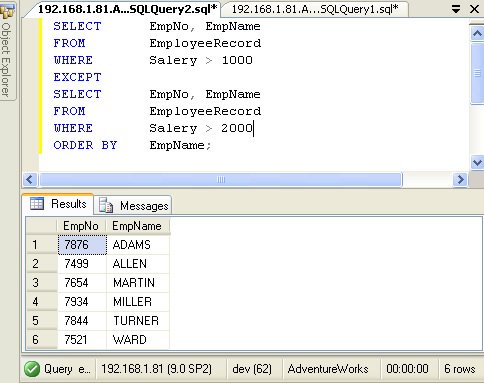
Now run following query in SQL Server:
SELECT EmpNo, EmpName
FROM EmployeeRecord
WHERE Salery > 1000
EXCEPT
SELECT EmpNo, EmpName
FROM EmployeeRecord
WHERE Salery > 2000
ORDER BY EmpName;
Now run following query in Oracle:
SELECT EmpNo, EmpName
FROM EmployeeRecord
WHERE Salery > 1000
MINUS
SELECT EmpNo, EmpName
FROM EmployeeRecord
WHERE Salery > 2000
ORDER BY EmpName;
You will find that both the query will return you same results.
Drop the table in SQL Server and Oracle as we are done with example.
DROP TABLE EmployeeRecord;
This proves that EXCEPT clause in SQL Server is same as MINUS clause in Oracle.
Here is another interesting article on the subject of difference between EXCEPT operator and Not In.
Published by Pinal Dave on SQLAuthority. More of my work at pinaldave.com.
Discover more from SQL Authority with Pinal Dave
Subscribe to get the latest posts sent to your email.




54 Comments. Leave new
thanks, for your help
My pleasure.