
Jr. A developer asked me the other day how to escape single quote? I find this question very interesting.
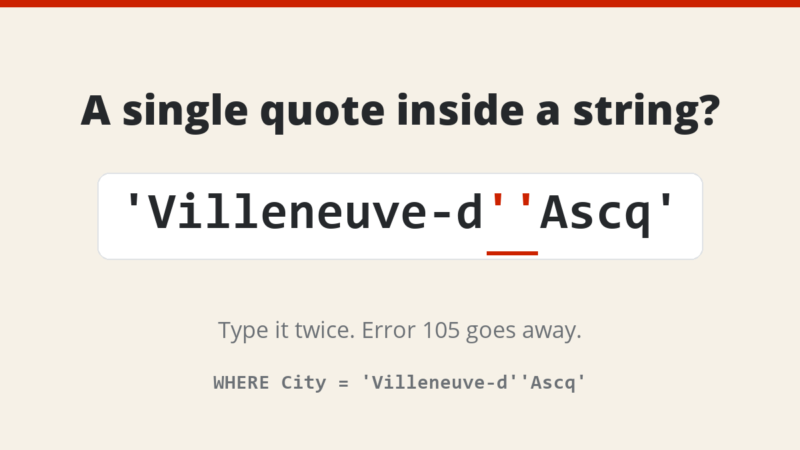
User can escape single quote using two single quotes (NOT double quote).
Following T-SQL Script will give error
USE AdventureWorks
GO
SELECT *
FROM Person.Address
WHERE City = ‘Villeneuve-d’Ascq’
GO
Resultset:
Error: 105 Unclosed quotation mark after the character string ‘
To fix the error mentioned above, escape single quotes with two single quotes as displayed in following example.
USE AdventureWorks
GO
SELECT *
FROM Person.Address
WHERE City = 'Villeneuve-d''Ascq'
GO
Well, it is a pretty easy way to escape single quotes. Here are a few interesting quotes about single and double quotes. In fiction, at least with American English (AmE), there’s really no use for single quotation marks other than as a quote within another quote. In general, quotation marks are used to mark direct speech in a text, to indicate irony, or to highlight the title of works that are part of a larger whole — like chapters of a novel, an article in a magazine or newspaper.
Let me know what you think of this blog post by leaving your opinion in the comment sections.
Published by Pinal Dave on SQLAuthority. More of my work at pinaldave.com.




74 Comments. Leave new
I have a table fields which contains characters like ‘s and because of SQL limitation I am getting errors in application. Such characters sequence stored because of laps during conversion time. Can any one help me to replace escape ‘ characters with other one…
Thanks…
Devang
Dear Sir,
I am trying to execute a batch statement which includes ‘Database, Tables, Stored Procedures Creation etc.’
It is a very big sql string. Here it would be difficult to find every single quote and replace it with two single quotes…
Isn’t there any option at the start of the string only ( like ‘@’ in C#) so that I can keep my whole string as it is. It will save a lot of time.
Please help me to resole this.
Thank You.
Amol
Dear Sir,
If I have a batch statement containing “Database, Tables, Stored Procedures” creation, then there’s gonna be thousands of lines containing single quote. It would be difficult to find each one and replacing with two singles.
Isn’t there a way like what @ operator doses in C# ?
Please help me to resolve this issue.
Thank You
Amol
Hmm. Doubling up single quotes stops me getting the “unclosed quotation” error, however it’s not pattern matching the data in the way I would hope. Searching on “Connor” brings back many results (which are displayed as “O’Connor”) whereas searching on “O’Connor” brings back none.
this is where my php code adds the relevant line to the query…
$querystr .= “AND UPPER(Authors) COLLATE SQL_Latin1_General_Cp1_CI_AS LIKE ‘%”.strtoupper(ereg_replace(“‘”,”””,$Authors)).”%’ “;
.. which once built, is then run against the mssql DB.
Any & all ideas welcome…!
OK, I’ve found a fairly inelegant solution… there was an escaping “\” in there, so my search string was “O\”Connor”. Have now changed the code to:
$querystr .= “AND UPPER(Authors) COLLATE SQL_Latin1_General_Cp1_CI_AS LIKE ‘%”.strtoupper(ereg_replace(“‘”,”_”,stripslashes($Authors))).”%’ “;
…and this appears to work – the underscore allowing for the apostrophe, and the % working for…everything else.
Thanks for providing me a forum to think through this in public ;-)
how can we change “,”” into single ‘
hi guys plz help me in making a function in T-sql through which i can change the string like
Double Quto(“) into single quto(‘) by using loop…
like Microsoft”s into Microsoft’s
Microsoft”” into Microsoft’s
and Microsoft’s shuld remain Microsoft’s
Hello Sir i am using a query in which i have generated a string from Comma separate and when i use it in “select id from tblName where id in(@str) ” here id is integer and i have @str as nvarchar its not giving result as it should.. please help me … Thanks in advance…….
i need sql insert stament without stored procedure to insert dynamic values from textbox which contains of (Apostrophe,Double quotes)! Simple example plz
can any one tell me ,what to do when we are getting data from web server with @ ‘ @ ,i mean single quote.i have to load that data in my sql database.please tell the solution.
Regards
Ajay Kohar
use four ‘ (””)
In order to be in compliance with strict security requirements as a DBA on a
military installation, I am required to run some queries against every
database on ever server – too many reasons and requirements to explain here.
I taken the auditors queries in the requirement pdf and modified code to get
the information in one procedure. It works PERFECT on all servers except the
one that has Sharepoint DB’s. Whoever initially set up Sharepoint evidently
used the wizard because the naming convention has a GUID which includes
three dashes:
SharePoint_AdminContent_2e102d4f-2187-469d-8528-5bbd08c1a49b
When my code runs through SELECT name FROM [master].sys.databases, it grabs
everything up to the 1st dash, then give me an error:
Msg 911, Level 16, State 1, Line 6 Could not locate entry in sysdatabases
for database ‘SharePoint_AdminContent_2e102d4f’. No entry found with that
name. Make sure that the name is entered correctly.
I have tried everything from concantenating with brackets and excluding that
DB in the query by various means, but nothing works. I know there is a
process to change the Sharepoint DB name, but I do not have authority to do
this, so I need to find a work-around in code in order to not have to run
the canned queries on around 100 DB’s on this server.
Here is the code:
create table #hd_rc ( ServerName NVARCHAR(100), DBName VARCHAR(100),
[Schema] VARCHAR(100),type_desc VARCHAR(100), [User] VARCHAR(100) ) DECLARE
@command varchar(1000)
SELECT @command = ‘IF EXISTS (
SELECT name FROM [master].sys.databases WHERE state = 0 and name = ”?” )
BEGIN USE ? EXEC(” INSERT INTO #hd_rc
SELECT distinct @@servername as ServerName, db_name() as DBName, s.name AS
[Schema], u.type_desc, l.name AS [User] FROM sys.all_objects o JOIN
sys.schemas s ON o.schema_id = s.schema_id JOIN sys.database_principals u ON
s.principal_id = u.principal_id JOIN master.sys.sql_logins l ON u.sid =
l.sid WHERE o.is_ms_shipped = 0 AND l.is_disabled = 0;
”)
END’ EXEC sp_MSforeachdb @command
select * from #hd_rc drop table #hd_rc
Thank you in advance for any assistance!! Mdh
are there other characters like the single quote that we should think about escaping?
i made a website on localhost and i want to secure my website. whenever i am entering a single quote its showing an error what should i do ?
You are a legend, this is an awesome fix, I love how google drives me onto your site every time I have an sql server question. Where do I donate?
This fix has been a major revelation for me. I have a query that has some issues with inconsistent addresses with abbreviations and quotes just haphazardly thrown in. At first I was getting numerous errors due to placement of the double single quotes but your fix is just awesome. Ten stars!!!! **********
thanks, it worked for me
Did you get any solution for this, as I am facing same issue while creating a procedure using sp_MSforeachdb, where the procedure is using BCP. Just imagine how many combinations are there.
Dear Sir,
Please suggest how could I skip the quotes here, where there is different types of quotes at every level?
SELECT @command = ‘IF ”?” NOT IN(”master”, ”model”, ”msdb”, ”tempdb”) BEGIN USE ?
EXEC(”CREATE PROCEDURE [dbo].[COLUMN_TO_CSV]…..
…………
SET @FQDN = CONCAT_WS(‘.’, @dbName, @schemaName, @tableName);
SET @sqlColumn = CONCAT(‘SELECT ‘, @columnName ,’ FROM ‘, @FQDN ,’ ‘;
SET @folderName = CONCAT(‘C:Temp’,@dbName,”,@tableName);
SET @fileName = CONCAT(@columnName,’.csv’);
SELECT @sqlFileOut = ‘BCP ” ‘+ @sqlColumn +’ ” queryout ” ‘+ @folderName + ” + @fileName +’ ” -c -t, -T -S” ‘+ @@servername +’ ” ‘;
EXEC master.sys.xp_cmdshell @sqlFileOut;
………….
END”) END’
EXEC sp_MSforeachdb @command