IIF and CASE choose result values, but their branches also define a shared return type. I make that type explicit when mixed inputs could surprise the reader. Typed NULL values help describe the same output contract.
A text branch does not guarantee a text result. SQL Server considers the types across the expression. An integer branch can require conversion of the selected text branch to an integer.

Compare equivalent conditional expressions
The first query has three condition inputs: one, zero and NULL. Its mixed branches contain the text 12 and the integer zero. Both expressions intentionally use the same branches and the same condition.
The chosen text is valid numeric text, so the comparison stays safe and read-only. This example does not execute an invalid conversion to demonstrate an error. It returns complete rows that can be compared directly.
I also include a typed NULL branch and a decimal output. Those columns describe two separate output contracts. A final explicit decimal cast states the required scale for that particular result column.
WITH Flags AS
(
    SELECT CaseId, Flag
    FROM (VALUES (1, CAST(1 AS int)), (2, 0), (3, NULL)) AS v(CaseId, Flag)
)
SELECT CaseId, Flag,
       IIF(Flag = 1, CAST('12' AS varchar(10)), CAST(0 AS int)) AS IifMixed,
       CASE WHEN Flag = 1 THEN CAST('12' AS varchar(10)) ELSE CAST(0 AS int) END AS CaseMixed,
       IIF(Flag = 1, CAST(NULL AS int), CAST(99 AS int)) AS TypedNull,
       CAST(IIF(Flag = 1, CAST(12 AS decimal(10,2)), CAST(0 AS int)) AS decimal(12,2)) AS DecimalChoice
FROM Flags
ORDER BY CaseId;

SELECT CAST(SQL_VARIANT_PROPERTY(IIF(1 = 1, CAST('12' AS varchar(10)), 0), 'BaseType') AS varchar(20)) AS IifMixedType,
       CAST(SQL_VARIANT_PROPERTY(CASE WHEN 1 = 1 THEN CAST('12' AS varchar(10)) ELSE 0 END, 'BaseType') AS varchar(20)) AS CaseMixedType;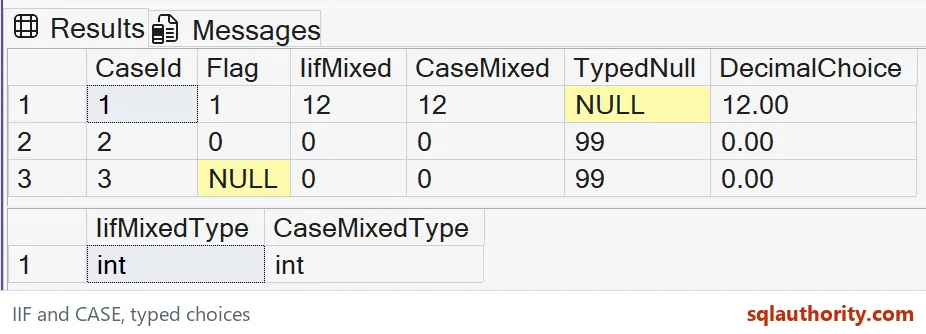
The selected branch still has a type contract
The expected IifMixed and CaseMixed values are integers. Both return 12 for Flag one and zero for the other two rows. The second result set makes their int base type visible.
Integer has higher precedence than varchar. SQL Server therefore converts the selected text 12 into an integer here. Replacing that text with a nonnumeric label would not preserve this contract.
IIF is shorthand for a CASE expression, so choosing its shorter spelling does not avoid type precedence. Use the form that makes the condition easiest to read. Keep the branch types deliberate in either form.
If the desired output is a label, both branches should use an appropriate text type. If it is a number, use compatible numeric types. Mixing a display label and an integer is usually an unclear output design.
Typed NULL values describe missing output
For Flag one, TypedNull returns NULL with an integer type. The other rows return 99. The cast says what kind of value is missing without substituting an invented number.
SQL Server raises an error when both result branches are untyped NULL constants. A typed NULL expression supplies the missing type information. I keep that unsafe constant-only example out of the query above.
The NULL condition also matters. Flag equals one is unknown when Flag itself is NULL. IIF uses its false branch for both false and unknown, which matches the equivalent searched CASE here.
That behavior may be appropriate for a default label, but it is a business decision. If missing input needs its own result, test IS NULL explicitly. Do not assume the condition has only two possible states.

Keep the example focused
The DecimalChoice column is explicitly decimal with two fractional digits. The expected rows contain 12.00 and 0.00. The declared scale is two. A query tool can still choose how to display the numeric value.
Conditional expressions return values; they are not replacements for procedural control flow. CASE also cannot be treated as a universal protection against every possible evaluation error. Some expressions can be evaluated before the condition chooses a result.
I don’t rely on branch order to hide an unsafe aggregate or an invalid type conversion. Define compatible types and safe inputs before presenting the conditional result. The accompanying query only uses bounded values and pure SELECT statements.
When adapting this example, inspect missing inputs and every possible branch. A test that selects one convenient branch can miss a conflicting return type. The complete result and type columns make that review straightforward.
Pick one return type for every branch, and the surprises mostly go away.
IIF is not a text picker, it is an expression with one shared return type.
Published by Pinal Dave on SQLAuthority. More of my work at pinaldave.com.
Discover more from SQL Authority with Pinal Dave
Subscribe to get the latest posts sent to your email.