This month's discount Comprehensive Database Performance Health Check · Testimonials
SQLAuthority with Pinal Dave
Home
  • Consulting
    • Health Check
  • Free Videos
  • All Articles
    • AI
    • SQL Performance
    • SQL Tips and Tricks
    • Interview Questions and Answers
    • SQL Puzzle
    • SQL Video
    • SQLAuthority News
    • Personal
  • Books
  • Consulting
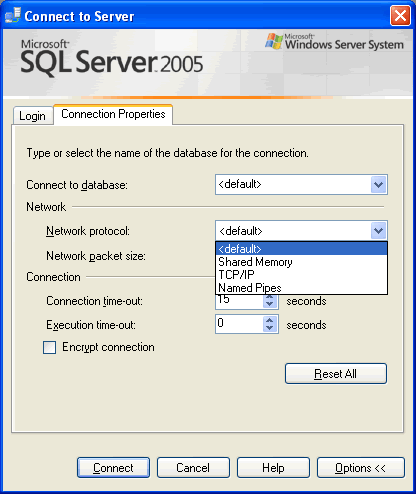
SQL SERVER - 2005 - Connection Property of SQL Server Management Studio SSMS

SQL SERVER – 2005 – Connection Property of SQL Server Management Studio SSMS

October 8, 2007
Pinal Dave
SQL Tips and Tricks
SQL Server, SQL Server Management Studio, SQL Utility

How to change connection properties in SSMS as you connect, like using named pipes instead of TCP/IP, as I do for one of our servers. Screenshots show each step.
Read More
SQL SERVER - 2005 - Open SSMS From Command Prompt - sqlwb.exe Example

SQL SERVER – 2005 – Open SSMS From Command Prompt – sqlwb.exe Example

October 5, 2007
Pinal Dave
SQL Tips and Tricks
SQL Scripts, SQL Server Management Studio, SQL Shortcut, SQL Utility

Open SSMS from command prompt with the sqlwb command. I show its syntax and the switches I use, like -E and -nosplash, to start Management Studio.
Read More
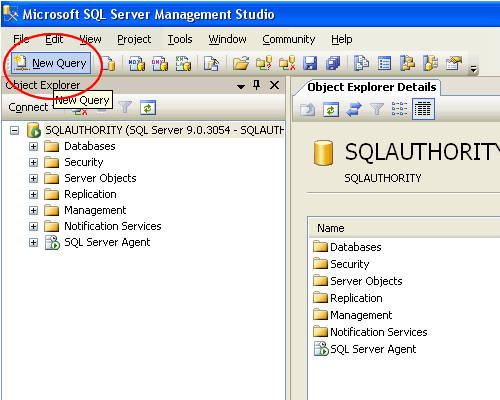
Click New Query button in SQL Server Management Studio.

SQL SERVER – 2005 Query Editor – Microsoft SQL Server Management Studio

September 30, 2007
Pinal Dave
SQL Tips and Tricks
SQL Server Management Studio, SQL Utility

Where is the Query Editor in SQL Server 2005? It is part of SQL Server Management Studio, and I list the enhancements it brings over older tools.

Read More
Enable autogrowth dialog.

SQL SERVER – 2005 – SSMS – Enable Autogrowth Database Property

August 8, 2007
Pinal Dave
SQL Tips and Tricks
SQL Data Storage, SQL Server Management Studio, SQL Utility

How to enable Autogrowth for a database in SSMS: open the database Properties, go to Files and click the small button in the Autogrowth column.
Read More
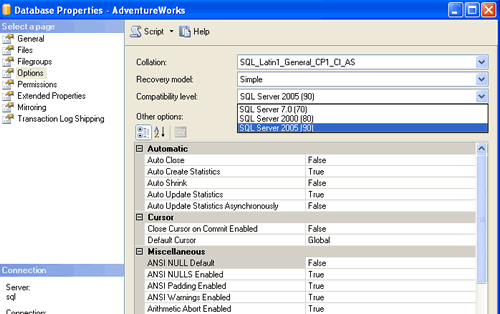
SQL Server compatible level settings.

SQL SERVER – 2005 Change Database Compatible Level – Backward Compatibility – Part 2 – Management Studio

May 31, 2007
Pinal Dave
SQL Tips and Tricks
Compatibility Level, SQL Server Management Studio

How to change database compatible level in SQL Server Management Studio: right click the database, open Properties, then Options, and pick the level you need.

Read More
SQL SERVER - 2005 - SSMS Change T-SQL Batch Separator

SQL SERVER – 2005 – SSMS Change T-SQL Batch Separator

May 18, 2007
Pinal Dave
SQL Tips and Tricks
SQL Server, SQL Server Management Studio, SQL Utility

A big script used EndBatch instead of GO. Rather than a risky mass replace, I changed the Batch Separator in SSMS under Tools, Options, and it ran as is.

Read More
Click New Query button in SQL Server Management Studio.

SQL SERVER – 2005 Query Analyzer – Microsoft SQL SERVER Management Studio

April 23, 2007
Pinal Dave
SQL Tips and Tricks
SQL Server Management Studio, SQL Utility

Looking for Query Analyzer in SQL Server 2005? It moved into SQL Server Management Studio. Where to find it and tips to feel at home there.

Read More
Previous 1 … 50 51 52 53 54 Next
  • Books
  • Testimonials
  • Privacy Policy

© 2006 – 2026 All rights reserved. pinal @ SQLAuthority.com