

SQL SERVER – DVM sys.dm_os_sys_info Column Name Changed in SQL Server. Let us learn about it in today’s blog post.

SQL SERVER – Three DMVs – sys.dm_server_memory_dumps – sys.dm_server_services – sys.dm_server_registry
Three new DMVs in SQL Server Denali: sys.dm_server_memory_dumps, sys.dm_server_services and sys.dm_server_registry. What they return, and a question for you.

SQL SERVER – Detecting Database Case Sensitive Property using fn_helpcollations()
Is your database Case Sensitive? Find its collation, then look it up in fn_helpcollations() and read the description. A quick answer from my Office Hours.

SQL SERVER – Denali – DMV – sys.dm_os_windows_info – Information about Operating System
A quick look at sys.dm_os_windows_info, the new Denali DMV that returns information about the Windows operating system, with an example query.
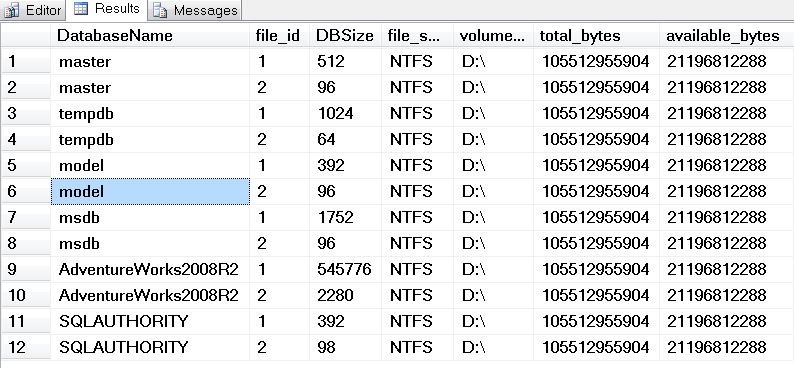
SQL SERVER – Denali – DMV – sys.dm_os_volume_stats – Information about operating system volume
The new Denali DMV sys.dm_os_volume_stats shows the operating system volume where each database file is stored, with its total and available space.
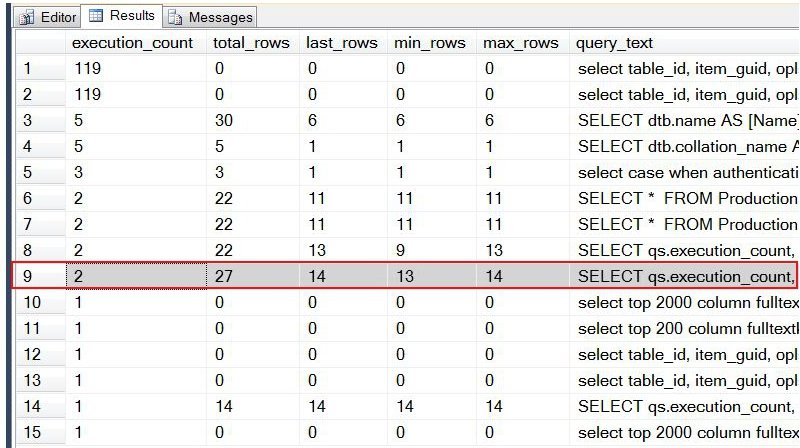
SQL SERVER – Denali – DMV Enhancement – sys.dm_exec_query_stats – New Columns
SQL Server Denali adds four new columns to sys.dm_exec_query_stats, like total_rows and last_rows, so you can see how many rows your queries returned.

SQL SERVER – Find Details for Statistics of Whole Database
Need statistics of whole database in one view? My script uses DMVs instead of the deprecated sp_helpstats and shows each stat, column and last update.