

There are many rules in SQL Server setup which are checked to make sure that the user is not seeing failure at the end of the installation. Most of the rules are generally passed, but few of them are known to generate warnings. One of such rule is Microsoft .NET Application Security which can be seen below.

SQL SERVER – Unable to Start SQL When Service Account is Removed From Local Administrators Group. Why?
One of my clients wanted to secure their SQL Server. One of the rules was that wanted to avoid running SQL Server service with an account which is part of local “Administrators” group. They wanted to provide the minimal permissions needed for the SQL server service account for SQL Server to function.
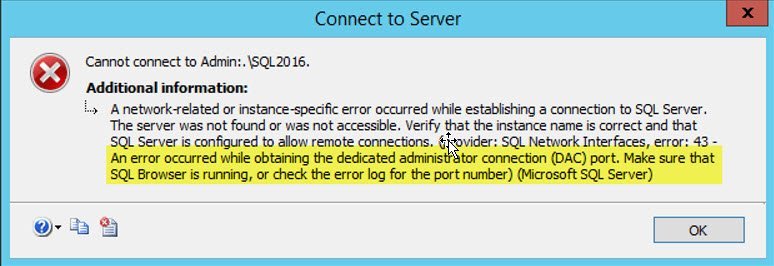
SQL SERVER – An Error Occurred While Obtaining the Dedicated Administrator Connection (DAC) Port
Microsoft SQL Server has given an option to connect to SQL Server when normal connections can’t be made because of any reasons. This feature is called as Dedicate Administrator Connection (DAC). You can read more about DAC over here. Diagnostic Connection for Database Administrators

SQL SERVER – The Patch Installer has Failed to Update the Shared Features
Applying a patch in SQL Server is a planned process which is followed across various companies. Most of the companies take time to apply the patch to make sure the stability of the patch can be validated. Let us see an error related to patch installer.

SQL SERVER – FIX: Rule “Reporting Services Catalog Database File Existence” Failed
Disasters are always bad. Recovering from disaster is a skill and needs a lot of planning and practice. One of my clients had a disaster and built a new machine to restore the backups. They tried a few attempts to install SQL Server but were having issues. Finally, they contacted me for consultation to fix rule reporting services catalog database file existence.

SQL SERVER – Could Not Load File or Assembly ‘SqlManagerUi, Version=14.0.0.0, Culture=neutral, PublicKeyToken=89845dcd8080cc91’ or One of its Dependencies
Recently, one of my clients reported a weird issue to me. They explained that when they right click on the database, and try to read its properties they were getting the following error message. Let us learn about error related to could not load file or assembly.

MySQL – Fix – Error – Your Password does not Satisfy the Current Policy Requirements
Just the other day I received an email from a MySQL user who has been struggling to set up his password due to the current policy requirements in MySQL. Let us see how we can identify what is his root cause and how to fix the issue with password security.