

Disks are often behind a slow server, and the problem can be hard to spot. Here is a PowerShell script to identify Disk Latency on your SQL Server box.
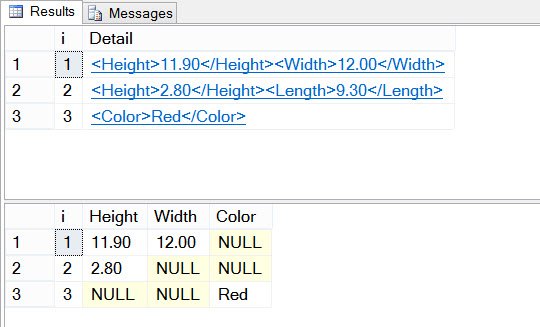
SQL SERVER – CREATE TABLE Failed Because Column ‘C1024’ in Table ‘myTable’ Exceeds the Maximum of 1024 Columns
Sparse columns should let a table go past 1024 columns, yet a reader’s CREATE TABLE failed saying it exceeds the maximum of 1024 columns. Here is why.

Interview Question of the Week #021 – Difference Between Index Seek and Index Scan (Table Scan)
Read index seek and index scan plans accurately, test equality and ranges, and judge lookups and rows read instead of fixed percentages.
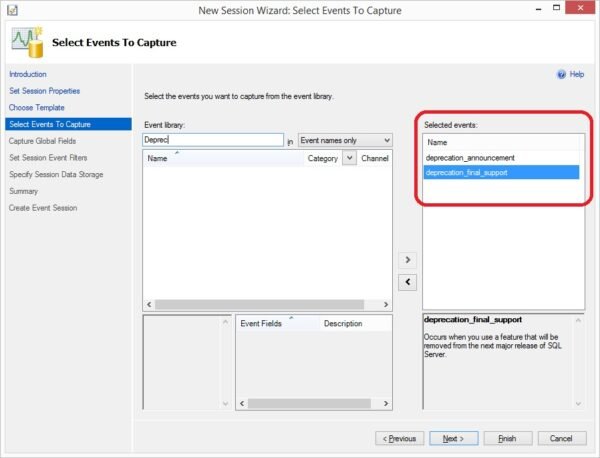
SQL Server – Knowing Deprecated or Discontinued Features Using Extended Events
Find the use of deprecated or discontinued features without Profiler. Here is a step by step way to track them using Extended Events in SSMS.
SQL SERVER – Only Formatted Files on Which the Cluster Resource of the Server has a Dependency can be Used
Creating a database on a SQL Server 2012 cluster failed with: Only formatted files on which the cluster resource has a dependency can be used. Here is why.

SQL SERVER – Adding Reference Data to Master Data Services – Notes from the Field #081
Reeves Smith shows how to add reference data to Master Data Services with the MDS add-in for Excel, so the business can manage it themselves.
SQL SERVER – Reading Statistics IO Data
I start every tuning exercise with Statistics IO. Here is how to read its output: scan count, logical reads, physical reads and read-ahead reads per table.

MONTH, DATEPART and DATENAME: Getting Month Names and Numbers Right
Use DATENAME for month labels, compare MONTH and DATEPART, control language and culture, and group sales without combining different years.
SQL SERVER – Antivirus Exclusions Best Practices With SQL Server
If antivirus locks a SQL Server file, you can face startup issues or even corruption. Here are the antivirus exclusions best practices every DBA should follow.

Checking That a Patch Really Installed
Checking That a Patch Really Installed means comparing full versions, reading Setup summary logs, and confirming the startup error log.