
Compatibility level in SQL Server is a per-database setting that decides which version’s behaviour that database follows. Upgrading the server does not change it. So a database can sit on a brand new SQL Server and still make decisions the way a much older one did. It is why a query that was fast last week is slow after a migration nobody thinks changed anything.

The Setting Belongs to the Database
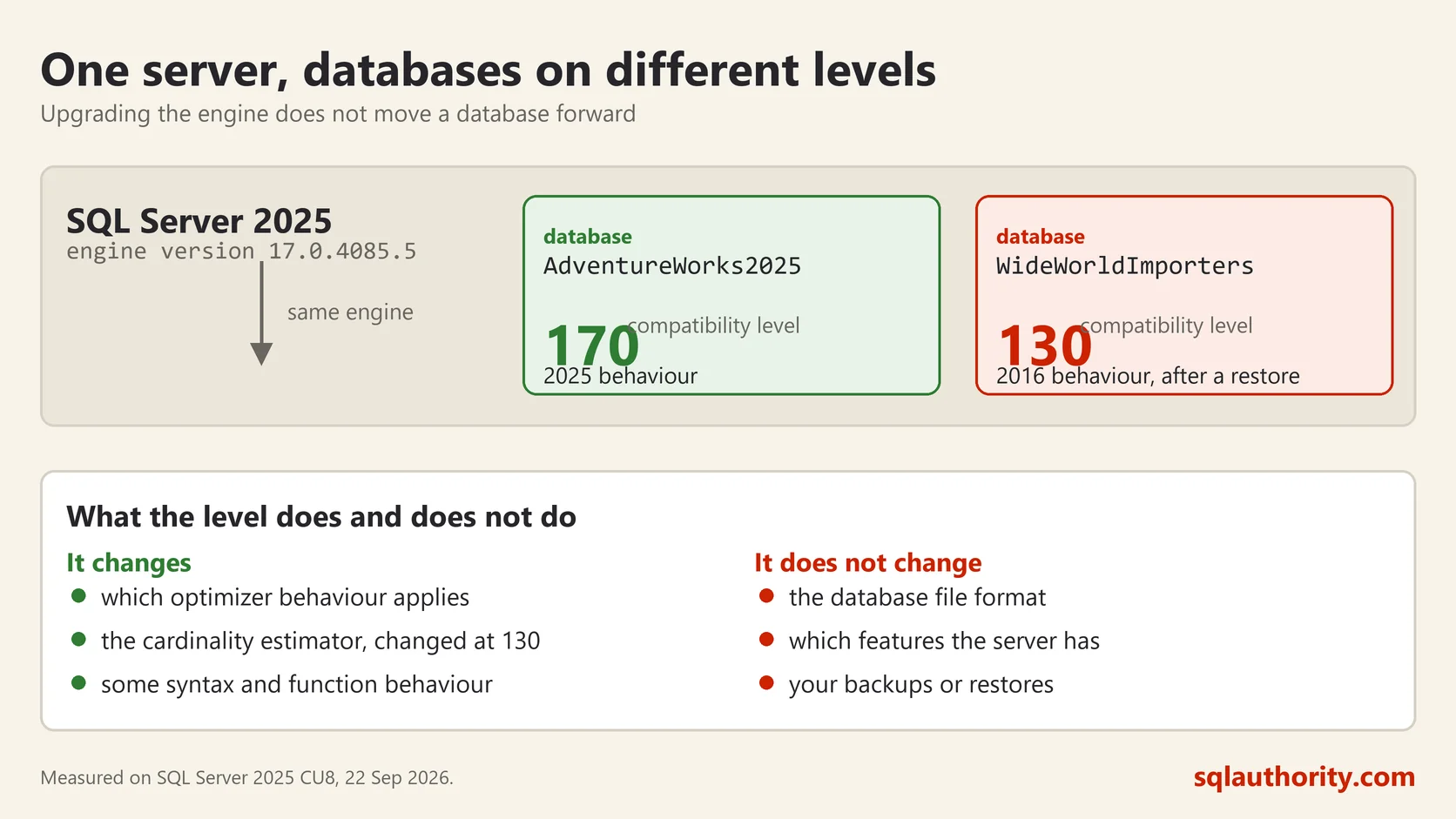
That is the part people miss. The server has a version. Each database on it has its own compatibility level, and they do not have to agree. One instance can run a database at the current level and another at a level from ten years ago, at the same time, with no complaint from anybody.
The level is a number that maps to a release. 170 is SQL Server 2025, 160 is 2022, 150 is 2019, 140 is 2017, 130 is 2016, and so on down. One query shows you every database on your server:
SELECT name, compatibility_level
FROM sys.databases
ORDER BY name;
A Restore Brings the Old Level With It
Here is the behaviour that surprises people, and I hit it again this week on my own machine. I restored Microsoft’s WideWorldImporters sample onto SQL Server 2025. The backup was taken on SQL Server 2016. This is what came back:
name                  compatibility_level
AdventureWorks2025    170
WideWorldImporters    130
Two databases, one server, two different levels. The restore upgraded the internal file format all the way from version 852 to 998, printing a wall of upgrade steps while it worked. It did not touch the compatibility level. That setting travels with the database and stays where it was.
So a database moved from an old server to a new one keeps behaving like the old server until somebody decides otherwise. Sometimes that is exactly what you want. Often nobody realises it happened at all.
What the Level Actually Controls
Two things, and it is worth keeping them separate in your head.
The first is language and feature behaviour. Some syntax and some functions are gated behind a minimum level, and some older behaviour is preserved below a level. This is the part the documentation lists in detail, version by version.
The second matters more for performance. The cardinality estimator, which is the part of the optimizer that guesses how many rows a step will produce, changed substantially at level 130. A database left at 110 or 120 is still using the older estimator on a modern server. That is the usual explanation when a migration to newer hardware somehow made a report slower.
What the level does not do is change the file format, the features the server offers, or your backup compatibility. It is a behaviour switch, not a version downgrade.
Changing It
One statement, and it takes effect immediately:
ALTER DATABASE WideWorldImporters SET COMPATIBILITY_LEVEL = 170;A server will not accept a level above its own. So 170 works on SQL Server 2025 and fails on 2022. Use 160 on 2022, 150 on 2019, 140 on 2017 and 130 on 2016.
The statement is instant and fully reversible, which makes it feel harmless. It is not harmless on a production database in the middle of the day. Every cached plan for that database is thrown away, so the next run of every query has to compile again. Do it during a quiet window.
How I Raise It Without Drama
Raising the level is usually right, and the way to do it calmly is to keep an escape route. Turn on Query Store first and let it collect a few days of normal work. Then raise the level. Query Store will show you any query whose plan changed and got worse. You can then force the old plan for that one query and leave the rest of the database on the new behaviour.
That way one awkward report does not hold an entire database on a ten year old estimator. I have seen that more than once, and the reason is always the same. Somebody raised the level, something got slower, and the whole change was rolled back. There was no way to deal with the single query at fault.
If you do nothing else after reading this, run the query at the top against your own server. On most estates I look at, at least one important database is sitting several versions behind the engine it runs on, and nobody knew.
Compatibility level is not a version number, it is a decision about which era of SQL Server your database still lives in.
This post was rewritten from scratch in September 2026. The original, published on 2010-05-17, was a short announcement about something that no longer exists. The address is the same, the subject is now a basic idea worth keeping.
Published by Pinal Dave on SQLAuthority. More of my work at pinaldave.com.



4 Comments. Leave new
Very useful.
After upgrdation to sql 2008 from sql 200, if the compatibility level is set to 80, will the queries that use the deprecated system tables and other deprecated features still work fine?
Yes they will work fine if they are all available for backward compatibility
sorry i meant sql 2000 not sql 200