XQuery string-length counts the selected string value, rather than the surrounding XML markup. I choose the element before counting its content. Empty content and a missing element need separate interpretation.

Select the content you intend to count
Consider a short description stored inside a v element. Its serialized XML contains element names and angle brackets. Those characters describe the structure, rather than the description’s string value.
The expression string((/r/v)[1]) selects the first matching element and obtains its string value. The positional predicate makes that choice explicit. It prevents multiple matching elements from becoming an accidental input contract.
Nested elements contribute their text to that string value. In the ABC examples, a b element surrounds only the middle letter. The selected content still reads ABC, despite the additional markup around B.
Read the text and the length beside each input
The query constructs seven cases from typed Unicode strings. It converts each supplied string to XML before calling the methods. For each input, read ElementPresent, ElementText and ContentLength.
WITH Cases AS
(
SELECT CaseId, CaseLabel, InputText
FROM (VALUES
(1, CAST(N'Plain element' AS nvarchar(40)), CAST(N'<r><v>ABC</v></r>' AS nvarchar(200))),
(2, CAST(N'Nested text' AS nvarchar(40)), CAST(N'<r><v>A<b>B</b>C</v></r>' AS nvarchar(200))),
(3, CAST(N'Empty element' AS nvarchar(40)), CAST(N'<r><v /></r>' AS nvarchar(200))),
(4, CAST(N'Missing element' AS nvarchar(40)), CAST(N'<r />' AS nvarchar(200))),
(5, CAST(N'Escaped ampersand' AS nvarchar(40)), CAST(N'<r><v>A&B</v></r>' AS nvarchar(200))),
(6, CAST(N'Two elements' AS nvarchar(40)), CAST(N'<r><v>AB</v><v>XYZ</v></r>' AS nvarchar(200))),
(7, CAST(N'Missing SQL value' AS nvarchar(40)), CAST(NULL AS nvarchar(200)))
) AS v(CaseId, CaseLabel, InputText)
), Documents AS
(
SELECT *, CONVERT(xml,InputText) AS XmlValue FROM Cases
), Results AS
(
SELECT *, XmlValue.exist('/r/v[1]') AS ElementPresent,
XmlValue.value('string((/r/v)[1])','nvarchar(200)') AS ElementText,
XmlValue.value('string-length(string((/r/v)[1]))','int') AS ContentLength
FROM Documents
)
SELECT CaseId, CaseLabel, InputText, ElementPresent, ElementText, ContentLength
FROM Results
ORDER BY CaseId;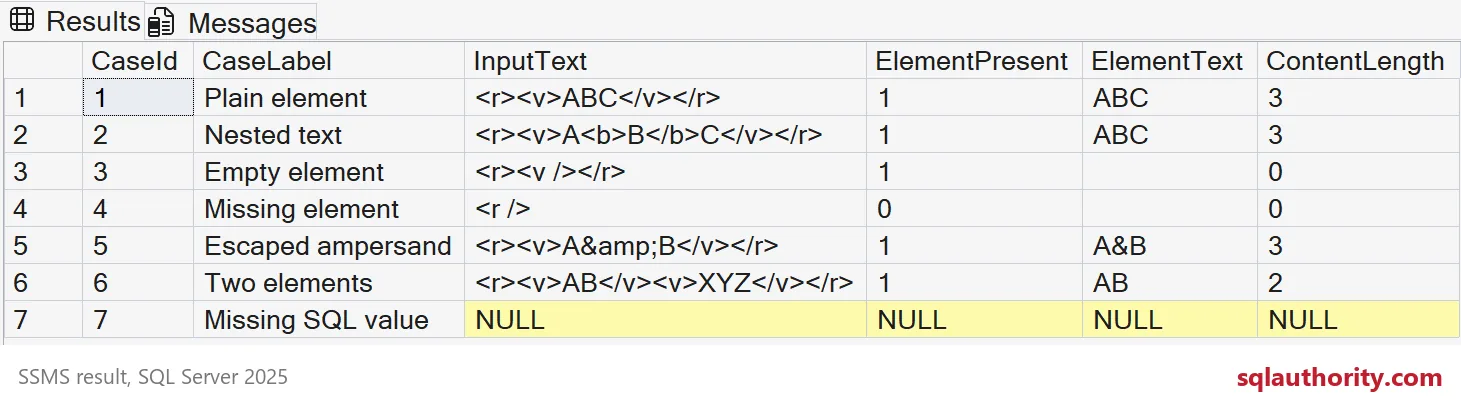
The first two cases both return a ContentLength of three. One uses plain text, and the other includes nested markup. Comparing their serialized source lengths would answer a different question.
Separate empty content from absent content
The empty v element exists but has no content characters. The missing v element has no selected node. Both cases return an empty string after string(), followed by a content length of zero.
ElementPresent distinguishes those cases. It returns one for the empty element and zero for the missing element. A content-length check alone cannot make that distinction.
The missing SQL value is a third condition. It supplies NULL rather than an XML document. The model keeps its method results NULL instead of claiming that a missing document contains an empty element.

Count parsed content, not escaped spelling
The escaped-ampersand source spells the entity as &. Its parsed element text is A&B. The content length is three, including the ampersand as one character.
The two-element case contains AB followed by XYZ. The selected expression counts only the first v element, giving two. Remove or change that selection only after defining how multiple descriptions should be handled.
These examples use short ASCII content without whitespace-only nodes or supplementary characters. XML parsing and Unicode rules deserve separate representative tests. This example does not establish a byte limit or every compatibility-level character-count rule.
Apply the check to one description
For a required product description, I first check that the intended element exists. Then I apply a content-length limit to its selected string value. That keeps missing structure separate from an existing description whose content is too short.
A missing element and an empty element can need different validation messages. Choose those rules before combining them into a single filter. The length operation supplies one observation, rather than the entire document validation policy.
Select the element first, then count the content your validation rule needs.
string-length is not a markup counter, it is a count of the characters in the selected content.
Published by Pinal Dave on SQLAuthority. More of my work at pinaldave.com.
Discover more from SQL Authority with Pinal Dave
Subscribe to get the latest posts sent to your email.